
Free JSONPath Evaluator & Extractor Pro
Use our free JSONPath evaluator to instantly query, extract, and test complex JSON data offline. Features live evaluation, syntax checking, and CSV export.

Table of Contents
Paste a messy API response and get it formatted, validated, and searchable in one place. Beyond pretty-printing, you can run a JSONPath query to pull out just the fields you care about, or convert the whole document to CSV, XML, or YAML. It is the tool to reach for when you are debugging a payload and would rather not send it to an online formatter.
🧩 JSON Studio Pro
Format, validate and convert JSON, CSV and XML — plus a live JSONPath evaluator and interactive tree. No upload, no login.
🔄 Data Format Converter
Convert between JSON, CSV, XML, YAML, TSV and SQL — all in your browser.
Convert Between Six Formats
Move data between JSON, CSV, XML, YAML, TSV and SQL without hunting for a separate site per format. The Convert tab handles all nine directions.
Query JSON With JSONPath
The Query tab runs live JSONPath expressions like $.store.book[*].author and shows matching results instantly, alongside an interactive tree you can click through.
Nothing Leaves Your Browser
Every conversion and query runs on your own machine. No upload, no login, no watermark — useful when the JSON holds API keys or customer records.
How to Use JSON Studio Pro
Pick a Tab
Convert & Format for reshaping data, Query & Explore for reading it.
Paste Your Data
Drop in JSON, CSV, XML or YAML. Nothing is uploaded anywhere.
Convert or Query
Choose a conversion and hit Convert, or type a JSONPath expression.
Copy or Download
Grab the result as a file with the right extension, or copy it straight out.
Last updated: July 2026
🔴 Reshaping Data and Reading Data Are Two Different Jobs
Working with JSON usually splits into two tasks. Sometimes you need to change its shape — turn a spreadsheet export into JSON, or hand a JSON array to a database as SQL inserts. Other times the JSON is fine as-is and you just need to pull one thing out of a deeply nested blob. This tool keeps those on separate tabs so the interface for each stays focused: Convert & Format for reshaping, Query & Explore for reading.
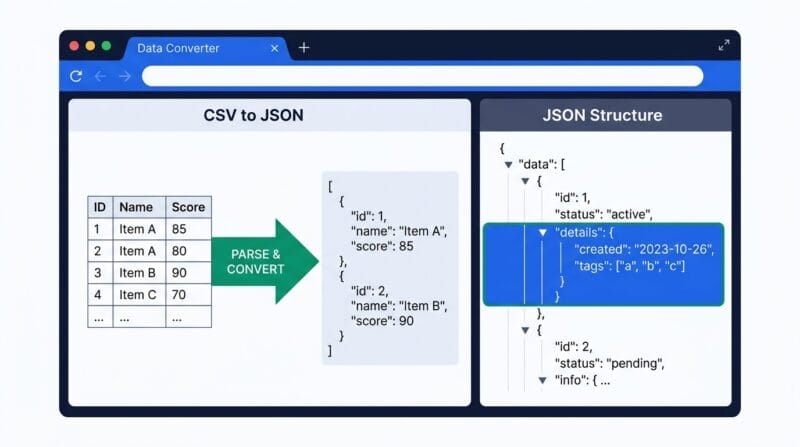
🟡 What the Convert Tab Is Actually For
The most common real use is bridging tools that don’t speak the same format. A designer sends you a CSV of product data; your app wants JSON. A legacy system exports XML; your new one reads YAML config. You have a JSON array from an API and need to seed a test database, so you convert it to SQL INSERT statements. Each of these is a one-paste job here instead of a scripting task.
🟢 A Real Example
Say you export 200 rows of contacts from a spreadsheet as CSV. Paste it in, choose CSV → JSON, and you get a clean array of objects with the header row as keys. Switch the conversion to JSON → SQL, type your table name, and the same data comes back as ready-to-run INSERT INTO contacts (...) lines — with single quotes inside names like O’Brien correctly escaped so the SQL doesn’t break. For array-based conversions, remember the input needs to be a JSON array of objects, not a single object.
🔴 When You’d Reach for the Query Tab
JSONPath is worth learning if you regularly dig through API responses. Instead of scrolling a huge blob to find every author in a nested book list, you write $.store.book[*].author and get them all at once. The interactive tree next to it is for the opposite situation — when you don’t yet know the structure and need to click through it to understand what’s there. If you also build and debug patterns a lot, our Regex Tester & Debugger pairs well with this for text extraction.
🟡 Common Mistakes and Limits
The single most common error is feeding an array converter a plain object — CSV, TSV and SQL conversions all expect a top-level JSON array. XML conversion is faithful but verbose: deeply nested attributes come through as @-prefixed keys, which is correct but can surprise you. And very large files run entirely in your browser’s memory, so a multi-hundred-megabyte JSON can be slow on an older machine — that’s the trade-off for never uploading your data. If your next step is turning a CSV directly into database queries, the dedicated CSV to SQL Converter skips the JSON middle step. For a wider set of browser-based utilities, see our roundup of offline developer tools.
Is my data uploaded to a server?
No. Every conversion and JSONPath query runs in your browser with JavaScript. Your data never leaves your device.
Why does CSV or SQL conversion fail on my JSON?
Those conversions need a JSON array of objects at the top level. A single object or a bare value won’t map to rows.
What is JSONPath used for?
It’s a query language for JSON — like SQL for a database. You write an expression such as $.items[*].id to pull every matching value at once.
Can it convert XML and YAML too?
Yes. The Convert tab handles XML ↔ JSON and YAML ↔ JSON, plus TSV and SQL output, alongside CSV.
Does it escape quotes in SQL output?
Yes. Single quotes inside string values are doubled automatically, so names like O’Brien produce valid INSERT statements.
Is there a file size limit?
No hard limit, but everything runs in browser memory. Very large files may be slow on older machines since nothing is offloaded to a server.