SEO Meta Tags Complete Guide
This guide covers every major meta tag type with the exact formulas, thresholds, and examples needed to implement them correctly without guesswork.
Table of Contents
Last updated: June 2026
🔴 The Science Behind Title Tags and Meta Descriptions
The <title> tag is the single most important on-page SEO element — it tells both users and search engines what a page is about, appears as the clickable blue link in Google’s SERP, and is the first thing screen readers announce to users who navigate by tab. Google measures title display width in pixels, not characters. At Chrome’s default sans-serif rendering, approximately 55–60 characters fit within Google’s 600px title container before truncation with an ellipsis. Wide characters like “W” consume more pixels than narrow ones like “i” — so a title of 58 characters in all-caps wide letters may truncate while a 62-character title with many narrow letters displays fully. The 50–60 character target is a practical approximation that works for most standard content titles.
Meta descriptions don’t directly influence rankings — Google confirmed this in 2009 and has repeatedly reaffirmed it. Their value is entirely in click-through rate from the SERP. A well-written 120–160 character meta description that addresses the searcher’s intent, includes the target keyword (which Google bolds in the snippet), and creates curiosity or urgency improves CTR. Higher CTR from a ranking position sends a positive relevance signal. Google rewrites meta descriptions approximately 60–70% of the time — pulling text from the page that better matches the specific query than your written description. This doesn’t mean skipping meta descriptions — when Google uses your written description (exact-match or navigational queries), having a compelling one makes a measurable difference.
🟡 Open Graph Tags — Complete Property Reference
Open Graph was created by Facebook in 2010 and has since become the universal standard for social sharing metadata. The protocol defines properties using the property attribute (not name) on <meta> tags: <meta property="og:title" content="...">. The four required properties for any shared URL are og:title, og:type, og:image, and og:url. Without all four, Facebook’s crawler may refuse to render a card. The og:type value affects how the page is interpreted: website is the default for most pages, article enables article-specific properties like article:published_time and article:author, and product is used by e-commerce platforms.
The additional OG properties add precision. og:site_name identifies the overall site — Facebook displays it as grey text above the card title. og:locale in format language_TERRITORY (e.g., en_US, de_DE) helps platforms serve the correct language variant when content is shared internationally. og:image:width and og:image:height tell the crawler the image dimensions upfront, allowing it to render the card immediately without waiting to download and dimension-check the image — this speeds up card display for users in countries with slower connections. Include both: <meta property="og:image:width" content="1200"> and <meta property="og:image:height" content="630">.
🟢 Twitter Card Meta Tags — summary vs summary_large_image
Twitter uses its own meta tag namespace (name="twitter:..." rather than property="og:...") but falls back to OG tags when Twitter-specific tags are absent. The four Twitter card types are: summary (small square thumbnail left of text), summary_large_image (full-width image above text), app (for app download cards), and player (for embedded media). For content marketing — blog posts, articles, guides — summary_large_image consistently achieves higher engagement because the large image occupies significantly more visual space in the Twitter feed, increasing impressions and CTR. The twitter:site property (@yourhandle) adds attribution and is required for some card types. Twitter re-scrapes URLs more frequently than Facebook — card updates typically take effect within hours without manual cache clearing.
🟢 Canonical URLs — Preventing Duplicate Content at Scale
The canonical tag (<link rel="canonical" href="https://example.com/page">) tells Google which URL is the authoritative version of a page when multiple URLs serve identical or near-identical content. Duplicate content scenarios that require canonical tags: HTTP vs HTTPS versions of the same URL, trailing slash variations (/page vs /page/), UTM-tracked URLs (?utm_source=email), session ID parameters, print versions, AMP pages pointing to canonical non-AMP, and paginated pages that repeat header/footer content. The canonical must be an absolute URL (not relative), must point to the most accessible and crawlable version, and must be consistent — if page A canonicals to B, page B should not canonical back to A.
Self-canonicals — pages that canonical to themselves — are a best practice even when there’s no known duplicate. They explicitly declare the intended URL and prevent accidental indexing of parameter variations. WordPress with Rank Math or Yoast SEO adds self-canonicals automatically. For custom-built sites, add a canonical to every page in the <head>. The canonical is a strong hint, not a directive — Google may choose to index a different URL if it determines another version has significantly more link authority. Regular crawl monitoring via Google Search Console shows which canonical Google actually selected for each page.
🟡 JSON-LD Schema Implementation — Structure, Validation, and Errors to Avoid
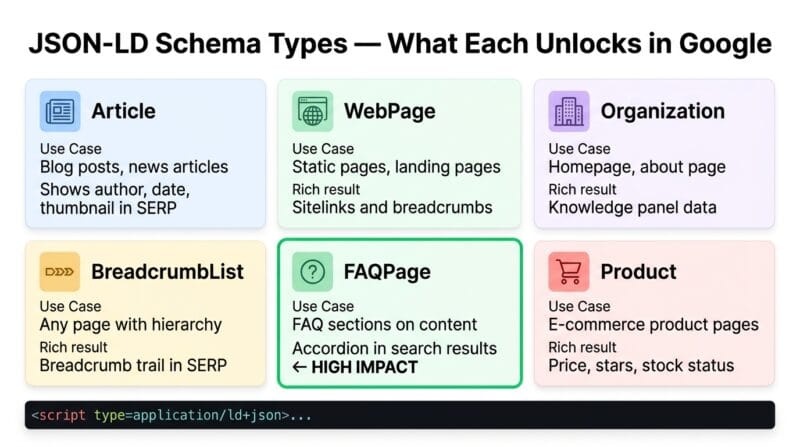
A JSON-LD block has three required parts: the @context (always https://schema.org), the @type (the schema type name — Article, Product, FAQPage), and the type-specific properties. The script tag format is: <script type="application/ld+json">{...}</script>. Multiple schema blocks can exist on a single page — one for the Article, one for the BreadcrumbList, one for the Organization — each in a separate <script> tag. Avoid combining unrelated types in a single block; it reduces clarity and can cause validation errors.
The most common JSON-LD errors that cause Google to ignore schema: using relative URLs (schema requires absolute URLs starting with https://), mismatched date formats (use ISO 8601, not “June 15, 2025”), property names with wrong capitalisation (datePublished not DatePublished), and missing required properties for the type. Validate every schema implementation with Google’s Rich Results Test (search “Google Rich Results Test”) before deploying. The test shows which schema types were detected, which properties were found, and which rich results are eligible based on the schema — plus any errors or warnings. Use our SEO Meta Tags Studio to generate valid JSON-LD for all six schema types with the correct property names and formats. For the full meta tag reference see our SEO meta tags complete guide.
🟢 Advanced Robots Directives — Crawl Budget, Indexing, and Snippet Control
Beyond the basic index/noindex, follow/nofollow, the robots meta tag supports several advanced directives. max-snippet:N limits the character length of the description snippet Google shows — max-snippet:0 prevents any snippet, max-snippet:-1 allows unlimited length. max-image-preview:standard or max-image-preview:large controls whether Google shows thumbnail or full-size images in SERP. max-video-preview:N limits video preview duration in seconds. These fine-grained controls are useful for paywalled content (news publishers often use max-snippet:0 on subscription articles) and for ensuring hero images appear at full size in image-rich SERP features.
- 🔵 Crawl budget is relevant for sites with thousands of pages. Google has a crawl rate limit per site — spending it on noindexed tag pages, paginated archives, and duplicate parameter URLs wastes budget that could be spent discovering and refreshing important content. Use
noindexplusrobots.txtallow (crawl but don’t index) for archive pages to signal which URLs are low-priority without blocking crawlers. - 🟠 X-Robots-Tag HTTP header is the server-level equivalent of the robots meta tag — it can control indexing for non-HTML resources like PDFs, images, and XML files that can’t have an HTML
<head>. Set it via your web server configuration or CDN:X-Robots-Tag: noindex. - 🟣 Googlebot-specific directives can target individual bots:
<meta name="googlebot" content="noindex">applies only to Google’s crawler while letting other bots index the page. Useful for international sites blocking certain language versions from specific search engines.
Does the order of meta tags in the head matter?
For most meta tags, order doesn’t affect functionality — search engines and social crawlers parse the entire <head> before acting on the tags. However, <meta charset> should appear within the first 1024 bytes of the document (before any character that might need the declared encoding). Beyond that convention, the practical recommendation is: charset → viewport → title → description → canonical → Open Graph → Twitter Card → schema. This is a readability convention, not a technical requirement.
What is the theme-color meta tag and who uses it?
The <meta name="theme-color"> tag specifies the colour that Chrome on Android uses to colour the browser’s address bar and UI chrome when the user visits your site. On mobile, it creates a branded browsing experience where the browser matches your site’s primary colour. The value is any valid CSS colour — hex (#2563eb), RGB, or named colour. Safari uses a similar apple-mobile-web-app-status-bar-style tag. The theme-color meta tag also affects the appearance of Progressive Web App (PWA) title bars when your site is installed to a home screen.
How long does it take for Google to show schema rich results?
After adding valid JSON-LD schema, Google needs to recrawl the page before the rich result can appear. High-authority pages with frequent crawling may see rich results within days. Lower-traffic pages may take 2–6 weeks. After recrawling, Google evaluates whether the schema qualifies for a rich result — it must pass quality thresholds, the structured data must match visible page content, and the page must meet Google’s content policies. Use Google Search Console’s URL Inspection tool to request recrawling after adding schema, then monitor the Enhancements section for rich result status.
Is the meta keywords tag still worth adding?
Google has ignored the <meta name="keywords"> tag since 2009 — it was abused for keyword stuffing in the early 2000s and was removed as a ranking signal. Bing also ignores it. Adding keywords doesn’t help rankings and doesn’t hurt them. However, some CMS platforms, internal search engines, and analytics tools still read the keywords tag for categorisation purposes. If your internal systems use it, add it; otherwise, skip it to keep your <head> clean. The SEO Audit checklist gives a minor score point for having keywords present — but it’s correctly rated as low weight.
What’s the difference between og:url and the canonical tag?
og:url tells social platforms the canonical URL of a page for deduplication — when multiple people share the same article but from different URL variants (with or without UTM parameters), Facebook uses og:url to merge all shares and their aggregate like/share counts under one URL. The HTML <link rel="canonical"> tag serves the same deduplication function for search engines. Both should point to the same clean, canonical URL without tracking parameters. In practice, set both to the same value — the canonical-form URL with https, without trailing parameters.
Can I put JSON-LD schema in the body instead of the head?
Yes. Google explicitly supports JSON-LD schema in either <head> or <body>. Placing it in the <body> — typically near the bottom before </body> — is common in WordPress environments where the theme or plugin adds schema via the wp_footer hook rather than wp_head. Both locations are crawled and processed equally by Google. The only scenario where head placement matters: if your page is very large and Google stops crawling before reaching the body schema, head placement ensures it’s always parsed.
What happens if I have conflicting schema on the same page?
Multiple JSON-LD blocks with the same @type on one page can cause confusion. Two Article schemas with different headlines will show validation warnings in Google’s Rich Results Test. Google may select one, combine them, or ignore both. Best practice: one block per schema type per page. If you need to describe multiple entities of the same type (multiple FAQs is fine — they’re a list within one FAQPage block), structure them within a single schema block using arrays rather than separate blocks. Two blocks of different types (one Article, one BreadcrumbList) on the same page are perfectly valid and encouraged.
Why does my page show noindex even though I didn’t set it?
Several common causes: a plugin (especially SEO plugins like Rank Math or Yoast) may have automatically noindexed the page type — check the plugin’s settings for “noindex tag pages,” “noindex archive pages,” or similar. WordPress’s Reading Settings includes a “Discourage search engines” checkbox that adds noindex sitewide. Password-protected pages in WordPress add noindex automatically. Development or staging environments may have a sitewide noindex applied. The canonical URL may redirect to a different page that is indexed, with the original noindexed. Use Google Search Console’s URL Inspection tool to see which robots directive Google found on any specific URL.
How do I prevent a page from appearing in Google’s cached results?
Add noarchive to your robots meta tag: <meta name="robots" content="index, follow, noarchive">. This tells Google not to store or show a cached version of the page while still indexing it normally. Note that Google Cache links in search results were deprecated in early 2024 and are no longer widely shown to users — the noarchive directive also prevents the page from appearing in the Wayback Machine via Google’s feeds, though the Internet Archive crawls independently and isn’t controlled by the robots meta tag.