
Ultimate Browser AI Models Directory
Ultimate 2026 browser ai models directory with 85+ models, clear 🟢 offline browser capable highlighting, and new “Computer Languages / Integration” column showing exactly which languages & frameworks (JavaScript, WebGPU, WASM, ONNX, TF.js etc.) can handle & connect each model. Perfect reference for PrimeToolHub offline web tools.

Table of Contents
Curious which AI models can actually run inside a browser, with no server behind them? Browse a reference of in-browser models covering what each one does, roughly how large it is, and what a client-side project can realistically use it for. On-device AI is moving quickly, and the practical question is no longer whether a model can run in a tab but which one fits your size, speed and privacy constraints. This directory is a starting point for that decision: it groups models by task, from transcription to text generation to image work, so you can find a candidate without trawling scattered release notes. It suits developers who want AI features without an API bill or a privacy trade-off, and anyone curious about what the browser can now do on its own. The page is a reference, so it is useful whether you are online or not.
| Model Name ↕ | Category ↕ | Deployment & Tech | 🖥️ Handles Code In & 🔗 Connect SDK | Primary Use Case |
|---|
🟨 No models found
Try adjusting your search terms or filters above.
Picking a model you can actually run, not just read about
There are hundreds of open models now, but only some of them fit inside a browser tab and run on the hardware you actually have. This directory exists to answer one narrow question quickly: given your device, your language stack, and whether you need it offline, which browser AI models are worth trying first? The sections below show how to read the list, walk through a few real searches, and are honest about what this reference will and will not do for you.
Last updated: July 2026
🔴 How to read the directory without getting lost
Every row is one model, and the columns are the things that actually decide whether it will work for you. The category tells you what it does (text chat, speech-to-text, image, embeddings). The tech column is the engine it needs, usually WebGPU for GPU-accelerated work or WebAssembly for a CPU-only fallback. The size is the rough download you should expect the first time you load it. And the language columns tell you which programming languages you can drive it from, split into the code languages the model touches and the SDK languages you would actually write in the browser.
The filters at the top let you narrow all of that at once. Search by name, restrict to a category, filter by offline status, or pick a technology. The practical trick is to filter by the one constraint you cannot change first, then sort by size. Your hardware and your language stack are fixed; the model is the variable you are shopping for.
🟡 A few real searches, and what comes back
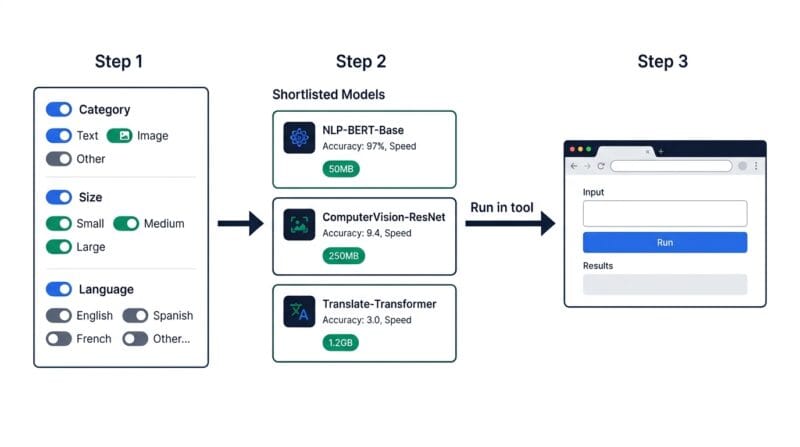
Say you want a chat assistant that runs on a mid-range phone. Filter the category to text or LLM, then sort by size ascending. The top of that list will be something like a one-billion-parameter model around 900 MB on WebGPU, tagged for fast local chat. Input: category equals text, sort by smallest. Output: a short list of models light enough that a phone can load them, each with the exact SDK language you would use to wire it up.
A second common case: you need speech-to-text but the audio is sensitive and cannot be uploaded. Filter the category to audio and look for a Whisper-family entry with an offline tag. What you get back is a handful of transcription models with their sizes, so you can trade accuracy against download weight before you commit. A third case is a hard language constraint. If your project is pure JavaScript with no Python backend, filter by SDK language for JavaScript, and the list collapses to only the models you can integrate without standing up a server.
Once you have a candidate, the next step is a tool that actually runs it. If you are prototyping, the AI Code Studio lets you test model calls in the browser, and for the speech case the offline transcription tool already wires a Whisper model up for you. This directory is the shortlist; those tools are where you put a model to work.
🟢 What this directory will not do for you
Being clear about the edges saves you time. This is a reference and comparison list, not a runtime. It does not run the models for you, and clicking a row will not start an inference. The sizes are approximate; the real download depends on the exact build and quantization you end up using, and can be larger or smaller than the figure shown. WebGPU support also varies by browser, so a model tagged WebGPU will want a recent Chrome or Edge, and older browsers fall back to the slower WebAssembly path or will not run it at all.
- 🔵 Hardware still rules. A large multi-billion-parameter model listed here can be downloaded, but a phone or a laptop without a capable GPU will struggle to run it at a usable speed.
- 🟠 The list is curated, not exhaustive. It covers the models worth trying in a browser today, not every model ever published. New ones appear faster than any single list can track.
- 🟣 First load is the cost. The size column is a one-time download that the browser then caches, not something you pay on every visit. Plan your first run on a good connection.
If you want the reasoning behind all of this, why the same model ships in three different sizes, how WebGPU and WebAssembly split the work, and why running locally keeps your data private, that is covered in the companion guide on how browser AI models actually work [confirm slug — new theory post].
Does this directory run the models?
No. It is a reference and comparison list. It shows each model’s engine, size, and integration languages so you can shortlist, then you run your pick in a separate tool or your own code.
Are the model sizes exact?
They are approximate. The real download depends on the exact build and quantization you use, so treat the figure as a guide for planning, not a precise number.
What is the difference between WebGPU and WebAssembly here?
WebGPU runs the model on your graphics hardware and is much faster; WebAssembly runs it on the CPU as a fallback. A WebGPU model wants a recent Chrome or Edge to reach full speed.
Can my phone run these?
The small models, yes. Filter the category you want and sort by size; the lightest entries are designed to load on mobile. Large multi-billion-parameter models are not realistic on a phone.
Do I need to write code to use a model?
Yes, or use a tool that already wraps one. The SDK language column tells you what you would write, and most browser models integrate through a JavaScript SDK.
Is my data private if I run a listed model?
When a model runs in your browser, the input stays on your device and is not sent to a server. The companion theory guide explains exactly why that holds.
How current is the list?
It is curated and refreshed periodically to cover models worth trying in a browser now. It is intentionally selective rather than a complete index of everything published.
Which model should a beginner start with?
Pick a small WebGPU text model in the one-billion-parameter range. It loads quickly, runs on modest hardware, and is enough to learn how in-browser inference behaves before you scale up.