
Interactive Learning Studio
Create crossword puzzles, word searches, drag-sort activities and memory match games free with Interactive Learning Studio Pro — offline, no login required.

Table of Contents
Teaching something and want activities that make it stick? Build crossword puzzles, word searches, drag-and-sort tasks, matching games, and more, then export them to use in class or share with students. Everything works offline, so a patchy classroom connection is not a problem.
🎓 Interactive Learning Studio Pro
Create crossword puzzles, word searches, drag-sort activities, matching games & memory card games — free, offline, no login required.
🧩 Crossword Puzzle
Fill in the grid using the clues below.
→ Across
↓ Down
🕵️ Cryptogram Maker
ℹ️ Example below is a placeholder — type your own, or click 💡 Load Sample above.
Build crossword puzzles, word search grids, drag-sort challenges, match-the-pairs games, and flip-card memory matches — all from a single browser tab. No switching between apps. No accounts. Just create, export, and share.
The built-in AI Assistant tab connects to Gemini (free), Groq Llama (free), or Claude Sonnet (paid) to generate activity content from any topic in any language. Type a subject, pick a target activity, click Generate — done in seconds.
Crossword clues work in Sinhala, Tamil, Arabic, Chinese, Hindi, and 29 more languages. Every completed activity exports as a fully interactive standalone HTML file or PNG image — ready for print, classroom distribution, or online sharing.
Click Crossword, Word Search, Drag & Sort, Match Pairs, or Memory Match from the tab bar at the top of the tool.
Click 💡 Load Sample to auto-fill demo content, or type your own words and clues directly into the input area — one per line.
Click ⚡ Generate (Crossword / Word Search), ⚡ Create Activity (Drag & Sort), or ⚡ Create Game / Start Game for Match Pairs and Memory Match.
Click 🖼 Export PNG for a printable image, or 📄 Download HTML for a fully interactive file students can open in any browser — no internet needed.
Last updated: June 2026
🔴 Why Teachers and Trainers Choose This Interactive Learning Studio
Making educational activities from scratch takes hours. Writing crossword clues, positioning a word search grid, sequencing drag-and-drop steps, pairing terms with definitions — each of these tasks demands careful preparation before a lesson even starts. Most tools that solve this problem require a subscription, an account, or an internet connection during the session itself. This interactive learning studio removes all three barriers.
Everything runs inside the browser. No server processes your data. No login stores your content. The tool generates a complete activity the moment you click Generate — and that activity can be exported as a standalone HTML file that works offline on any device. A teacher in a school with unreliable internet can hand students a USB drive containing the exported file. It opens. It works. Students solve it, drag tiles, flip cards, and check answers — all without touching a network connection.
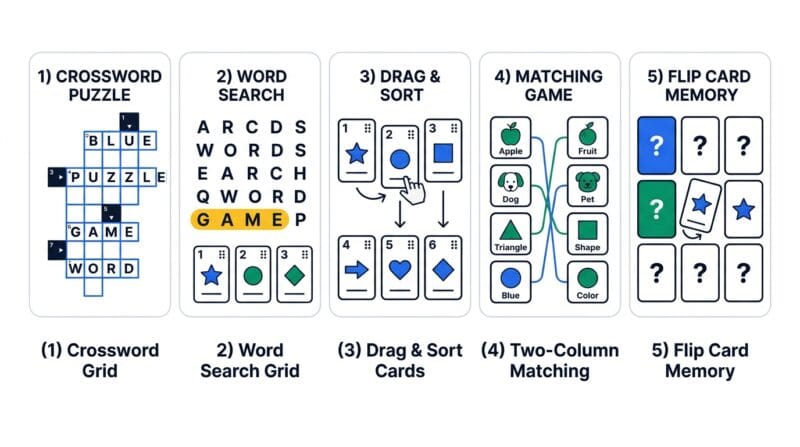
The design choice to support five distinct activity types in a single tabbed interface reflects how lesson planning actually works. A vocabulary lesson might start with a word search to introduce terms, move to a match-pairs game to link concepts, and finish with a crossword that tests retention. Jumping between five different websites to create those three activities breaks workflow. Having them in one place — with a shared toolbar for Load Sample, Full Width, Clear, and Print — keeps momentum intact.
🟡 Five Activity Types — What Each One Does and When to Use It
Each tab in the tool serves a specific pedagogical function. Understanding which activity fits which learning goal prevents the common mistake of overusing one format for every lesson.
🟢 Crossword Creator — Assessment Through Recall
The Crossword tab accepts WORD:Clue pairs — one per line. The placement algorithm tries up to 300 times per word to find a valid intersecting position in a 21×21 grid, then trims the bounding box to the smallest rectangle that fits all placed words. Clues support any script: Sinhala, Arabic, Chinese, Devanagari, Thai, and 29 other languages display correctly using lazy-loaded Google Noto fonts. The language popup — searchable, 33 languages, three-column grid — makes switching between sample datasets instant.
The Customize panel applies eight CSS variables in real time: cell size (28–56px), letter size, cell background, black cell color, letter color, correct/wrong cell highlight colors, and across/down clue colors. A student solving the exported HTML file gets the same visual treatment — all variables are baked into the export’s inline CSS. According to MDN’s documentation on CSS custom properties, this approach keeps styling predictable and overridable without framework dependencies.
- 🔵 Enter up to 20 word-clue pairs; the algorithm places the longest words first to maximize grid density
- 🟠 Skipped words (those that cannot be placed after 300 attempts) are listed in the Stats panel alongside words placed and grid size
- 🟣 Check Answers highlights correct cells green, wrong cells red; Reveal All fills remaining cells in yellow
🟢 Word Search Generator — Recognition Before Recall
Word Search is the right activity at the start of a unit, not the end. When students haven’t encountered terms yet, recognition — spotting PHOTOSYNTHESIS hidden diagonally in a grid — builds familiarity with spelling before deeper meaning is introduced. The generator supports grid sizes from 10×10 to 18×18 and three direction modes: Horizontal Only, Horizontal + Vertical, and All Eight Directions including diagonals and reverse.
Selection works through click-and-drag on desktop and touch-drag on mobile. The Pointer Events API captures both input methods through a single event path — no separate mouse and touch handlers. When a valid word is selected, the cells turn green and the word tag at the bottom gains a strikethrough style. The built-in timer tracks personal best times across sessions, giving students a self-directed challenge even without a teacher present.
🟢 Drag & Sort — Sequencing and Process Thinking
Two modes serve two distinct purposes. Sentence Sorter scrambles individual sentences that belong in a logical order — useful for narrative comprehension and argument structure. Step Sequencer scrambles procedural steps — useful for science experiments, programming tutorials, cooking recipes, and historical event timelines. Both modes use the same drag-and-drop engine with HTML5 drag events on desktop and Pointer Events API capture on touch screens.
After dragging items into order, Check Order highlights each item green (correct position) or red (wrong position) and shows a percentage score. Reshuffle resets to a new random arrangement of the same items — useful for repeated practice without regenerating the activity from scratch.
🟢 Match Pairs and Memory Match — Associative Learning
Match the Pairs displays terms and definitions in two shuffled columns. Students click a term, then click its matching definition. Correct pairs lock green and become non-interactive. Wrong selections flash red for 700 milliseconds, then reset — the brief penalty reinforces attention without frustrating learners. A live timer and attempt counter track performance across the session.
Memory Match uses CSS 3D flip animation — rotateY(180deg) with backface-visibility:hidden — to create genuine card-flip behavior without JavaScript-driven position changes. Students flip two cards; matching pairs stay face-up with a green border; non-matching pairs flip back after 900 milliseconds. The two-flip lock mechanism prevents a third card from being flipped while a mismatch is resetting, which is a common bug in simpler implementations. Emoji support in the Match field makes animal-to-emoji or fruit-to-emoji memory games possible with a single colon separator: Apple:🍎.
For a broader collection of free vocabulary and comprehension tools, see our free web tools directory — or explore the PTH AI Code Studio for AI-assisted code generation using the same multi-provider AI approach.
🔴 The AI Assistant Tab — Three Providers, One Workflow
The AI Assistant tab connects to three platforms through direct browser-to-API calls. Keys are stored in sessionStorage — they disappear when the browser tab closes and are never sent to PrimeToolHub servers. This matches the security model used in PTH AI Code Studio and is consistent with MDN’s sessionStorage specification.
Google Gemini Flash is free — no credit card required, just a Google account at AI Studio. Groq with Llama 3.3 70B is also free on the developer tier and runs significantly faster than most alternatives. Anthropic Claude Sonnet 4.6 requires a paid API key but produces the most precisely formatted output for complex multilingual clue sets. The generator tries multiple models per provider in sequence — if Gemini 2.5 Flash returns a quota error, it automatically retries with Gemini 2.0 Flash, then 1.5 Flash, before reporting failure.
- 🔵 Paste your key and click 💾 Save Key — the provider tab shows a ✅ tick when a key is stored
- 🟠 Choose the target activity tab, enter a topic in any language, set item count (6–15), output language (15 options), and difficulty
- 🟣 Click ✨ Generate — the preview shows the cleaned output; click ➡ Use in Tab to auto-fill the target activity’s input and switch tabs automatically
The output cleaner validates each format. Crossword output checks that the word before the colon matches /^[A-Za-z]{3,12}$/. Word Search output strips non-alphabetic characters and enforces uppercase. Sort output filters lines shorter than five characters. Match and Memory output require at least one colon per line. Lines failing validation are silently dropped — the displayed count reflects only valid items.
🟡 Exporting Activities for Classroom Use
Every activity type offers three export paths. Export PNG captures the current grid or game board as a raster image using the Canvas API — useful for embedding in slide decks or printing directly. Download HTML produces a self-contained file with all CSS, JavaScript, and data embedded inline — students can open it in Chrome, Firefox, Edge, or Safari without an internet connection. Copy HTML Code places the same markup in a scrollable text area for pasting into a CMS, LMS, or email.
The exported Word Search HTML uses Pointer Events API for both mouse and touch selection — the same approach that fixed the drag-selection bug that affected mousedown/mouseover combinations in Chromium-based browsers. The exported Crossword uses a data-json attribute on a hidden div to store all grid and clue data, then injects an interactive script at the end of the <body> using a string split-join technique that avoids literal script tag pairs in source — a requirement for WordPress and LiteSpeed compatibility.
❓ Frequently Asked Questions
Does the interactive learning studio work without an internet connection?
All five activity tabs — Crossword, Word Search, Drag & Sort, Match Pairs, and Memory Match — run entirely in your browser with zero server calls. The AI Assistant tab requires internet only when generating content; once you click Use in Tab, the filled activity works offline. Exported HTML files are fully self-contained and open without a network connection.
Which AI provider should I start with?
Start with Google Gemini Flash — it is free, requires only a Google account to get a key from AI Studio, and handles most topics and languages well. Groq with Llama 3.3 70B is the fastest option and also free on the developer tier. Use Claude Sonnet only if you need the highest output quality for complex multilingual crossword clues.
Can I write crossword clues in Sinhala, Tamil, or Arabic?
Yes. The WORD before the colon must use Latin letters A–Z for grid placement, but the CLUE after the colon supports any language and script. The tool detects the script automatically, loads the appropriate Google Noto font, and applies right-to-left text direction for Arabic, Hebrew, Persian, and Urdu clues.
How many words can I add to each activity?
Crossword accepts up to 20 word-clue pairs. Word Search accepts up to 20 words. Drag & Sort has no hard limit but works best with 4–12 items for classroom readability. Match Pairs and Memory Match each support up to 16 pairs — larger sets create a 4-column grid that remains playable on tablets and desktops.
Is my API key safe when I paste it into the tool?
Your key is stored in sessionStorage only — it exists in your browser’s memory for the current tab session and is deleted automatically when the tab closes. The key is sent directly from your browser to the AI provider’s API (Google, Groq, or Anthropic) and never passes through PrimeToolHub servers.
Can students play the exported HTML on a phone?
Yes. All exported activities are mobile-responsive. The Word Search and Crossword grids scroll horizontally on small screens, and cell sizes adapt at the 480px breakpoint. Drag & Sort and Match Pairs use Pointer Events API so touch dragging works the same as mouse dragging. Memory Match flips correctly on iOS Safari and Android Chrome.
Why are some crossword words listed as Skipped in the Stats panel?
The placement algorithm tries up to 300 random positions per word. If no valid intersection with existing placed words is found after 300 attempts, the word is marked Skipped. This happens when words share no common letters with already-placed words. Try adding shorter words or words that share letters with your topic’s key terms to reduce skips.
What does the Full Width button do?
Clicking ⛶ Full Width hides the sidebar and expands the main activity area to 100% of the page width. This is useful on smaller laptops where the two-column layout compresses the grid. Click the button again to restore the sidebar with its How to Use guide, Stats panel, and AI Word Generator card.
Can I use the AI Assistant to fill all five activity types?
Yes. The AI Assistant tab generates content formatted specifically for each target: WORD:Clue pairs for Crossword, uppercase word lists for Word Search, ordered steps for Drag & Sort, Term:Definition pairs for Match Pairs, and Term:Match pairs with optional emoji for Memory Match. Select the target tab first, enter your topic, click Generate, then Use in Tab — the content fills automatically.