
Number Systems Studio Pro
Binary, hex and decimal are the easy part — most converters stop there. The harder questions are the ones that actually bite: what does a negative number look like in memory, why does 0.1 not print exactly, and what happens when a value goes one bit too far? This studio answers all three, with a bit grid you can actually see. Here is how to use each tab, with a worked example.

Table of Contents
Turning a hex value into decimal, or checking a binary flag by hand? Enter a number in any base and see it at once in binary, octal, decimal, and hexadecimal. This is the calculator to keep open while you are reading register values or working through bitwise logic.
🔢 Number Systems Studio Pro
| Value | Category | Binary | Notes |
|---|
The Number Base Converter processes mathematical radices instantly, calculating binary, octal, and hexadecimal values directly inside your Central Processing Unit.
By confining all memory address conversions to your local hardware, this Number Base Converter ensures sensitive digital electronics data never reaches external servers.
The JavaScript engine computes division matrices in real-time, outputting the exact mathematical remainders required for computer science analysis.
Type your numerical array into the appropriate input field within the Number Base Converter interface.
The browser natively identifies your starting base limit and validates the character constraints before computing.
The algorithm automatically translates the integer across all standard programming bases instantaneously.
Examine the generated mathematical breakdown to understand how the quotient and remainder logic functioned locally.
Last updated: July 2026
🔴 Converting between bases, at any width
Type into any of the four fields — binary, octal, decimal, hexadecimal — and the other three update instantly. Input: 2026 in decimal. Output: 11111101010 in binary, 7ea in hex. The custom base field goes further, handling any base from 2 to 36, which covers less common cases like base-36 short codes. The bit-width selector matters for the padded binary view underneath: an 8-bit view pads 2026 differently than nothing would, since 2026 does not actually fit in 8 bits, which is a preview of the overflow idea the next tab covers properly.
🟡 Seeing a negative number’s actual bit pattern
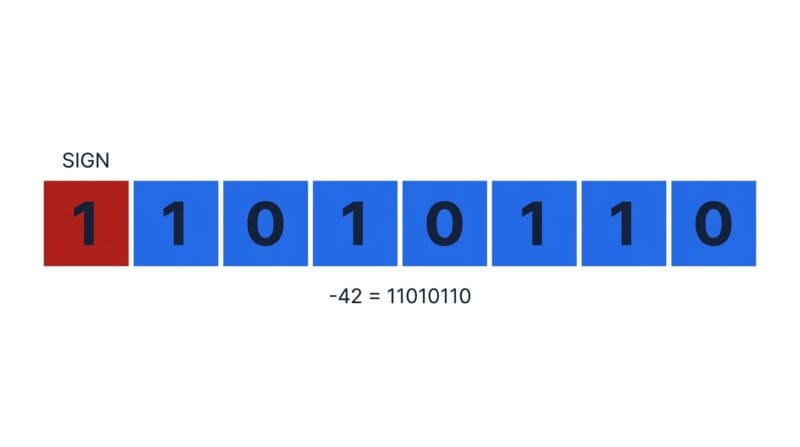
Type -42 into the Signed and Two’s Complement tab at 8-bit width and the bit grid lights up 11010110, with the leftmost bit shown in red as the sign bit. That red bit is not a separate flag bolted on; it is simply the top bit of an ordinary binary number, chosen so that regular addition happens to produce the right answer for negatives too. The comparison table underneath shows the same value in sign-magnitude, which flips only the top bit and is easier to read by eye but breaks normal addition — it is why every processor uses two’s complement instead.
The range check is the part people skip until it costs them a bug. Every bit width has a hard signed range: 8-bit signed runs from -128 to 127, and typing -129 or 200 triggers an overflow warning showing exactly where the wraparound landed. That is the same failure mode behind real-world integer overflow bugs, made visible instead of silent.
🟢 Why 3.14 is not really 3.14 in memory
The IEEE 754 tab breaks a decimal into its three real components: a sign bit, an exponent field, and a mantissa, each colour-coded in the bit grid. Enter 3.14159 and decode the bits back to decimal, and the result is 3.141590118408203 — not because anything is broken, but because most decimal fractions cannot be stored exactly in binary floating point, the same reason 0.1 plus 0.2 famously does not equal 0.3 in most programming languages. The tool flags this directly: an exact round trip gets a green confirmation, an inexact one gets an explanation. It also recognizes the special bit patterns — an all-ones exponent means Infinity or NaN depending on the mantissa, and an all-zero exponent means a signed zero or a denormal number.
🟡 Bitwise operations, and where this tool stops
The Bitwise tab shows AND, OR, XOR, NOT and single-bit shifts with every operand’s bits drawn out, so you can see exactly which bits combined to produce the result rather than trusting a calculator blindly. Each operation includes a one-line note on what it is actually used for in real code — AND for reading a flag, OR for setting one, XOR for toggling one, a left shift for doubling or positioning a flag.
- 🔵 This handles integers and IEEE 754 floats, not arbitrary-precision math. Values are limited by what standard 32-bit and 64-bit JavaScript number handling supports, which covers everyday engineering and coursework but not cryptographic-scale big integers.
- 🟠 Bitwise operations here use plain JavaScript integer semantics. They match how a real processor treats fixed-width integers, but always confirm your bit width matches your actual target hardware or language before relying on the exact result.
- 🟣 This is representation, not logic design. For Boolean algebra, Karnaugh maps and gate circuits, the tools live in the electronics cluster instead — see below.
If your next step is designing the logic itself rather than representing numbers, the Boolean Algebra Studio minimizes expressions, the Truth Table Generator prints every input/output row, and the Digital Logic Studio covers K-maps, gate conversion and circuits. To see the physical chips these values eventually run on, the 7400 Series IC Finder is a useful reference. And if you want to understand why any of this works the way it does — why two’s complement makes hardware simpler, why floats trade precision for range — that is the subject of the companion guide on how computers actually represent numbers
Why is two’s complement used instead of a plain sign bit?
Because ordinary binary addition works on it unmodified, even for negative numbers. A plain sign-flip (sign-magnitude) needs special-case logic and produces two zeros, which two’s complement avoids entirely.
Why doesn’t 3.14 come back exactly after conversion?
Most decimal fractions cannot be represented exactly in binary floating point. IEEE 754 stores the closest representable value, which is why the round trip shows 3.141590118408203 rather than the original.
What does an all-ones exponent mean in IEEE 754?
It signals a special value. Combined with a zero mantissa it means Infinity; combined with a non-zero mantissa it means NaN, meaning the result is not a valid number.
What is the valid range for an 8-bit signed integer?
-128 to 127. Anything outside that range wraps around when forced into 8 bits, which is exactly what the overflow warning in the Two’s Complement tab is catching.
What can I actually do with AND, OR and XOR?
AND reads a specific bit or flag, OR sets a flag on, and XOR toggles a flag or builds a simple checksum. The Bitwise tab shows exactly which bits combine to produce each result.
Does this tool handle Boolean logic and circuits?
No — this is number representation, not logic design. For Boolean simplification, truth tables and gate circuits, see the Boolean Algebra Studio, Truth Table Generator and Digital Logic Studio.
What is a denormal number?
A float with an all-zero exponent and a non-zero mantissa, used to represent values too small to fit the normal IEEE 754 range without losing all precision.
Is anything I type sent anywhere?
No. Every calculation runs in your browser tab. Nothing is uploaded, so it keeps working with your connection switched off.