Free AI Face Blur & Anonymizer Studio | Auto Censor Photos
Protect privacy instantly with our free AI face blur tool. Automatically detect and censor faces in photos 100% offline in your browser. No image uploads required.

Table of Contents
Sharing a photo or clip that has bystanders in it? This studio detects faces and blurs or pixelates them in images and video, so you can post without exposing people who did not agree to be shown. Everything processes locally, which matters when the footage is sensitive.
🎭 Face Blur Studio
Blur or pixelate faces in photos and videos with automatic AI detection — right in your browser. No upload, no login.
🎭 AI Face Blur & Anonymizer Pro Detailed Analysis
Click or Drag & Drop an Image
100% Secure • Analyzed offline • Detects Age, Gender & Side Profiles
🛡️ Ready to Anonymize
🤖 Booting AI Engine...
Preparing Environment...
🎛️ Live Censor Adjustments
🎬 AI Video Face Blur Pro v2.1 • FFmpeg
Click or Drag & Drop a Video
100% Offline • New trimming & quality controls
Two Tools, One Page
The Image tab and Video tab share the same Face Blur Studio, so you don’t have to hunt for a separate video tool if a photo job turns into a video job halfway through.
Automatic Detection, Age & Gender Read
Faces are found automatically — no manual boxes to drag. The sidebar also shows a rough age and gender estimate per face, useful if you need to confirm children were caught by the blur.
Style Presets for Both Formats
News Style, Social Safe, Child Protection, and Full Anonymize apply sensible blur strength and coverage instantly, on both images and video frames, instead of you guessing a slider value.
How to Use Face Blur Studio
Pick Image or Video Tab
Choose the tab that matches your file type at the top of the tool.
Drop Your File In
Drag and drop, or click the drop zone to browse. Nothing leaves your browser.
Choose a Preset or Adjust
Tap a preset like Child Protection, or fine-tune blur style and intensity yourself.
Check the Result and Download
Use the before/after slider (image) or preview (video), then download the finished file.
Last updated: July 2026
🔴 Why We Put Image and Video Blur in One Tool
We used to run these as two separate tools. The problem was simple: if you were blurring faces in a batch of event photos and then needed to do the same thing to the event highlight video, you had to leave the page, search for the video version, and start over. Now both live under one Face Blur Studio — click a tab, keep working.
🟡 What’s Actually Happening When You Click “Detect”
The tool loads a small face-detection model (built on face-api.js, a JavaScript port of a face recognition model) directly into your browser tab. It scans the image or each video frame for face-shaped patterns, estimates a bounding box, and — where the model is confident enough — a rough age and gender. None of this touches a server. If your Wi-Fi died mid-process, the tool wouldn’t notice, because it was never talking to anything outside your tab.
🟢 A Real Example
Say you upload a school sports day photo with 14 kids in frame. Detection finds 12 of them cleanly. Two are turned sideways near the edge of the photo and get missed — this is the single most common gap we see, and it’s worth checking for before you publish anything. Switch to Child Protection preset, review the result in the before/after slider, and manually note any face the model skipped so you can crop it out or blur it by hand.
Video Works the Same Way, Frame by Frame
For video, the same detection runs on individual frames while FFmpeg compiled to WebAssembly handles the trimming and re-encoding. This is why video processing takes noticeably longer than a single photo — a 30-second clip at normal frame rate means detection runs dozens of times, not once.
🔴 Common Mistakes and What This Tool Doesn’t Do
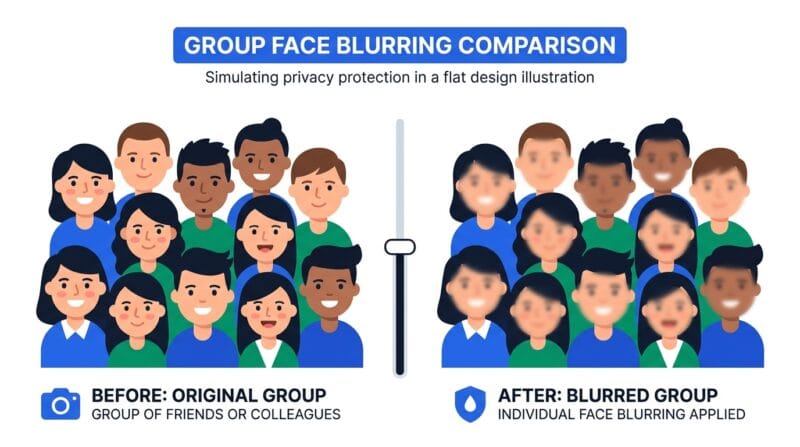
The biggest mistake is trusting automatic detection completely on a photo with faces at odd angles, in shadow, or far in the background — the model isn’t perfect and it can miss faces the presets don’t catch. Always scan the result yourself before sharing anything sensitive. On the video side, very shaky or low-light footage produces more missed frames than a stable, well-lit clip. Videos over a couple of minutes will also take a while to process since everything runs on your device’s CPU, not a server farm — there’s no way around that trade-off if you want the “never leaves your browser” privacy guarantee.
This also isn’t a tool for identifying people — it’s the opposite. It hides faces; it doesn’t recognize who they belong to, and no data about the faces is stored or sent anywhere.
🟡 When You’d Actually Reach for This
Parents sharing school event photos in a class WhatsApp group, use Child Protection so other kids’ faces aren’t identifiable to strangers who might see a forwarded copy. Someone posting a street interview video to social media uses Social Safe to blur bystanders who didn’t consent to being filmed. A journalist protecting a source’s identity in raw footage before it goes to an editor reaches for Full Anonymize. Related tools on the site — try our Image Background Remover if you need to clean up the rest of the photo too, or check our guide to safely sharing photos online for more context on what else to check before posting.
Does my photo or video get uploaded anywhere?
No. Detection and blurring both run in your browser tab using JavaScript and WebAssembly. Your file never reaches our server or anyone else’s.
Why did it miss a face in my photo?
Detection struggles most with faces turned far to the side, partly covered, or very small in the frame. Always check the before/after slider before you rely on it fully.
Why is video processing so much slower than the image tab?
Video means running face detection on dozens or hundreds of individual frames, then re-encoding the result — all on your device’s processor, not a server.
What’s the difference between the blur presets?
News Style and Social Safe use a moderate blur that still shows a face is present. Child Protection and Full Anonymize apply stronger coverage meant to make identification impossible.
Can I undo a blur after downloading?
No. Once a face is blurred and the file is exported, the original pixel data in that area is gone. Keep your original file if you might need it again.
Is there a file size or length limit for video?
There’s no hard cap, but longer or higher-resolution clips take proportionally longer to process since everything runs on your CPU. Very long videos may be slow on older laptops.
Does the age and gender estimate actually identify anyone?
No. It’s a rough statistical guess from the detection model, shown for context only. Nothing about the estimate is stored, logged, or tied to an identity.