How to Faces Blur in Photos and Videos for Free
A practical walkthrough for anonymizing faces before you post — whether it’s one photo or a full video clip, done entirely in your browser.
Table of Contents
Last updated: July 2026
🔴 How a Computer Actually Finds a Face
Face detection sounds like it should be complicated, and the underlying math is, but the concept is simple enough to explain in a minute. A detection model has been shown millions of example images beforehand — some containing faces, most not — until it learns the visual pattern that separates a face from a doorknob or a patch of wallpaper. When you hand it a new photo, it doesn’t “see” a face the way you do. It slides a grid over the image, scores each region for how face-like it looks, and keeps the regions that score high enough. That’s the bounding box you see drawn around a detected face.
Tools built on face-api.js, a JavaScript port of a well-known face recognition library, run this entire process using WebAssembly and your device’s own processor. No frame of your photo is ever sent anywhere for analysis — the model itself, a few megabytes of pre-trained data, gets downloaded once and then does all its work locally.
🟡 Why “Runs in Your Browser” Is the Part That Actually Matters
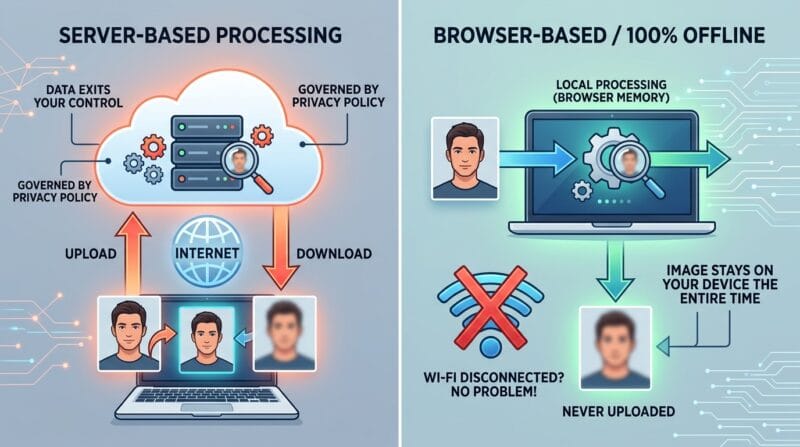
Most people skim past “100% offline” claims without thinking about what they mean practically. Here’s the difference: a server-based face blur tool has to receive your file first, which means it exists — even briefly — on hardware you don’t control, governed by a privacy policy you probably haven’t read. A browser-based tool like this one never uploads anything. The image or video stays in your device’s memory the entire time, gets processed there, and gets downloaded back to your device. If you closed your Wi-Fi mid-process, nothing would break, because nothing was ever leaving.
🟢 Where This Intersects With Privacy Law
This matters beyond convenience. Regulations like the EU’s General Data Protection Regulation (GDPR) treat a person’s face as biometric data in certain contexts, and publishing identifiable images of people — especially minors — without consent can carry real legal exposure depending on your country and what the photo is used for. A journalist protecting a source, a teacher posting classroom photos, or a business filming customer testimonials all have a genuine reason to blur faces before anything goes public, not just a stylistic one.
🔴 Where Blurring Fits Into a Real Workflow
Face blurring is rarely the only step. If you’re preparing an event photo for a public gallery, you’d typically crop first, blur second, then compress for web. For video, people usually trim the clip down to just the usable section before running detection, since processing time scales with how many frames the model has to check — a 10-second trimmed clip finishes far faster than a 3-minute raw upload. Thinking about blurring as the middle step of a small pipeline, not a standalone task, saves a lot of wasted processing time.
Where Detection Still Falls Short
No detection model is perfect, and it’s worth understanding why. The model was trained mostly on front-facing and near-front-facing examples, so a face turned sharply to the side, partially covered by a hand or object, or very small relative to the frame will sometimes go undetected. This isn’t a bug you can wait for a software update to fix — it’s a known limitation of how these models generalize. The practical takeaway: always review the result yourself before publishing anything sensitive, rather than trusting automatic detection blindly.
If you’re ready to try it yourself, the Face Blur Studio tool applies exactly this detection process to both photos and video, with presets tuned for different privacy needs. For a closer look at the interface and blur style options, see our Face Blur Studio guide.
Does face detection recognize who someone is?
No. Detection just finds the location of a face in the frame. It doesn’t identify a person or match faces against a database — it has no idea whose face it found, only that a face-shaped pattern exists there.
Is server-based face blurring ever necessary instead of browser-based?
For very large batches or professional video pipelines, yes — server processing can be faster at scale. For everyday photos and short clips, browser-based processing is usually just as capable and keeps your files private.
Why do some faces get missed by detection?
The model was trained mainly on front-facing examples. Side profiles, partial occlusion, and very small or distant faces are the most common gaps — always review results manually before publishing.
Is blurring faces a legal requirement anywhere?
It depends on your country and context. Regulations like GDPR treat facial images as sensitive data in some cases, so publishing identifiable photos of people without consent can carry legal risk — check your local rules if you’re unsure.
Does this work on animals or objects shaped like faces?
Occasionally a pattern that resembles a human face — like certain toys or illustrations — can trigger a false detection. It’s uncommon but worth checking for in unusual images.
Why does video take so much longer than a single photo?
A photo needs one detection pass. A video needs the same detection repeated across dozens or hundreds of frames per minute of footage, which is why trimming clips down first speeds things up considerably.