
How Regular Expressions Actually Work
A regex is a tiny program, and the engine that runs it makes real decisions: where to start, how much to grab, when to give text back. Once you can picture those steps, patterns stop feeling like luck and greedy matching, backtracking and flags all click into place.

Table of Contents
Last updated: July 2026
🔴 A pattern is a set of instructions, not a search box
It helps to stop thinking of a regular expression as a fancy search term and start seeing it as a short program. Each piece is an instruction to a small machine that walks through your text one position at a time. A literal letter says “the next character must be this”. A class such as \d says “the next character must be a digit”. A quantifier such as + says “repeat the previous instruction one or more times”. The engine reads these instructions left to right and tries to make the whole sequence succeed at some starting point in the text.
This is why the same characters can mean wildly different things. A dot is “any character”, but a dot after a backslash, \., is a real full stop. The engine is not guessing your intent; it is following the metacharacter rules precisely. The formal roots of this idea go back to a branch of computer science called automata theory, and the practical dialect almost every website uses is documented in the MDN regular expressions guide. A general history and the wider family of syntaxes are worth a look on the Wikipedia overview.
🟡 Greedy by default, and why that surprises people

The single biggest source of confusion is that quantifiers are greedy. When you write .*, the engine does not match the smallest sensible chunk; it grabs as much as it possibly can, all the way to the end of the line, and only then works backwards looking for a way to satisfy the rest of the pattern. That backing-up step is called backtracking.
Picture the pattern “.*” run against the line say “hi” and “bye”. You might expect it to match “hi”. Instead it matches “hi” and “bye” in one gulp, because the greedy star swallowed everything up to the final quote before backtracking just enough to land on it. Add a single question mark to make it lazy, “.*?”, and the engine takes the smallest match instead, giving you “hi”. Nothing about the text changed; you simply told the engine to prefer little over large. Watching this happen in a live tester, where you can flip the question mark and see the highlight shrink, is the fastest way to make greed intuitive rather than mysterious.
🟢 Flags change the rules of the whole match
The short letters after the closing slash are not decoration; each one rewrites how the engine behaves. The global flag g tells it to keep going after the first match and find them all, which is why a pattern without it returns a single result no matter how many hits exist. The ignore-case flag i makes letters match regardless of capitalisation.
Two more are worth knowing because they quietly fix common problems. The multiline flag m changes the anchors ^ and $ so they mean start and end of each line rather than the entire text, which matters the moment you work with a list. The dotall flag s lets the dot match newline characters too, so a pattern can reach across line breaks. Choosing the right flags is often the difference between a pattern that almost works and one that simply works.
🟢 Groups do two jobs at once
Parentheses both organise a pattern and capture what they matched so you can reuse it. That captured text is what powers backreferences in a replacement, where $1 means “whatever group one caught”. When you only want the grouping and not the capture, a non-capturing group (?:…) keeps the structure without cluttering your results, which keeps extraction clean.
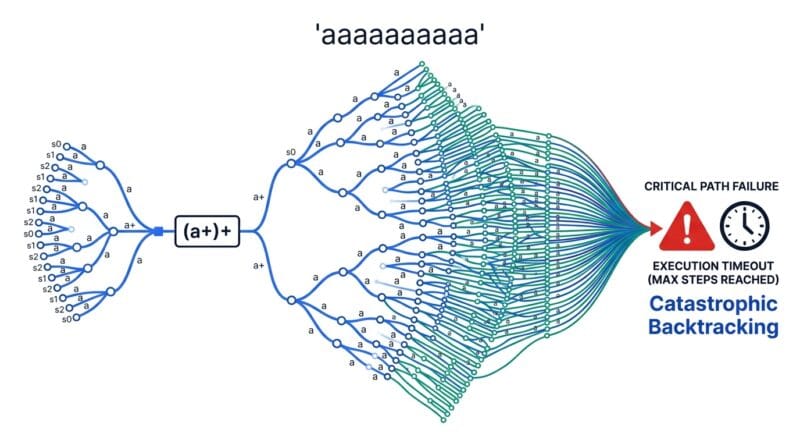
🔴 Catastrophic backtracking: the pattern that freezes the page
Because backtracking can retry many combinations, a careless pattern can make the engine do an astronomical amount of work on a short string. The textbook trigger is nested, overlapping quantifiers on the same characters, such as (a+)+$ tested against a long run of the letter a followed by something that fails. The engine tries every possible way to split the a’s before admitting defeat, and the number of attempts explodes. On a web page this shows up as a tab that hangs for seconds or locks entirely.
This failure mode has a name in security circles, regular expression denial of service, because a hostile input can deliberately trigger it. The defences are practical. Avoid stacking quantifiers on quantifiers, prefer specific character classes over broad ones like .*, and anchor patterns where you can so the engine has fewer starting points to try. Testing a pattern against realistic and slightly nasty input before it ships is cheap insurance, and doing it in an offline tester means you can throw awkward data at it without sending anything anywhere. If your work also touches comparing or cleaning text around these patterns, the Text Diff Checker pairs well with regex cleanup.
🟡 Where a tester fits in real work
Understanding the engine changes how you build patterns. Instead of writing one long expression and hoping, you grow it a piece at a time, checking each addition against live text so you can see the exact moment it starts over-matching. You confirm capture groups hold what you expect before wiring them into code, and you sanity-check flags on a multi-line sample rather than in production. That habit of building patterns interactively, one visible step at a time, is what a good tester is for, and it is why keeping one open next to your editor saves so much time. You can put every idea on this page into practice in the Regex Studio, which runs the same JavaScript engine described here entirely in your browser.
What does “greedy” mean in regex?
A greedy quantifier grabs as much text as it can, then backtracks only as needed. That is why .* often matches more than expected. Adding a question mark makes it lazy and take the smallest match.
What is backtracking?
When part of a pattern fails, the engine goes back and tries a different way to match earlier parts. It is normal and useful, but heavy backtracking is what makes some patterns slow.
Why does my pattern only find one match?
Without the global flag g, the engine stops at the first match. Add g to the flags to find every occurrence in the text.
What is catastrophic backtracking?
It is when nested quantifiers cause the engine to try an enormous number of combinations on a short input, freezing the page. Avoid stacking quantifiers and prefer specific character classes.
What does the multiline flag change?
With m, the anchors ^ and $ match the start and end of each line instead of the whole string. It is essential when your text is a list of lines.
Why can’t regex parse HTML properly?
HTML can nest to any depth, and regular expressions cannot reliably track arbitrary nesting. They are fine for finding simple tags but a real parser is needed to understand a document.
What is the difference between a capturing and non-capturing group?
A capturing group ( ) remembers what it matched for reuse as $1 and similar. A non-capturing group (?:…) only groups for structure and does not store the result.
Do patterns behave the same in every language?
Broadly, but dialects differ. This tool uses the JavaScript engine, so patterns match ECMAScript rules. Other languages may support extra features or subtle differences.
How do I test a pattern safely?
Use an offline tester so private data never leaves your device, and try realistic plus slightly awkward input to catch slow patterns before they reach production.