Parsing, GFM Extensions & Why It Beats a Word Processor
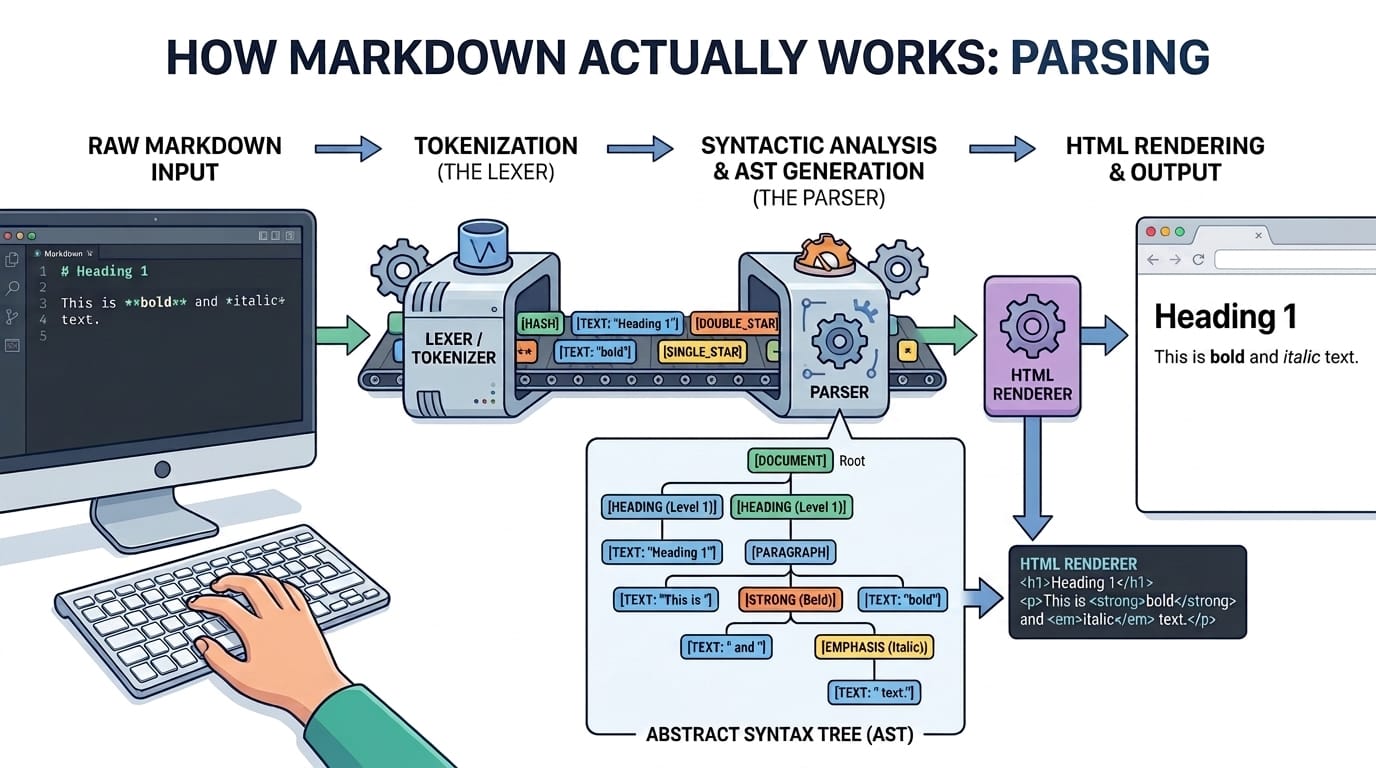
Markdown looks almost too simple to matter — a hash sign for a heading, two asterisks for bold. But that simplicity is precisely why it outlived Rich Text Format, DOCX lock-in and every proprietary editor. Here is what is actually happening when an asterisk becomes bold text on your screen.
Table of Contents
Last updated: July 2026
🔴 Why a plain-text format won
John Gruber created Markdown in 2004 with one explicit goal: writing formatted text should look like an email, not a binary file. A Word document is a compressed archive of XML that needs a specific application to open; a Markdown file is just characters, readable in any text editor, diffable in version control, and portable forever because there is no format to become obsolete. That single decision is why Markdown ended up running documentation sites, chat apps, note-taking tools, static site generators and version-control platforms alike — the same plain-text file works everywhere because it never depended on any one of them.
The syntax itself was designed to already look like what it produces. Asterisks around a word suggest emphasis even unrendered; a line starting with a hash reads as a heading before any software touches it; a greater-than sign reads as a quotation. Gruber’s stated aim was that a Markdown document should be publishable as-is, readable as plain text, which is why the syntax favours characters that were already informal conventions in plain-text email.
🟡 From characters to structure: how a parser reads Markdown
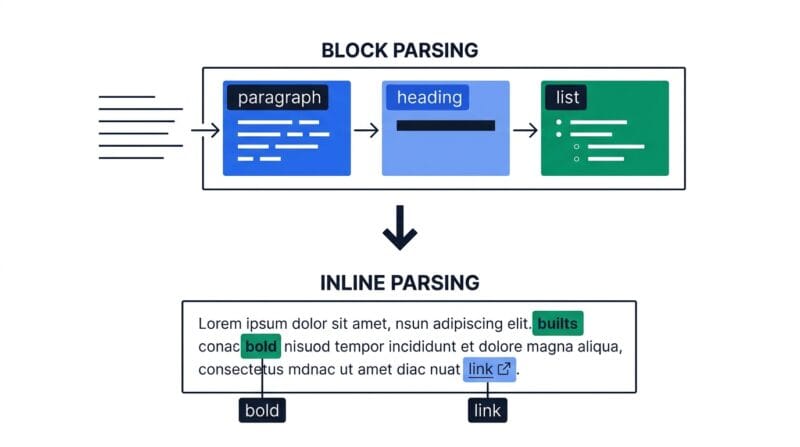
Turning Markdown into HTML happens in two passes. The first is block-level parsing: the source is split into lines, and the parser groups them into blocks — a run of consecutive non-blank lines is a paragraph, lines starting with hashes are headings, lines starting with a dash or number are a list, and anything inside triple backticks is a fenced code block that gets treated as literal text rather than parsed further. This pass is really about finding boundaries: where does this paragraph end and the next block begin.
The second pass is inline parsing, which runs inside each block that is not literal text. It hunts for the smaller patterns — double asterisks for bold, single asterisks for italic, backticks for code, square brackets followed by parentheses for a link — and replaces each match with the corresponding HTML tag. The order matters: a parser has to try the triple-asterisk pattern for bold-italic before the double-asterisk pattern for bold, or it will match the wrong thing halfway through. This two-pass structure, block first and then inline, is the same shape used by every Markdown implementation, from the original Perl script to the parser inside your browser.
🟢 Tables, task lists and why they need care
A Markdown table is really just a lightweight grammar layered on top of pipe characters. The parser looks for a line of pipe-separated cells immediately followed by a line of dashes and colons; that second line is not printed, it exists purely to declare column alignment, where a colon on the left means left-aligned, a colon on the right means right-aligned, and colons on both sides mean centred. Because the whole thing depends on that separator line, a single missing pipe or dash silently breaks the entire table, which is the most common Markdown authoring mistake and why a visual builder beats typing pipes by hand.
Task lists — a dash, a bracket pair, and a space — are not part of original Markdown at all. They belong to a set of additions called GitHub Flavored Markdown, alongside tables, strikethrough, and automatic linking of bare URLs. GFM exists because GitHub needed richer formatting for issues and pull requests than 2004-era Markdown offered, and the extensions proved useful enough that most modern parsers adopted them as a de facto standard, even outside GitHub itself. This is also why a checkbox in a task list renders as a genuinely disabled input — it is a visual record of state, not an interactive control, since the source of truth is the character inside the brackets, not a click in the browser.
🟡 What survives a round trip, and what does not
Converting Markdown to HTML is close to lossless, since HTML can represent everything Markdown expresses. The reverse direction is where care is needed. HTML can express things Markdown has no syntax for at all — inline styles, custom classes, embedded scripts, deeply nested layout structures — and a converter going from HTML back to Markdown has to either drop those or approximate them, because there is no pipe-and-dash equivalent for a three-column flexbox layout. This is precisely why an HTML-to-Markdown converter should be judged on the common cases — headings, links, lists, tables, emphasis, code — rather than on whether it can perfectly preserve a page built from custom CSS.
This asymmetry is a feature, not a limitation. Markdown was never meant to be a general-purpose layout language; it was meant to be the fastest way to write structured prose that renders correctly everywhere, and it deliberately leaves layout to whatever renders it. When you need a table built without hand-counting pipes, or a whole HTML page turned back into clean source you can actually edit, that is exactly the gap the Markdown Studio is built to close, converting in both directions and building tables visually instead of by hand.
🔴 Where Markdown fits next to other tools
Markdown earns its place for documentation, README files, technical notes, and any content that lives in version control alongside code, because a plain-text diff shows exactly which sentence changed in a way a binary document format never can. It is the wrong tool for pixel-precise layout, complex multi-column design, or anything that needs to look identical across every viewer — that is what full markup and CSS are for. Once your Markdown is written, the natural next step in a developer workflow is version control, where the Text Diff Checker shows exactly what changed between two drafts, and if the final destination is a styled web page rather than a repository, the Web Studio is where the converted HTML gets its layout and styling.
Who created Markdown and why?
John Gruber in 2004, so that formatted writing could look as readable in plain text as it does rendered — like a well-written email rather than a binary document format.
How does a parser turn Markdown into HTML?
In two passes. Block-level parsing groups lines into paragraphs, headings and lists first; inline parsing then finds patterns like bold and links inside each block and swaps them for HTML tags.
What is GitHub Flavored Markdown?
A set of extensions — tables, task lists, strikethrough, automatic URL linking — that GitHub added for issues and pull requests. Most modern parsers now support them as a de facto standard.
Why does my table break so easily?
The whole table depends on a separator line of dashes right after the header row. One missing pipe or dash there breaks the entire table, which is why a visual table builder is safer than typing it by hand.
Are task list checkboxes clickable?
No, they render as disabled inputs. The checked state is a visual record of the character in the source brackets, not an interactive control you can toggle in the preview.
Can any HTML convert cleanly to Markdown?
The common structural elements do — headings, lists, tables, links, emphasis, code. Inline styles, scripts and complex custom layouts cannot, because Markdown has no syntax to represent them.
Why do developers prefer Markdown for documentation?
Because it is plain text, a diff in version control shows exactly which sentence changed. A binary document format cannot be diffed meaningfully the same way.
Is Markdown a replacement for CSS and layout?
No. It was designed for structured prose, not pixel-precise design. For real layout control, convert to HTML and style it separately.