Screen Recorder Studio | Free offline Video Capture & Trimmer
Professional offline screen recorder by Prime Tool Hub. Capture your screen, microphone, system audio, and webcam locally. Includes a built-in video trimmer.
Table of Contents
Need to capture a bug, record a quick demo, or save a walkthrough? Record your screen straight from the browser and download the clip, with no installer and no account. Good for support tickets, tutorials, and showing a teammate exactly what you are seeing.
🎥 Screen Recorder Studio
🎙️ Media Sources
⚙️ Output Quality
✂️ Video Trimmer
Capture your full screen at 1080p, 4K UHD, or 720p — your choice. Tick the Webcam PiP Overlay checkbox and a circular webcam bubble appears. Move it to any of four corners: top-left, top-right, bottom-left, or bottom-right. Perfect for tutorial recordings where face context matters.
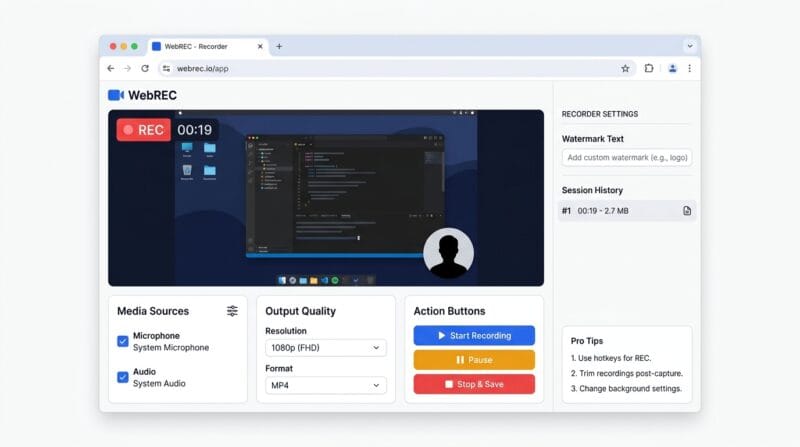
Type any text into the Watermark field — your domain, brand name, or channel handle — and it burns onto the preview overlay instantly. Every recording you make in the same browser session stacks in the Session History sidebar, each with its duration and file size, ready to re-download without re-recording.
After stopping, click “✂ Trim Video” to open the built-in trimmer. Set a Start Time and End Time in MM:SS format — the player auto-fills the end with the exact recording duration. Choose MP4 H.264 for universal playback (VLC, Windows Media Player) or WebM for fast web use. FFmpeg WASM handles the re-encode entirely inside your browser.
Under Media Sources, tick Record Microphone and/or Capture System Audio. Tick Webcam PiP Overlay to enable the circular face cam — then pick a corner position from the sidebar. Set your Resolution (1080p/4K/720p) and Format (WebM or MP4).
Click “▶ Start Recording.” A 3-second countdown runs. Your browser then shows a screen-picker dialog — select Entire Screen, a specific Window, or a Browser Tab. Confirm, and the red REC indicator appears with a live HH:MM:SS timer. Recording begins immediately.
Hit “⏸ Pause” mid-recording — the indicator turns amber and shows PAUSED. Click “▶ Resume” to continue. When done, click “⏹ Stop & Save.” The recording is packaged into a Blob in your browser RAM. Duration and file size appear instantly in the result area.
Click “⬇ Download Video” for the raw file. Or click “✂ Trim Video” to open the trimmer — set Start/End times, choose your export format, and hit “⚙ Process Trim.” Once FFmpeg finishes, the trimmed file loads in the preview player and “⬇ Download Trimmed” appears.
Last updated: June 2026
🔴 How Browser-Based Screen Recording Actually Works
Most people assume screen recording requires a desktop app. OBS, Camtasia, Bandicam — all installed software that hooks into the OS at the driver level. Browser-based recording works completely differently. It uses the MediaDevices.getDisplayMedia() API, a W3C standard that lets a web page request access to your screen stream directly through the browser sandbox. No installation. No driver. No admin rights. MDN’s getDisplayMedia documentation covers the full spec — it’s supported in Chrome 72+, Edge 79+, and Firefox 66+.
When you click Start Recording here, the browser opens a native OS picker dialog — the same system-level UI you see for file uploads, but for display surfaces. You choose an Entire Screen, a specific application Window, or a Browser Tab. The browser packages that visual stream into a MediaStream object, which then feeds into a MediaRecorder. Every second (1000ms interval), a data chunk is pushed into an array. When you click Stop, those chunks merge into a single Blob and a temporary blob:// URL is created for download. The video never touches a server. It lives in your browser’s RAM from start to finish.
Audio capture works in parallel. System audio comes from the displayMedia request itself — when you tick Capture System Audio, the browser asks the OS to include the audio track from whichever display surface you picked. Microphone audio comes from a separate getUserMedia() call with echoCancellation: true and noiseSuppression: true applied. Both audio tracks get merged into the same MediaStream alongside the video track before MediaRecorder starts. This is why you need headphones when recording both — without them, the mic picks up system audio output and you get an echo loop.
🟡 The FFmpeg WASM Trimmer — What’s Happening Inside Your Browser
The built-in trimmer is not a simple JavaScript slice operation. It runs FFmpeg — the same command-line video processing engine used in professional broadcast workflows — compiled to WebAssembly (WASM). On first use, the browser downloads a ~30MB FFmpeg core binary from a CDN. After that, the entire encode-decode-remux pipeline runs locally inside a WASM sandbox. No video data leaves your machine at any point during trimming.
Two export modes behave very differently. WebM stream copy (-c copy) is extremely fast — FFmpeg just cuts the container at keyframe boundaries without decoding a single frame. The downside is accuracy; cuts can only land on I-frames, so the trim point might be off by half a second. MP4 H.264 export uses full re-encoding with libx264 -preset ultrafast -pix_fmt yuv420p. This is slower, but the output plays in every media player without codec issues — VLC, Windows Media Player, QuickTime, phones. If your raw WebM won’t open in a standard player, use the MP4 export path. The yuv420p pixel format flag specifically solves the green-tint or black-screen playback bug that appears when chroma subsampling doesn’t match what the player expects.
🟢 Webcam PiP — Positioning and Stream Handling
The Picture-in-Picture webcam works through a second simultaneous getUserMedia() stream. When you tick Webcam PiP Overlay, the tool requests {video: true, audio: false} — audio is explicitly excluded from the webcam stream to avoid duplicating the mic input. The webcam video feeds into a circular <video> element positioned absolutely over the screen preview using CSS. You pick the corner from the sidebar: top-left, top-right, bottom-left, or bottom-right. The position changes class on the element (pth-pip-tl, pth-pip-tr, etc.) instantly via JavaScript — no re-initialisation needed.
One important note: the webcam overlay you see in the browser preview is a visual representation. The actual video file captured by MediaRecorder records only the screen stream — the webcam circle is not composited into the recording file itself. To burn the webcam into the final video, you’d need canvas-based compositing, which is a heavier operation. For most tutorial use cases — where the webcam is shown on-screen as part of the presenter’s actual screen layout — simply having the webcam open in a browser window while recording the full screen achieves the same result naturally. Our Video Merger & Trimmer tool can combine separate screen and webcam recordings if you need true compositing. You can also read more about audio and video sync techniques in our complete screen capture guide.
🟢 Resolution, Format, and What Actually Affects File Size
The Resolution setting sends a width: {ideal: W}, height: {ideal: H} constraint to getDisplayMedia(). It’s a hint, not a guarantee. If your monitor’s native resolution is 1920×1080, requesting 4K UHD still caps at the display’s actual output. The browser honours the constraint only up to the physical display limit. Frame rate defaults to 30fps via frameRate: {ideal: 30}.
Format choice directly controls the MediaRecorder MIME type. WebM VP9 produces the smallest files for a given quality — typically 3–8 MB per minute for a 1080p screen recording of mostly static content like code or documents. Fast motion (games, animations) will be larger. MP4 H.264 from the trimmer is re-encoded, so file size depends on the encoding parameters. With -preset ultrafast, files are slightly larger than a careful VP9 encode but process in seconds rather than minutes. Key points:
- 🔵 WebM VP9 — best for sharing on the web, Google Drive, or re-uploading to YouTube. Smallest file, Chrome/Firefox native support.
- 🟠 MP4 H.264 (from trimmer) — best for sending to clients, playing on Windows/Mac without extra codecs, or importing into video editors like DaVinci Resolve or Premiere.
- 🟣 Session History — every recording stays accessible as a Blob URL until you close or refresh the tab. The sidebar shows take number, duration, and size so you can compare multiple takes and download the best one.
🟡 Privacy and Security — What the Tool Can and Cannot Access
Browser screen capture is sandboxed at multiple levels. The getDisplayMedia() API requires explicit user gesture — a button click — before the OS picker opens. The browser cannot call it silently or on page load. The OS picker is drawn by the operating system itself, not by any web page code, which means a malicious page cannot spoof or intercept it. You choose exactly what to share.
This tool has zero network requests for your video data. The JavaScript source is hosted on this page. FFmpeg WASM loads from a CDN once and cached. After that, trim operations run offline. You can test this yourself: open DevTools → Network tab → start a recording → stop and trim. You’ll see zero POST requests, zero file uploads, zero WebSocket connections carrying your video. The Blob URL created after recording is a local browser memory reference — it’s revoked and freed when you navigate away or click New Recording.
One real security consideration: system audio capture in Chrome on Windows captures the audio of every application, not just the one you’re recording. If you have a notification sound, a private call, or sensitive audio in another app during recording, it will be included. Plan your recording environment accordingly. Muting all non-essential applications or using a dedicated browser profile for recording sessions is good practice.
Does the webcam PiP actually get recorded into the video file?
The webcam overlay shown in the browser preview is a live CSS element — it’s not composited into the MediaRecorder output file. To include your face cam in the recording, open your webcam in a separate browser window and position it on-screen before capturing your full screen. That way it appears naturally inside the recorded area.
Why does the trimmer take a long time on the first use?
The first trim operation downloads the FFmpeg WebAssembly core (~30MB) from a CDN. This is a one-time download per browser session — subsequent trims in the same session start immediately. If you’re on a slow connection, the log panel shows “Loading FFmpeg core…” while it downloads. The trim itself is very fast once the engine is loaded.
My recorded WebM file won’t play in VLC or Windows Media Player. How do I fix it?
Open the built-in trimmer, set Start Time to 00:00 and End Time to the full duration (auto-filled), and select “MP4 H.264 — Best Compatibility” as the export format. Click Process Trim. The FFmpeg engine re-encodes the file to H.264/YUV420P, which plays in every media player without needing extra codecs.
Can I record just a single browser tab instead of the entire screen?
Yes. When the browser’s screen-picker dialog opens after clicking Start Recording, switch to the “Tab” option at the top of the dialog. Select the specific tab you want to capture. Note that tab capture does not include system audio — only the audio from that tab is available. Microphone audio still works normally.
Is there a recording time limit?
No hard time limit is enforced by the tool. The practical limit is your device’s available RAM — video chunks accumulate in browser memory during recording. A typical 1080p screen recording uses roughly 3–8 MB per minute. On most modern devices with 8GB+ RAM, you can record comfortably for 30–60 minutes before memory becomes a concern.
Does the tool work on Safari or iOS?
Safari on macOS supports getDisplayMedia from Safari 13+ but with limited audio capture. Safari on iOS does not support screen capture at all — Apple restricts getDisplayMedia on iOS. Use Chrome 72+, Edge 79+, or Firefox 66+ on desktop for full functionality including system audio and webcam PiP.
What happens to my recordings if I close the browser tab?
All recordings exist as Blob URLs in browser memory only. Closing or refreshing the tab permanently destroys them — there is no server backup or local file auto-save. Always download your recordings before navigating away. The Session History sidebar shows all takes from the current session so you don’t miss one.
Can I record my screen with background music without echo?
Tick Capture System Audio to include computer audio (music, app sounds). If you also tick Record Microphone, wear headphones — the microphone has echo cancellation enabled, but it can’t fully cancel loud system audio played through speakers. With headphones, microphone and system audio are captured cleanly on separate tracks merged into one stream.
How is this different from the Windows built-in Game Bar recorder (Win+G)?
Windows Game Bar only records the active application window — it can’t capture the full desktop or multiple windows at once. This screen recorder captures any display surface: full screen, specific app window, or browser tab. It also adds webcam PiP, a built-in video trimmer with MP4 export, custom watermark, and session history — all inside the browser without any OS-level installation.