
SVG File | Technical Guide
SVG File Format (Scalable Vector Graphics) is XML-based, resolution-independent, and renders natively in every modern browser. This guide covers how SVGs work internally, how browsers parse and render them, when to rasterize, and how to optimize them for real production use.

Table of Contents
Last updated: June 2025
🔴 What SVG Actually Is — XML, DOM Nodes, and the Rendering Pipeline
Open any SVG file in a text editor and you’ll see XML. That’s not a coincidence — SVG is formally defined as an XML application by the W3C, and the SVG 2 specification is a living standard maintained there. Every element in an SVG — <circle>, <path>, <rect>, <text> — becomes a DOM node when the browser parses the file. That means SVG elements respond to CSS, JavaScript, and DOM events exactly like HTML elements do.
This is the core difference from raster formats. A PNG is a rectangular grid of pixels — static, fixed-resolution, opaque to the DOM. An SVG is a live document. You can select a <circle> with document.querySelector('circle'), change its fill attribute with JavaScript, animate its r (radius) via CSS transitions, or add a click event listener to it. This programmability makes SVG the only image format that is also a UI component.
🟢 The SVG Coordinate System and viewBox
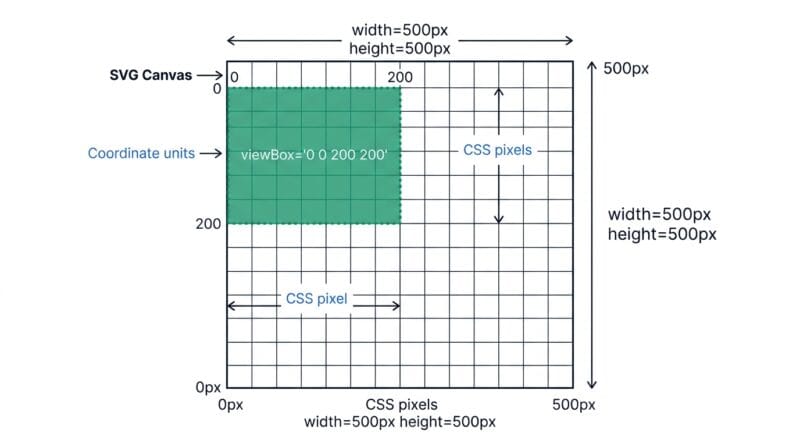
Every SVG has a coordinate system. By default, (0,0) is the top-left corner and coordinates increase right and down. The viewBox attribute defines which portion of that coordinate space is visible. viewBox="0 0 200 200" means: show the rectangle from (0,0) to (200,200) in the SVG’s internal coordinate space.
The width and height attributes (or CSS properties) control how large the SVG renders on screen. These are independent of viewBox. If your SVG has viewBox="0 0 100 100" and you render it at 500×500 CSS pixels, the browser scales the 100-unit coordinate space uniformly to fill 500 pixels. That’s where the infinite scalability comes from — the math always fits the canvas.
- 🔵
viewBoxdefines the coordinate space window — what portion of the drawing is visible - 🟠
widthandheightdefine the rendered output size in CSS pixels - 🟣
preserveAspectRatiocontrols how the viewBox scales when aspect ratios don’t match — default isxMidYMid meet(centered, letterboxed)
🟡 SVG Path Commands — The d Attribute Decoded
The <path> element is the workhorse of SVG. Its d attribute contains a series of drawing commands in a compact mini-language. Understanding it makes SVG optimization and manual editing make sense.
Commands are single letters. Uppercase = absolute coordinates. Lowercase = relative coordinates (relative to the current pen position). The most common ones:
- 🔵
M x y— Move to. Lifts the pen and places it at (x, y). Doesn’t draw anything. - 🟠
L x y— Line to. Draws a straight line from current position to (x, y). - 🟣
C cx1 cy1 cx2 cy2 x y— Cubic Bézier curve. Two control points and an endpoint. This is how smooth curves are stored. - 🔵
A rx ry x-rotation large-arc sweep x y— Arc. Draws an elliptical arc segment. - 🟠
Z— Close path. Draws a straight line back to the starting M point.
A path like d="M 10 10 L 90 10 L 90 90 L 10 90 Z" draws a square. Figma and Illustrator generate these strings automatically, which is why exported SVGs often have long, opaque d values — they’re describing complex curves with many Bézier segments. The key insight: shortening path data (by reducing decimal precision or merging short segments) is the highest-impact SVG optimization technique, but it requires dedicated tools beyond what a text editor can safely do.
🟢 Reusable Elements — defs, use, and symbol
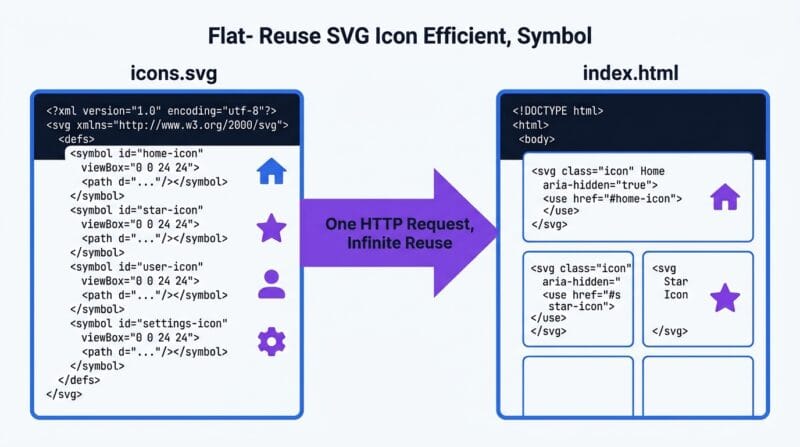
SVG has a built-in mechanism for element reuse. Anything defined inside a <defs> block is not rendered directly — it’s a library of reusable shapes, gradients, filters, and clip paths. Reference them later with <use href="#id"/>.
A <symbol> is like a <defs> container with its own viewBox. This is how SVG sprite sheets work — one file holds dozens of icons, each as a <symbol>, and each use of an icon is a <use href="#icon-name"/> that costs only a few bytes. This is why SVG sprites are still favored for icon systems over individual PNG files — one HTTP request, infinite scalability, CSS control over color.
🔴 When to Rasterize — SVG vs PNG vs WebP Decision Guide
Vector vs raster isn’t a quality question. It’s a use-case question. Neither format is universally better. The right answer depends on where the image goes and what it needs to do.
Keep it SVG when: the image is used in CSS backgrounds, React or Vue components, HTML <img> tags where scalability matters (logos, icons), inline SVG in HTML where you need CSS hover states or JavaScript interactivity, or SVG animation via CSS or SMIL.
Rasterize to PNG when: the target is a favicon (browsers require PNG or ICO for <link rel="icon">), an Apple Touch Icon, a thumbnail for a CMS that doesn’t support SVG uploads, or an email template (most email clients don’t render SVG).
Rasterize to WebP when: the output is an OG image (social sharing preview), a blog post featured image, a product thumbnail, or any web image where file size and load speed matter. WebP gives you 25–35% smaller files than PNG at equivalent quality, directly improving Largest Contentful Paint (LCP) scores.
- 🔵 SVG — logos, icons, illustrations, interactive graphics, animations
- 🟠 PNG — favicons, app icons, email images, CMS uploads, screenshots
- 🟣 WebP — web images, OG images, thumbnails, featured images, performance-critical assets
- 🔵 JPG — photos that will never need transparency; legacy compatibility
🟢 SVG Performance on the Web — What Actually Impacts Page Speed
Inline SVG (pasted directly into HTML) is parsed as part of the DOM. That means it blocks the render if it’s large and complex. A single inline icon with 8 paths costs almost nothing. An inline illustration with 3,000 path elements in the <body> is a real parse cost that shows up in browser profiler traces.
External SVG via <img src="logo.svg"> avoids DOM parsing overhead — the browser renders it in a separate context. But it can’t be styled via CSS or manipulated with JavaScript. SVG in CSS background-image works the same way. For hero graphics, decorative SVGs, and any image that doesn’t need interactivity, external SVG is the right call — smaller DOM, simpler DevTools traces, better CLS scores when explicit dimensions are set.
File size matters for external SVG. A 200KB SVG logo is a 200KB HTTP request. Strip the Inkscape metadata, remove comments, and collapse whitespace using our SVG Studio Pro optimizer and that same file often drops to 80–120KB. Then gzip it on the server (text compresses very well) and the transfer size shrinks again to 15–40KB. SVG also responds perfectly to long-cache headers — a logo that never changes can be cached for a year.
🟡 SVG Security — Why You Can’t Trust User-Uploaded SVGs
This section matters if you’re building any platform that accepts user uploads. SVG is XML with scripting support. An SVG file can contain a <script> tag. If that SVG gets served inline or from the same origin as your app, the script runs in your users’ browsers — this is a stored XSS vulnerability.
The patterns that make SVG dangerous in user upload contexts:
- 🔵
<script>alert(document.cookie)</script>— direct script injection, runs if served inline - 🟠
<image href="javascript:alert(1)"/>— javascript: URI in href attributes - 🟣
<foreignObject><html><body onload="...">— embedding HTML with event handlers - 🔵 External entity references via DOCTYPE — XXE attacks targeting server-side SVG processors
Safe handling: sanitize uploaded SVGs with a whitelist-based library (DOMPurify works on SVG), serve them from a separate domain or subdomain to isolate origin, set Content-Security-Policy: default-src 'none' on the SVG-serving domain, and never serve user SVGs inline in your main application HTML. If you just need the visual, rasterize the SVG to PNG server-side on upload — then there’s nothing to execute.
For purely offline personal use — converting your own logo, generating favicon packs — security isn’t a concern. All the processing in SVG Studio Pro happens in your browser and nothing persists anywhere.
Is SVG always better than PNG for icons?
For scalable, interactive, or CSS-styled icons — yes. But for email clients, Apple Touch Icons, favicons, and platforms that don’t support SVG uploads, you still need PNG. SVG is the source; PNG is often the delivery format for specific targets.
Why does my SVG look different in different browsers?
Browsers implement parts of the SVG spec differently, especially for filters, text rendering, and font handling. Chrome and Safari handle SVG filter effects slightly differently. The safest approach for complex visual effects is to rasterize to PNG, which renders identically everywhere.
What’s the difference between SVG width/height and viewBox?
The viewBox defines the SVG’s internal coordinate space — which portion of the drawing is visible. The width and height attributes control how large it renders on screen in CSS pixels. They’re independent. You can have a viewBox of “0 0 100 100” and render it at 1000×1000 pixels with no quality loss.
Can SVG files contain malware?
SVG can contain JavaScript via script tags, event handler attributes, and javascript: URIs. If you serve a malicious SVG inline or from your main origin, it creates an XSS vulnerability. For user uploads, always sanitize SVGs with a whitelist library like DOMPurify, or rasterize on the server and serve only the PNG output.
How do I make an SVG responsive?
Remove the fixed width and height attributes from the SVG element and keep only viewBox. Then set width: 100%; height: auto; in CSS. The browser will scale the SVG proportionally to fill its container while respecting the viewBox aspect ratio. This works for both inline SVG and external SVG in img tags.
Why are Figma SVG exports so large?
Figma includes metadata, layer names as IDs, comments, and sometimes redundant path data in exported SVGs. Running Strip Metadata, Remove Comments, and Strip IDs typically reduces Figma exports by 30–50%. Turning off “Include id attribute” in Figma’s export dialog helps too.
What is an SVG sprite sheet?
An SVG sprite sheet is a single SVG file containing multiple icons, each defined as a symbol element with a unique ID. You reference individual icons with use href=”#icon-id”. This reduces HTTP requests — one file serves all icons — and lets you control icon colors with CSS currentColor.
Does SVG support animation?
Yes, in three ways. CSS animations and transitions work on SVG elements exactly like HTML. JavaScript via the Web Animations API gives full programmatic control. SMIL (Synchronized Multimedia Integration Language) is SVG’s built-in animation format — though CSS and JS are preferred for modern projects due to broader tooling support.
What resolution should I rasterize an SVG to for print?
Print requires 300 DPI minimum. Multiply the physical print dimensions in inches by 300 to get pixel dimensions. For a 4×4 inch print: 1200×1200 pixels at minimum. SVG’s resolution independence makes this easy — rasterize to whatever size you need and quality stays perfect since you’re scaling vector math, not stretching pixels.