
Trying to work out whether a schedule means every night or every single minute? Build a cron expression from plain-language presets, or set the five fields visually and read back exactly when the job will fire. It takes the guesswork out of counting asterisks before you paste the line into your crontab.
Cron Studio Pro
Generate, parse, and test Cron job expressions offline. Instantly translate complex crontab schedules into human-readable text and view upcoming execution dates. now use Cron Job Generator & Parser.

Table of Contents
⏰ Cron Studio Pro
| Field | Position | Range | Examples |
|---|---|---|---|
| Minute | 1st | 0–59 | 0 */15 0,30 |
| Hour | 2nd | 0–23 | 9 */4 9,17 |
| Day (Month) | 3rd | 1–31 | 1 15 1,15 |
| Month | 4th | 1–12 | * 1,7 JAN |
| Day (Week) | 5th | 0–6 | 1-5 0,6 MON |
| Char | Meaning | Example |
|---|---|---|
| * | Any value (wildcard) | * * * * * = every minute |
| , | List separator | 1,15 = 1st and 15th |
| - | Range | 1-5 = Monday to Friday |
| / | Step / interval | */10 = every 10 units |
| ? | No specific value (some systems) | 0 0 ? * MON |
Next Runs, Presets Library, Visual Builder and Reference tabs work together in one tool. Type an expression, see it explained in plain English, calculate the next 10 executions in your timezone, and copy to clipboard — without leaving the page.
Build cron expressions by clicking — not typing. Five build modes: Interval (every N minutes or hours), Daily (pick exact time), Weekly (checkbox grid for days), Monthly (calendar grid for dates), and Advanced (field-by-field inputs). Generated expression updates live.
Searchable library of 30 categorized presets — Backups, Web Maintenance, Reports, System tasks and Common patterns. Next executions display in 15 timezones including UTC, US, Europe, Asia and Sri Lanka, with relative time badges showing “in 2 hrs” or “in 3 days”.
Type a cron expression directly into the main input box, or click 💡 Load Sample to start with a working example. The 5 segment boxes update instantly to show each field.
The green bar below the input shows the plain-English meaning — “Weekdays (Mon–Fri) at 9:00 AM” or “Every 15 minutes”. If the expression is invalid, you see exactly what’s wrong.
Switch to the 📅 Next Runs tab. Select your timezone and how many runs to show. See the upcoming 5, 10 or 20 execution times with relative time labels like “in 4 hours”.
Click 📋 Copy to put the verified expression on your clipboard. Paste it into your server crontab, GitHub Actions schedule, AWS EventBridge rule or any cron-compatible system.
Last updated: July 2025
🔴 What a Cron Expression Actually Does — and Why Getting It Wrong Is Costly
A cron expression is a schedule. Five fields, separated by spaces, that tell a Unix-based scheduler exactly when to fire a task. Get the expression right and your backup runs silently every Sunday at 3 AM for years. Get it wrong and either it never runs, runs every minute flooding your database, or fires at 3 PM instead of 3 AM — and you don’t find out until something breaks.
The classic problem with cron syntax is that it looks deceptively simple. Five characters like 0 3 * * 0 pack a precise meaning — “at 3:00 AM every Sunday” — but the minute you introduce a step value or a range, or you’re working across timezones, or you’re writing for AWS EventBridge instead of Linux crontab, the rules shift. A cron expression generator that shows you the next actual run times removes the guesswork entirely.
🟡 The Five Fields — What Each Position Controls
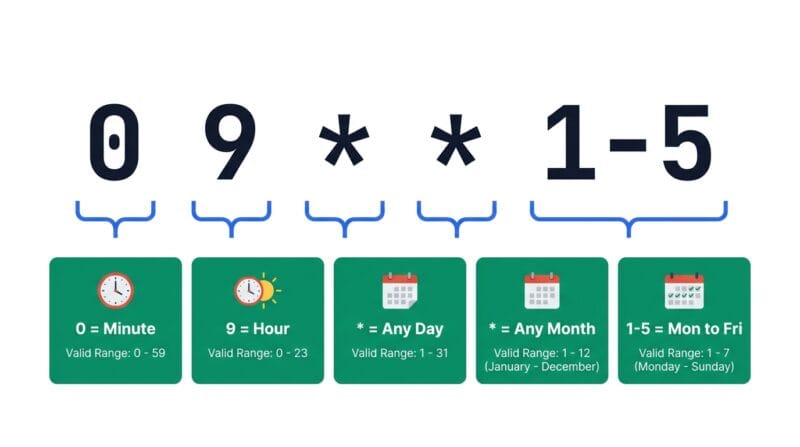
Reading left to right: Minute (0–59), Hour (0–23), Day of Month (1–31), Month (1–12), Day of Week (0–6, where 0 is Sunday). The most common mistake is confusing field order — especially Day of Month and Month, which swap positions compared to how humans naturally say dates.
Each field accepts four types of values:
- 🔵 Wildcard
*— match any value.* * * * *runs every minute of every hour of every day. - 🟠 Step
*/5— every 5 units.*/15 * * * *runs at minutes 0, 15, 30, 45 of every hour. - 🟣 Range
1-5— every value from 1 to 5 inclusive.0 9 * * 1-5means 9 AM, Monday through Friday. - 🔵 List
1,15— specific values.0 0 1,15 * *runs at midnight on the 1st and 15th of each month.
You can also combine them: 0,30 9-17 * * 1-5 fires at the top and bottom of every hour, between 9 AM and 5 PM, on weekdays. The Expression Analyser sidebar in Cron Studio Pro labels each field type — Any, Every, List, Range — so you can see at a glance what each position is doing.
🟢 Day of Month vs Day of Week — The OR Logic Trap
When both the Day of Month field and Day of Week field are set to something other than *, most cron implementations apply OR logic — the job runs if either condition is met. 0 0 1 * 1 does not mean “the first Monday of the month” — it means “midnight on the 1st of every month OR every Monday”, whichever comes first. This surprises a lot of developers.
To get “first Monday of the month” you need a script-level check inside the cron job itself — compare the date and day together in your shell script or application code, then exit early if the condition isn’t met. AWS EventBridge is the one major platform that enforces AND logic when both fields are set.
🔴 30 Real-World Cron Patterns and When to Use Each
Cron Studio Pro’s preset library organizes 30 patterns into five categories. Here’s the logic behind each group and when to reach for them.
🟢 Backup Schedules — Stagger to Avoid Peak Load
Backups should never run at midnight exactly. Every shared server, cloud VM and managed database cluster has a traffic spike at 0 0 * * * because every developer uses midnight as the default. Use 0 2 * * * (2 AM) or 0 3 * * 0 (3 AM Sunday) instead. Stagger different backup types: files at 2 AM, database at 2:30 AM (30 2 * * *), and off-site sync at 3 AM. Quarterly backups hit the first day of each quarter: 0 0 1 1,4,7,10 *.
🟢 Web Maintenance — Cache, Sitemaps and SSL
Cache-clearing jobs cause a brief performance dip as pages rebuild. Run them during the lowest-traffic window for your audience — typically 4–6 AM local time. 0 */6 * * * clears cache every 6 hours without hammering the server. Sitemap rebuilds only need to run when content changes, so weekly (0 0 * * 0) or daily (0 1 * * *) is enough for most sites. SSL certificate checks should run daily well before the renewal window — 0 8 * * * gives you a morning email if something expired overnight.
WordPress sites using WP-Cron need special treatment. WP-Cron fires on page load, not on a real schedule. For reliable execution, disable it in wp-config.php with define('DISABLE_WP_CRON', true); and add a real server cron: */5 * * * * php /var/www/html/wp-cron.php. This fires WordPress scheduled events every 5 minutes regardless of traffic.
🟢 Reporting Jobs — Timing Around Business Hours
Daily report emails land best at the start of the business day, not at midnight. 0 8 * * * or 0 9 * * * puts the summary in inboxes before the first coffee. Weekly reports work best on Monday morning (0 9 * * 1) so teams see last week’s numbers at the start of the new week. End-of-day summaries at 0 17 * * 1-5 hit inboxes as people wrap up. Monthly reports on the 1st (0 7 1 * *) give a few hours before the standup.
Always factor in timezone. A cron running on a UTC server at 0 9 * * * fires at 9 AM UTC — which is 2:30 PM IST (India/Sri Lanka) or 4 AM US Eastern. Use the timezone selector in Cron Studio Pro’s Next Runs tab to verify the actual local time before deploying. Check our Developer Tools collection for related server and scheduling utilities.
🟡 Platform Differences — Why the Same Expression Fails on AWS but Works on Linux
The 5-field cron format is not universal. Different platforms extend or modify it in incompatible ways.
Linux crontab is the reference implementation. Five fields, runs as the user’s own cron table edited via crontab -e. The system crontab at /etc/cron.d/ adds a username field before the command, making it 7 parts total (6 schedule fields + user + command). Special strings like @reboot and @daily work here.
AWS EventBridge uses a 6-field format where the 6th field is year: min hr day month dow year. It also requires that exactly one of Day of Month or Day of Week is set to ? — you cannot use * for both. Always runs in UTC. A standard 5-field expression copied from Linux will fail here without modification.
GitHub Actions accepts the standard 5-field format in the on: schedule: - cron: YAML block. Minimum interval is 5 minutes — shorter intervals simply won’t trigger. All times are UTC. Heavy load periods like midnight UTC on popular open-source repos sometimes delay jobs by 15–30 minutes.
Cloudflare Workers supports standard 5-field cron via wrangler.toml triggers. UTC only. Kubernetes CronJobs also use standard 5-field, but run in the cluster’s configured timezone, which defaults to UTC unless explicitly set.
What does * * * * * mean in a cron expression?
It means “every minute”. Each asterisk is a wildcard matching every possible value for that field — every minute, every hour, every day of the month, every month, and every day of the week. It’s the most permissive cron expression possible and fires 1,440 times per day.
How do I run a cron job every 5 minutes?
Use */5 * * * *. The */5 in the minute field means “every 5 minutes starting from 0”, so it fires at :00, :05, :10, :15 and so on. Change 5 to any divisor of 60 for consistent intervals: 2, 3, 4, 5, 6, 10, 12, 15, 20, 30.
Does the cron expression generator work offline?
Yes. Cron Studio Pro runs 100% in your browser. The next run calculator, human-readable translator, visual builder, preset library and all other features use JavaScript with no server calls. It works without an internet connection once the page has loaded.
How do I write a cron expression for the first Monday of each month?
Standard cron can’t express “first Monday” directly — using both day-of-month and day-of-week applies OR logic, not AND. The reliable approach is to set a Monday cron (0 9 * * 1) and add a script check: only proceed if the date is between 1 and 7. AWS EventBridge supports this natively via its ? syntax.
What timezone does cron use?
Linux crontab uses the system timezone of the server — which is often UTC on cloud VMs. If your server is UTC and you want a job at 9 AM IST (Sri Lanka), you need to set the minute and hour fields for 3:30 AM UTC, which is 30 3 * * *. Use the timezone selector in the Next Runs tab to verify before deploying.
What’s the difference between cron on Linux and AWS EventBridge?
AWS EventBridge uses a 6-field format (adds a year field) and requires ? in either the day-of-month or day-of-week position — you cannot use * for both. Linux crontab uses 5 fields, allows both to be *, and supports @special strings. A standard Linux expression needs manual adjustment for EventBridge.
Why does my cron job seem to run at the wrong time?
Almost always a timezone mismatch. Cloud servers and containers typically run in UTC. If you write 0 9 * * * expecting 9 AM local time but the server is UTC and you’re UTC+5:30 (IST), the job fires at 2:30 PM your time. Always verify next run times in your actual timezone using a cron calculator before deploying to production.
Can I use names like MON or JAN instead of numbers?
Yes. Most cron implementations accept three-letter abbreviations for days (SUN, MON, TUE, WED, THU, FRI, SAT) and months (JAN, FEB, MAR, APR, MAY, JUN, JUL, AUG, SEP, OCT, NOV, DEC). You can use ranges and lists with names too: 0 9 * JAN,JUL MON-FRI is valid on Linux crontab.
What is the minimum cron interval on GitHub Actions?
GitHub Actions enforces a minimum schedule interval of 5 minutes — the shortest valid expression is */5 * * * *. Additionally, scheduled workflows on popular repositories may be delayed by 15–30 minutes during high-load periods. GitHub Actions always runs in UTC regardless of repository settings.