Verifying a download or generating a checksum for a config value? Enter your text and read back its SHA-256, SHA-512, or MD5 hash straight away. The hashing happens locally, so you can fingerprint sensitive strings without them ever reaching a server.
Free Secure Hash Generator & File Checksum (SHA-256, MD5)
Instantly generate MD5, SHA-1, SHA-256, and SHA-512 hashes from text or verify file checksums completely offline securely in your browser.
Table of Contents
🔐 PTH Secure Hash Studio
SHA-256/512/384/1 · MD5 · CRC32 · HMAC · File Checksum · Encoder — 100% Offline
Drag & drop any file — or click to browse
All processing is local — file never leaves your browser
Need standalone encoder tools?
Full Base64 Studio → free-base64-encoder-decoder-utf-8-supported · URL Encoder → universal-url-encoder-decoder
🔍 Verifier — Auto-Detect + Diff Position
Paste any known hash and the original text. Click 🔍 Auto-detect Algo to identify the algorithm by hash length automatically — 32 chars = MD5, 64 = SHA-256, 128 = SHA-512. The tool re-computes the hash and reports ✅ MATCH or ❌ MISMATCH. On a mismatch, it shows the exact character position where the two hashes first differ — useful when debugging copy-paste truncation or encoding mismatches.
🔐 HMAC — Web Crypto API, 4 Algorithms
Enter a message and a secret key. Choose HMAC-SHA256, HMAC-SHA512, HMAC-SHA384, or HMAC-SHA1. The output appears in both HEX and BASE64 format. Everything runs through the browser’s native crypto.subtle.sign() — the same cryptographic engine used by HTTPS and JWT libraries. Three pre-loaded samples cover the most common real-world HMAC use cases: API request signing, webhook payload verification, and JWT-style session tokens.
📋 Batch CSV — Hash Many Items at Once
Paste a list of words, passwords, emails, or URLs — one per line. Select any algorithm and click ⚡ Hash All. Results appear in a scrollable table with input and hash side by side. Click ⬇ Download CSV to export the full table as a comma-separated file with columns for input and hash. Four sample sets load instantly: fruits, common passwords, URLs, and numbers 1–10.
🔄 Encoder — 7 Modes Including ROT13 and Morse
Seven encoding modes in one panel: Base64 (RFC 4648), URL Encode (percent-encoding), Hex (byte-by-byte), Binary (8-bit per character), HTML Entities (& escaping), ROT13 (Caesar cipher), and Morse Code (dot-dash). Every mode supports both encode and decode, plus a Swap button to reverse the direction. Clicking the SOS sample automatically switches to Morse Code mode. For standalone full-featured Base64 work, see the PTH Base64 Encoder/Decoder.
How to Use PTH Secure Hash Studio
Four steps from opening the tool to a verified hash or HMAC output.
The ✏️ Text Hasher tab opens by default, ready to hash immediately. For file integrity checking, click 📁 File Checksum. For API or webhook authentication, click 🔐 HMAC. For verifying a known hash from a software download page, click 🔍 Verifier.
Every tab has purple Try: sample buttons above the input area. Click any sample to auto-fill the inputs with a realistic example. For the Verifier tab, clicking a sample pre-fills both the original text and the known SHA-256 hash — just click Verify Hash to see it in action before using your own data.
In the Text Hasher, use the HEX / HEX UPPER / BASE64 toggle buttons below the entropy meter to switch output format before copying. Click 📋 next to any individual algorithm to copy just that hash, or click 📋 Copy All to copy all six hashes at once in a labelled multi-line format.
In the Batch CSV tab, after hashing a list, click ⬇ Download CSV to save the input-hash table as a .csv file. For the Encoder tab, click 📋 Copy Output to copy the encoded result. All outputs stay local — nothing is sent to PrimeToolHub’s server at any point.
Last updated: July 2026
🔴 What This Tool Actually Does That Others Don’t
Most online hash generators give you a text field and one algorithm. PTH Secure Hash Studio combines six use cases — text hashing, file integrity checking, hash verification, HMAC generation, batch processing, and text encoding — in a single browser page. None of your input reaches a server. The SHA-2 family of algorithms runs through the browser’s built-in crypto.subtle.digest() Web Crypto API. MD5 and CRC32 run through pure-JavaScript implementations that are loaded once with the page. This means the tool works offline after the initial page load, with no internet dependency for the hashing operations themselves.
Real Input → Real Output Examples
Here are exact outputs for the sample strings the tool uses, so you can confirm the results match when testing:
SHA-256(‘hello’) = 2cf24dba5fb0a30e26e83b2ac5b9e29e1b161e5c1fa7425e73043362938b9824
SHA-256(‘Hello, World!’) = dffd6021bb2bd5b0af676290809ec3a53191dd81c7f70a4b28688a362182986f
SHA-256(‘password123’) = ef92b778bafe771e89245b89ecbc08a44a4e166c06659911881f383d4473e94f
MD5(‘hello’) = 5d41402abc4b2a76b9719d911017c592
MD5(‘password123’) = 482c811da5d5b4bc6d497ffa98491e38
Notice that SHA-256(‘password123’) is 64 hexadecimal characters long (256 bits), while MD5(‘password123’) is 32 characters (128 bits). Also notice that SHA-256(‘hello’) and SHA-256(‘Hello, World!’) share no visible pattern even though the inputs are similar — this avalanche effect is a core property of cryptographic hash functions and one of the reasons they are trusted for integrity verification.
🟡 The HMAC Tab — When a Hash Alone Is Not Enough
A plain SHA-256 hash tells you that data has not changed. But it does not tell you who created it. Anyone who knows the data can compute the same hash. HMAC solves this by mixing a secret key into the hash computation using the formula defined in RFC 2104. Only someone who knows both the data and the secret key can produce the correct HMAC value.
The most practical use of HMAC in web development is webhook verification. When GitHub, Stripe, or Shopify sends a webhook to your server, they include an HMAC-SHA256 signature of the request body in a header. Your server re-computes the HMAC using your shared secret and compares it to the header value. If they match, the webhook came from the genuine service — not from someone spoofing a request to your endpoint. The Webhook sample in the HMAC tab uses exactly this pattern: a payload string containing amount, currency, and timestamp fields, signed with a shared secret.
🟢 File Checksum — Why This Matters More Than You Think
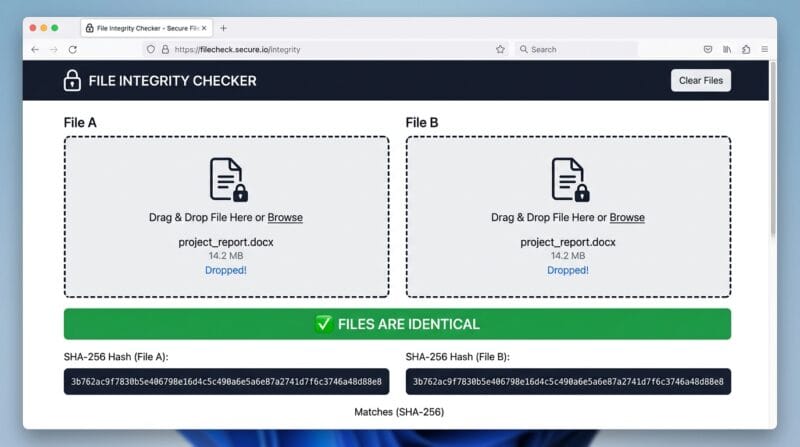
When you download a Linux ISO, a WordPress theme zip, or a Python installer from the internet, the download page usually lists a SHA-256 checksum. The purpose is to give you a way to confirm that the file you received is byte-for-byte identical to the file the server published. If a malicious actor intercepts the download and replaces the installer with one that contains malware, the SHA-256 hash will be completely different — the avalanche effect means even one byte change produces an entirely different 64-character output.
Drop your downloaded file into the File Checksum tab, select SHA-256, and compare the output against the hash on the official download page. The Compare Two Files mode is useful when you have two copies of a file — such as a backup and an original — and need to confirm they are identical without opening or reading their content.
🔴 The Encoder Tab — ROT13 and Morse Are Not Cryptography
It is worth being explicit about what the Encoder tab is and is not. Base64, URL encoding, Hex, Binary, and HTML Entities are encoding schemes — reversible transformations that change how data is represented without adding any secrecy. ROT13 and Morse Code are also purely encoding: anyone who knows the encoding can decode the output instantly. None of these provide security or privacy. They are included because they are genuinely useful for development work — Base64 for embedding binary data in JSON, URL encoding for query strings, HTML entities for preventing XSS, ROT13 for obfuscating spoiler text, Morse for signal testing. If you need actual encryption, that is a different tool for a different purpose.
For dedicated Base64 work with UTF-8 support, image encoding, and batch file encoding, see the PTH Base64 Encoder/Decoder Studio. For percent-encoding and URL decoding with query parameter parsing, see the PTH URL Encoder/Decoder.
❓ Frequently Asked Questions
Is my text or file sent to a server when I hash it?
No. All hashing runs inside your browser. SHA-256, SHA-512, SHA-384, and SHA-1 use the Web Crypto API’s crypto.subtle.digest(), which is a browser-native function. MD5 and CRC32 run through pure-JavaScript implementations loaded with the page. No data leaves your device at any point — not even to PrimeToolHub’s server.
What is the difference between SHA-256 and MD5?
SHA-256 produces a 256-bit (64-character hex) output and is cryptographically secure for integrity verification and digital signatures. MD5 produces a 128-bit (32-character hex) output and is fast, but is no longer considered cryptographically secure — collision attacks against MD5 have been demonstrated. Use SHA-256 or SHA-512 for anything security-related. MD5 is still widely used for non-security checksums where speed matters and collision resistance is not required.
How does auto-detect algorithm work in the Verifier?
The tool detects the algorithm by measuring the hex string length: 8 chars = CRC32, 32 = MD5, 40 = SHA-1, 64 = SHA-256, 96 = SHA-384, 128 = SHA-512. This works because each algorithm produces a fixed-length output. Click the purple 🔍 Auto-detect Algo button in the Verifier tab after pasting the known hash — the algorithm dropdown updates automatically.
What does the entropy meter show in the Text Hasher?
The entropy meter calculates Shannon entropy — a measure of how unpredictable the characters in your input are. It counts character frequency, applies the entropy formula, and shows total bits. A short or repetitive string like “aaaaaa” scores very low (red bar). A long, random string scores high (green bar). This is useful for quickly checking whether a password, token, or key has sufficient randomness before hashing it.
Can I hash a large file like a 4GB ISO?
The tool reads files using the browser’s FileReader API, which loads the file into memory before hashing. Available memory limits the practical maximum file size — in most desktop browsers, files up to 500 MB work reliably. Very large files (2 GB+) may cause the browser to slow or run out of memory depending on your device. For large files, a command-line tool such as sha256sum (Linux/Mac) or CertUtil -hashfile (Windows) is more suitable.
What is HMAC and when should I use it?
HMAC (Hash-based Message Authentication Code) is a hash computed using both the message content and a secret key. Use it when you need to prove that a message was created by someone who knows the shared secret — for example, signing API requests, verifying webhook payloads, or creating tamper-proof session tokens. A plain SHA-256 hash only tells you the data has not changed; HMAC also proves it came from the expected sender.
Why does hashing the same text twice give the same result?
Hash functions are deterministic — the same input always produces the same output. This is the property that makes them useful for verification: you can compute the hash of a file, share it publicly, and anyone who downloads the file can verify it by computing the hash themselves and comparing. If anything in the file changed — even a single bit — the hash would be completely different.
How does the Batch CSV tab work?
Paste a list of items — passwords, emails, words, or any strings — one per line in the text area. Select an algorithm from the dropdown (SHA-256, MD5, CRC32, etc.) and click ⚡ Hash All. The tool processes each line and displays results in a table. Click ⬇ Download CSV to save the full table as a .csv file with two columns: Input and Hash. Useful for generating password hash tables for testing or auditing a list of values.
Is ROT13 a form of encryption?
No. ROT13 is a substitution cipher where each letter is shifted 13 positions in the alphabet. It provides no cryptographic security — anyone who recognises ROT13 can decode it instantly. It is used historically for hiding spoilers in forums, obfuscating puzzle answers, and as a learning example in programming. The Encoder tab includes it because it is a frequently requested text transformation, not because it offers privacy.