Boolean Expression Simplifier & Logic Gate Calculator
Use our free, 100% offline Boolean Expression Simplifier to instantly solve complex logic equations with a step-by-step breakdown and Boolean laws reference.

Table of Contents
Staring at a long Boolean expression that has to reduce down somehow? Enter it and get the simplified form worked out through the Boolean algebra laws and the Quine-McCluskey method, so you can see the shorter equivalent without grinding through every step by hand. This tool is built for the exact point where the algebra gets messy: it minimises expressions of up to eight variables, shows the minimal Sum-of-Products and Product-of-Sums, and lists which laws it applied along the way. That makes it useful for A-Level and university logic coursework, where you need to check your own working, as well as for circuit design, where a shorter expression means fewer gates. Everything runs inside your browser tab, so the expression you paste is never uploaded and the tool keeps working with the network switched off.
🧮 Boolean Algebra Studio Pro
A' or !A · AND = AB, A.B or A*B · OR = A+B · XOR = A^B · use ( ) and constants 0 / 1. Single-letter variables (A–Z).This Boolean Expression Simplifier executes discrete mathematical theorems iteratively to minimize complex variable sets into their most highly optimized forms natively.
The compiler outputs a strict chronological audit trail, displaying exactly which specific algebraic rule modified the parent string during processing.
By isolating the evaluation loop within the local browser DOM, developers can process unreleased circuitry blueprints completely offline without remote server intervention.
Enter your raw logical operators manually or insert variables using the integrated virtual symbol keyboard.
Configure the interface to render text-based operators or strict mathematical symbols based on your academic requirements.
Trigger the compiler to apply theorems iteratively until the logical string reaches its absolute minimal viable form.
Copy the finalized output or download a detailed TXT file containing the complete mathematical step breakdown.
Last updated: July 2026
🔴 Writing the expression the tool understands
The input accepts the notation you already write by hand. NOT is an apostrophe after the variable, as in A’, or an exclamation mark before it. AND is implied by writing letters together, so AB means A AND B, and a dot or asterisk works too. OR is a plus sign, XOR is a caret, and parentheses group as you would expect. Constants 0 and 1 are allowed. Variables are single letters, and the tool handles up to eight of them, which covers essentially every textbook problem and most real design work.
🟡 A worked example, tab by tab
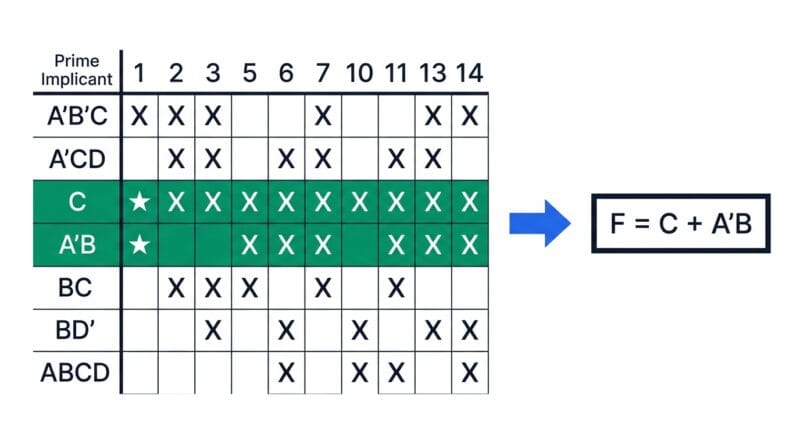
Take the expression A’C + A’B + AB’C + BC and press Simplify. Input: four product terms, three variables. Output: F = C + A’B. That is the minimal Sum-of-Products, and the Simplify tab lists the steps that produced it — the variables detected, the minterms where the function is true, the prime implicants found, how many were essential, and the final cover. Read those five lines and you can reproduce the derivation on paper.
The Quine–McCluskey tab is where the real working lives. It lists every prime implicant with the minterms it covers, then draws the prime implicant chart: implicants down the side, minterms across the top, an X where one covers the other. Rows marked with a star are essential, meaning they are the only implicant covering some minterm, so they must be in the answer. This is exactly the table an exam asks you to construct, and seeing it filled in correctly is the fastest way to learn the method.
The SOP and POS tab shows the canonical form beside the minimal one, so you can see how much was thrown away. The Gate Realization tab then takes the result to hardware: the two-level AND–OR circuit, the NAND-only and NOR-only equivalents, and a cost comparison. For our example the canonical form needs 15 literals; the minimal needs 3. That is the number a hardware engineer actually cares about, because fewer literals means fewer gate inputs, less silicon, and lower propagation delay.
🟢 When to use this, and when to use something else
This tool is the algebraic specialist. It exists to minimize an expression correctly and show the tabular method behind it. That makes it the right choice when you need the minimal form, the prime implicant chart, or a gate-cost comparison — and especially when you have more than four variables, where a Karnaugh map becomes awkward and Quine–McCluskey is the only sane approach.
- 🔵 Want the visual grid instead? A Karnaugh map is easier to eyeball for two to four variables. The K-Map Solver does the grouping for you visually.
- 🟠 Need the full input/output table? The Truth Table Generator prints every row for up to eight variables.
- 🟣 Building the circuit? The Digital Logic Studio handles gate conversion, circuit diagrams, timing waveforms and Verilog output.
Two honest limits worth stating. The tool minimizes to a two-level Sum-of-Products or Product-of-Sums, which is the standard textbook target — it does not perform multi-level factoring, so an expression that a human might factor cleverly into three levels will still be reported in two-level form. And it does not currently accept don’t-care conditions, so functions with unspecified outputs need to be handled by treating those rows as 0 or 1 before you enter them. If you want the theory behind the method itself, the companion guide on Boolean minimization and Quine–McCluskey explains why each step works.
How do I type NOT, AND and OR?
NOT is A’ or !A. AND is AB, A.B or A*B. OR is A+B. XOR is A^B. Parentheses group as normal and constants 0 and 1 are allowed.
Is the answer always the true minimum?
For two-level Sum-of-Products, yes. It builds the truth table and runs Quine–McCluskey, which is exhaustive, so the result is the minimal SOP rather than a lucky guess.
What is a prime implicant?
A product term that cannot be combined any further with a neighbouring term. Essential ones are the only implicant covering some minterm, so they must appear in the final answer.
Why use Quine–McCluskey instead of a K-map?
K-maps are quicker to eyeball up to four variables. Beyond that the grid gets unwieldy, while Quine–McCluskey is a systematic algorithm that scales and can be checked step by step.
How many variables can it handle?
Up to eight single-letter variables, which is 256 truth-table rows. That covers standard coursework and most practical combinational design.
Does it support don’t-care conditions?
Not currently. Decide whether each unspecified row should be 0 or 1 and enter the expression accordingly. This is a known limit rather than a bug.
What does the literal count tell me?
It is the total number of variable appearances in the expression, which maps roughly to gate inputs. Fewer literals means a smaller, cheaper, faster circuit.
Does my expression get uploaded anywhere?
No. The parser, truth table and minimizer all run in your browser tab. Nothing is sent to a server, so it works offline once the page has loaded.