How PDF Files Work Inside
A plain explanation of what is actually stored inside a PDF, why copied text comes out jumbled, why a black box does not delete anything, and what the file quietly reveals about you
Table of Contents
Last Updated: August 2026
🟢 A PDF Is Not a Document, It Is a Set of Drawing Instructions
Nearly every problem people hit with PDFs comes from one wrong assumption: that the file contains a document the way a Word file does, with paragraphs, headings and a flow of text. It does not. Adobe designed the format in the early 1990s to solve a printing problem – a page had to look identical on every machine and every printer. The answer was to stop describing content and start describing appearance.
What a page actually holds is closer to a script for a plotter. Move to this coordinate. Select this font at this size. Draw these glyphs. Move again. Draw a line from here to there. The result looks like a page of prose to you, but the file has no idea it is prose. If you want the background, the format’s history and specification is a reasonable starting point.
Once that clicks, the odd behaviour stops being mysterious.
🟡 What Is Actually Inside the File
A PDF is built from numbered objects that reference each other. Open one in a text editor and you will see fragments like this near the top:
%PDF-1.7
1 0 obj
  << /Type /Catalog /Pages 2 0 R >>
endobj
2 0 obj
  << /Type /Pages /Kids [3 0 R] /Count 1 >>
endobj
3 0 obj
  << /Type /Page /Parent 2 0 R /Contents 4 0 R >>
endobj
Object 1 is the catalogue, the entry point. It points at object 2, the page tree. That points at object 3, a single page. The page points at object 4, its content stream – the compressed list of drawing commands that produces what you see.
Four kinds of object matter for everyday work:
| Object | What it holds | Why you notice it |
|---|---|---|
| Page tree | The order of pages | Reordering pages rewrites this, not the pages themselves |
| Content stream | Drawing commands for one page | This is where text and shapes actually live |
| Resources | Fonts, embedded images, colour spaces | Why extracting images is separate from extracting text |
| Info dictionary | Author, title, producer, dates | The metadata that travels with the file |
Because pages are entries in a tree, reordering or deleting them is a cheap operation. The page content is untouched – only the list that names them changes. That is why page organisation is fast even on a large document, while redaction is slow.
🔴 Why Extracted Text Comes Out Jumbled
A content stream places text with commands roughly like BT /F1 12 Tf 72 720 Td (Hello) Tj ET. Read that as: begin text, use font F1 at 12 points, move to coordinate 72,720, show the string “Hello”, end text.
Notice what is missing. There is no instruction saying “this is a paragraph” or “this line ends here”. A line of prose might be a single string, or it might be twenty separate placements because the producing program adjusted spacing between words. Two columns are simply text placed at different x coordinates, with no marker saying they are columns.
So when software extracts text, it has to reconstruct the reading order by looking at coordinates – grouping fragments that share a similar vertical position into a line, guessing where a space belongs from the gap between glyphs. It works well on a plain report and falls apart on a two-column academic paper, a table, or a form.
The three failures you will meet
- 🔵 Columns interleaved. The extractor reads across the page instead of down each column, mixing two sentences together.
- 🟠 Missing or extra spaces. Word gaps are inferred from distance, so tight kerning produces
runtogetherwordsand loose spacing splits a word. - 🟣 Nothing at all. If the page is a scan, there are no text commands to read – only one large image. Getting words out needs optical character recognition, a completely different process.
🔴 Why a Black Box Deletes Nothing
This is the most costly misunderstanding in the whole format, and it has caused real leaks in court filings and government releases.
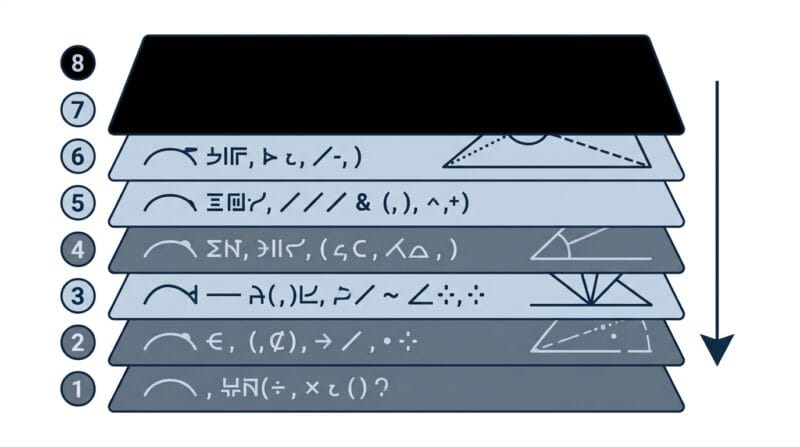
A content stream is a sequence. Commands run in order, and later commands paint over earlier ones. When you draw a black rectangle across a name, you append one more instruction to the end of that sequence. The command that drew the name is still sitting there, earlier in the stream, completely intact.
Anything that reads the stream rather than the picture – a text extractor, a search index, or simply selecting with your mouse and pressing copy – walks straight past the rectangle and finds the original characters.
The same trap applies to a white rectangle, a solid image pasted on top, and to page cropping. Cropping changes the visible boundary of the page. The content outside that boundary is still in the file and reappears the moment someone widens the crop.
What genuinely removes text
There are two honest approaches, and both have a cost.
The first is surgical: parse the content stream, find the text-showing commands that fall inside the marked area, and rewrite the stream without them. This keeps the rest of the page selectable, but it is delicate work – a partially overlapping word, text drawn as a path rather than glyphs, or an unusual font encoding can all leave fragments behind.
The second is blunt and reliable: render the page to an image at print resolution, paint the black bars onto that image, and replace the page with the flattened picture. Nothing can be recovered because no text commands survive. The trade-off is that the whole page stops being selectable or searchable. When the information is genuinely sensitive, that trade is usually the right one, and it is the approach used in the offline PDF editor on this site.
🟡 The Part of the File You Did Not Write
Beyond the visible page, a PDF carries an information dictionary and often an XMP metadata block. Between them they typically record the author name taken from your operating system account, the application that created the file, the exact creation and modification timestamps, and sometimes the original file path.
None of this appears on the page. All of it travels with the file when you email it. For a public tender, an anonymous submission, or a document leaving a company, that hidden detail is worth clearing deliberately rather than hoping nobody looks.
There is a second, subtler issue. PDF supports incremental saving, where an edit is appended to the end of the file rather than rewritten from scratch. Done carelessly, the earlier version of an edited page can remain inside the file, recoverable by anyone who reads the raw objects. Saving a fresh copy rather than repeatedly patching the same file avoids that.
🟢 Why Doing This Work in the Browser Changes the Picture
Every one of the operations above – parsing objects, walking the page tree, rendering a page to pixels, writing a new file – can now run inside a browser tab. Modern browsers expose the file to a page as raw bytes through the File API, and the same rendering engine that draws this article can draw a PDF page onto a canvas.
The practical consequence is a privacy one. A document containing a salary figure, a medical result or a signature never has to be handed to a third party just so it can be annotated. It is opened, changed and saved on the machine it was already sitting on. For documents that carry personal detail, that is a meaningfully different risk profile from a free upload site, and it is the same reasoning behind the wider set of tools described in our guide to secure offline web development utilities.
🟢 Practical Rules Worth Remembering
- 🔵 If the text must be gone, flatten the page to an image. Covering it is decoration, not removal.
- 🟠 Test your own redaction the way an opponent would: save the file, reopen it, select the area and press copy.
- 🟣 Clear the metadata before a document leaves your organisation.
- 🔵 Expect messy extraction from multi-column layouts and nothing at all from scans.
- 🟠 Save a new copy rather than repeatedly patching the same file, so old revisions do not travel along.
Try it on a real document
Annotate, reorder, sign and permanently redact a PDF without uploading it anywhere.
Open PDF Studio Pro
🟡 Keep Reading
If you need to combine several PDFs or cut one apart, that job belongs to the PDF Merge & Split Studio. If you would rather produce a clean PDF from scratch, writing in Markdown and exporting is often faster than fighting a word processor – the method is covered in how Markdown converts to PDF. For a wider view of what runs without uploading anything, see the round-up of client-side offline tools or browse the full free web tools directory.
Frequently Asked Questions
What is stored inside a PDF file?
Numbered objects that reference each other: a catalogue, a page tree, a content stream of drawing commands for each page, embedded fonts and images, and a dictionary of file information.
Why does copied PDF text look scrambled?
The file stores glyph positions, not lines or paragraphs. Software has to rebuild the reading order from coordinates, which struggles with columns, tables and unusual spacing.
Can text under a black box really be recovered?
Yes. The rectangle is a later drawing command painted over earlier ones. The original text command is still in the content stream and can be read by anything that parses the file.
Does cropping a page delete the hidden part?
No. Cropping changes the visible page boundary only. The content outside it remains in the file and returns as soon as the crop is widened.
What is the safest way to redact?
Render the page to an image, paint the bars onto that image, and replace the page with it. No text commands survive, so nothing can be recovered. The page stops being selectable, which is the trade-off.
Why can I not extract text from a scan?
A scanned page holds one large image rather than text commands. Turning those pixels into characters requires optical character recognition, which is a separate process from extraction.
What personal information does a PDF carry?
Commonly the author name from your user account, the software that produced the file, creation and modification timestamps, and sometimes the original file path. None of it shows on the page.
Why is reordering pages fast but redaction slow?
Reordering only rewrites the page tree, a small list. Redaction has to render a page to pixels at print resolution and rebuild it, which is far more work.
Can a PDF still contain an older version of an edit?
It can. PDF allows incremental saving, where changes are appended rather than rewritten. Saving a fresh copy instead of patching the same file repeatedly avoids carrying old revisions along.