Why Speaking Slowly Makes It Worse
Discover the powerful free offline voice typing studio that converts speech to text instantly using 100% client-side processing. Real-time dictation, custom voice commands, Smart Fix & 100+ language translation with zero server uploads and military-grade privacy.
Table of Contents
Last Updated: July 2026
🔴 From Air Pressure to Text
Speech reaches a microphone as changing air pressure and leaves the system as characters on a screen. Four steps sit between those two points.
Step one: turning sound into numbers
The microphone samples the pressure wave thousands of times a second — typically 16,000 for speech, which is plenty, because the frequencies that carry meaning in human voice sit well below 8 kHz. What comes out is a long list of numbers describing amplitude over time.
Step two: pulling out what matters
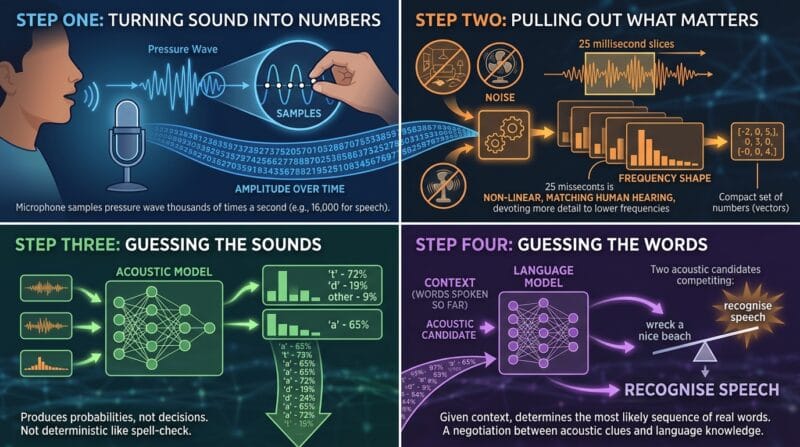
Raw samples are a poor thing to analyse directly, because most of what they contain is irrelevant. Your voice pitch, the room’s echo, the hum of a fan — none of that helps identify which sound you made.
So the audio is cut into overlapping slices of roughly 25 milliseconds and each slice is converted into a compact set of numbers describing its frequency shape. The scale used is deliberately non-linear, spacing frequencies the way human hearing does rather than the way physics does: we distinguish 200 Hz from 300 Hz easily but 5,000 Hz from 5,100 Hz hardly at all, so the representation devotes more detail where the ear does.
Step three: guessing the sounds
The acoustic model takes those slices and produces probabilities over speech sounds. Note that word — probabilities. It does not decide that you said a hard “t”. It produces something closer to “72% chance of a t, 19% chance of a d, 9% something else”, for every slice, continuously.
This is why the same word said twice can transcribe differently. Nothing about the process is deterministic in the way spell-check is.
Step four: guessing the words
Here is where the interesting part happens. A language model takes the stream of sound probabilities and asks a different question: given everything said so far, which sequence of real words is most likely?
It knows “recognise speech” is a far more common phrase than “wreck a nice beach”, even though the two are close to identical acoustically. The acoustic model supplies candidates; the language model picks between them using context. The final text is a negotiation between the two, not a lookup.
🟡 Why Slowing Down Backfires
Now the opening puzzle answers itself. Speaking one. word. at. a. time. strips out exactly the information the language model depends on.
Isolated words have no context to use
Say “there” in the middle of a sentence and the surrounding words settle whether you meant there, their or they’re. Say it alone and there is nothing to settle it with. The system falls back on whichever is most common overall, which is a coin toss dressed up as a decision.
Exaggerated pronunciation is off-distribution
There is a second effect. The acoustic model was trained on ordinary speech, so its idea of what a word sounds like is built from people talking normally. Over-enunciating produces something that is technically clearer to a human but statistically unusual — further from the examples the model learned. Careful speech can be harder for it to place than casual speech.
What helps instead
🔵 Speak in complete phrases rather than word by word, so the language model has something to work with
🟠 Keep a steady, natural rhythm — normal conversational pace beats careful dictation
🟣 Cut background noise — this genuinely does help, because it corrupts the feature extraction at step two
🔵 Fix repeated errors with a substitution rule rather than fighting the recogniser, which is what the vocabulary feature in the Voice Studio is for
🟢 The Problems That Do Not Go Away
Homophones are not an accuracy bug
“To”, “too” and “two” are acoustically identical. No microphone upgrade fixes that, and no amount of clear speech helps, because the distinction does not exist in the sound at all. It exists only in meaning.
The language model resolves most cases from context and gets it right most of the time. When it fails, it fails invisibly: the output is a real word, spelled correctly, in a grammatical sentence. Spell-check will not flag it, and your eye slides straight over it. This is the single strongest argument for reading a dictated draft properly rather than trusting a clean-looking transcript.
Punctuation is guesswork
Speech has no full stops. It has pauses, and pauses mean several different things — the end of a thought, a search for a word, a breath. Systems that punctuate automatically are inferring intent from timing, and they are wrong often enough that any dictated draft needs a punctuation pass.
Accent coverage is uneven, and it is a data problem
A model is only as good as the speech it learned from. Widely spoken varieties with enormous recorded corpora — American English, standard Mandarin, European Spanish — perform well. Regional accents, smaller languages and second-language speakers perform measurably worse.
Teaching in Sri Lanka, this is not abstract. Sinhala and Tamil dictation work, but not to the standard English users take for granted, and the gap is not about the technology being immature. It is about how much recorded, transcribed speech exists to train on. That imbalance closes slowly and unevenly.
🔴 Where Your Voice Actually Goes
This deserves plain treatment, because the marketing around browser dictation tends to blur it.
Browser recognition is usually remote
The Web Speech API is what makes dictation possible on a web page. What it does not specify is where the processing happens, and in practice most browsers stream the audio to their own service — Chrome to Google’s, Safari to Apple’s. Any dictation site built on this API inherits that behaviour, whatever the site says about privacy, because the page never touches the audio itself.
That is a meaningful distinction. Text you type into a page can genuinely stay on your machine. Audio handed to the browser’s recogniser generally does not, and no web developer can change that from inside a page.
On-device models changed the picture
The alternative is running the model in the browser itself. Compact speech models can now be downloaded once and executed locally using WebAssembly and WebGPU, which means the audio never leaves the machine at any point.
The trade is real: a first download of tens or hundreds of megabytes, more memory, and slower transcription than a data centre would manage. For a confidential recording, that trade is usually worth making. The mechanics of how these in-browser models load and run are covered in how browser AI models actually work.
A sensible split
In practice, use live browser dictation for ordinary drafting where the content is not sensitive — notes, blog drafts, emails. For anything confidential, record first and transcribe with a locally running model, then bring the finished text back for editing. Same result, different privacy profile, and it takes about a minute longer.
🟡 What to Remember
Speak in phrases, not words. Read the draft properly, because the errors that survive look like correct English. And know which of the two systems you are using — the fast remote one or the private local one — because the difference matters far more than any accuracy figure.
The API itself is documented at MDN’s Web Speech API reference, and the wider history of the field is well covered in Wikipedia’s speech recognition article.
❓ Frequently Asked Questions
Why does speaking slowly reduce accuracy?
The language model relies on surrounding words to choose between similar sounds. Isolating each word removes that context, and exaggerated pronunciation is also less like the speech the model was trained on.
Why does it confuse there, their and they’re?
They are acoustically identical. The choice is made from context alone, so when the sentence gives no clue the system has to guess.
Is my audio sent to a server when I dictate in a browser?
Usually yes. Chrome and Safari process speech through their own services. A web page using this feature never handles the audio and cannot change where it goes.
How can I dictate with nothing leaving my device?
Record the audio, then transcribe it with a model that runs inside your browser. The download is larger and it is slower, but no audio is transmitted at all.
Would a better microphone fix my errors?
It helps with noise, which does corrupt the analysis. It cannot help with homophones or grammar, because those failures happen after the sound has already been identified correctly.
Why is accuracy worse in some languages?
Models learn from recorded and transcribed speech, and far more of it exists for widely spoken varieties. Less-resourced languages and strong regional accents perform measurably worse.
Can a recogniser learn my voice?
Dedicated desktop software can adapt over time. Browser recognition does not. Substitution rules for words it repeatedly gets wrong are the practical workaround.
Why is automatic punctuation unreliable?
It infers sentence ends from pause length, but a pause can equally mean you were thinking or taking a breath. Timing alone cannot separate those cases.
Is dictation faster than typing?
For a first draft, usually — speech runs well ahead of most typing speeds. Once editing time is counted, the advantage narrows, and for short precise text typing often wins.