Free Random Word Generator – Nouns, Verbs & Adjectives
Instantly generate random words, nouns, verbs, and adjectives offline. Customize outputs by word length and parts of speech with our free, secure tool.
Table of Contents
Stuck for an idea, a name, or a writing prompt? Generate random nouns, verbs, or adjectives to break a blank-page moment or spark something new. Useful for brainstorming, word games, and warm-up writing exercises.
📝 Ultimate Word Studio Pro
The 📝 Words tab draws from a 1200+ word lexicon spanning six parts of speech — Nouns, Verbs, Adjectives, Adverbs, Pronouns, and Prepositions. Each category has three frequency tiers: Common words (everyday vocabulary), Uncommon (richer literary vocabulary), and Rare (poetic and unusual words like petrichor, vellichor, susurrus). Tick any combination of checkboxes to mix parts of speech. Filter by minimum and maximum letter length, by starting or ending letters, by frequency tier, and choose from six output formats — one per line, comma, space, JSON array, numbered list, or bullet list. Unique words only mode prevents repeats in the output.
The 💬 Sentences tab generates grammatically structured random sentences with topic focus (Nature, Business, Tech, People, Abstract), tense (Present, Past, Future), and style (Simple, Descriptive, Compound, With Adverb). The 📄 Lorem+ tab offers five placeholder text variants — Classic Latin Lorem Ipsum, Scrambled Real English, Hipster Ipsum, Tech Jargon Ipsum, and Nature Ipsum — in paragraphs, sentences, words, or byte count, with optional HTML paragraph wrapping. The 🔧 Toolkit tab gives four standalone tools: Alliteration Generator (words starting with the same letter), Word Scrambler (jumble letters for anagram puzzles), Acronym Builder (create or expand acronyms), and Stop Words Remover with highlight mode.
The ✍️ Prompts tab generates creative writing prompts across eight genres (Fiction, Sci-Fi, Fantasy, Romance, Mystery, Horror, Thriller, Mixed) and five prompt types (Story Starter, Character, Setting, Conflict, Plot Twist). A built-in Character Name Generator produces first + last name combinations from six cultural origins: English, Celtic, Nordic, Latin/Roman, Japanese, and Fantasy — with masculine, feminine, and neutral options. The 📊 Stats tab analyzes any pasted text for total words, unique words, sentence count, average sentence length, average word length, syllable estimate, vocabulary richness percentage, and a top-20 keyword frequency table — exportable as a .txt report.
Choose from six tabs at the top of the tool. 📝 Words for random vocabulary lists. 💬 Sentences for grammatically structured sentences. 📄 Lorem+ for placeholder text. 🔧 Toolkit for alliteration, scrambling, acronyms and stop words. ✍️ Prompts for creative writing starters, characters and settings. 📊 Stats to analyze any text. Click 💡 Load Sample to instantly see the Words tab in action.
In the 📝 Words tab: tick part-of-speech checkboxes to mix word types, set word count (up to 1000), filter by letter length, add Starts With or Ends With filters, choose frequency (Common, Uncommon, Rare), pick output format and case, and toggle Unique Words Only. In 💬 Sentences: set count, tense, style and topic. In 📄 Lorem+: pick type, unit and count. Each tab’s settings are completely independent.
Click the ⚡ Generate button on any tab. Results appear instantly in the dark Output panel at the bottom. The session stats sidebar counts total words generated and number of generations this session. In the Toolkit tab, click any alliteration or scrambled word pill to copy it instantly. In Prompts, each result shows a genre + type badge for easy reference. In Stats, the keyword frequency table shows visual bars alongside counts.
Click 📋 Copy below the output panel to copy everything to clipboard. Click 📤 Export .txt to download as a text file. In the Stats tab, click 📤 Export Report to download a formatted statistics report including all metrics and the top keyword frequency table. Use ⛶ Full Width to hide the sidebar and give the tool maximum workspace. Everything runs offline — no data leaves your browser.
Last updated: June 2026
🔴 Why Word Frequency Tiers Matter for Writers and Content Creators
A random word generator that draws only from the most common 1000 English words produces predictable, flat vocabulary — the same words that appear in every beginner’s writing exercise. Vocabulary richness is one of the most noticeable differences between amateur and professional prose. The Words tab addresses this with three frequency tiers. Common words are the 500–2000 most frequently occurring English words — the core vocabulary every native speaker uses daily: time, make, right, face, keep. Uncommon words appear less frequently but are known to educated readers: luminous, traverse, tenacious, resilient. Rare words like petrichor (the smell of rain on dry earth), vellichor (the strange wistfulness of used bookshops), and susurrus (a whispering or murmuring sound) add precision and texture that common vocabulary cannot.
For creative writers, mixing tiers is the practical technique. A paragraph of all common words reads like a news report — clear but forgettable. A paragraph of all rare words reads like a thesaurus entry — impressive but exhausting. The effective approach is a common-word base with uncommon or rare words used at specific emotional peaks — the word that captures exactly the right feeling because no common synonym exists for it. The Rare frequency tier in this tool surfaces words from linguistics and literature that most writers have encountered but rarely think to reach for. Setting the output to Rare and mixing Nouns with Adjectives produces word pairs that can break a writer out of familiar patterns.
🟡 Lorem Ipsum Variants — When to Use Each Placeholder Text Style
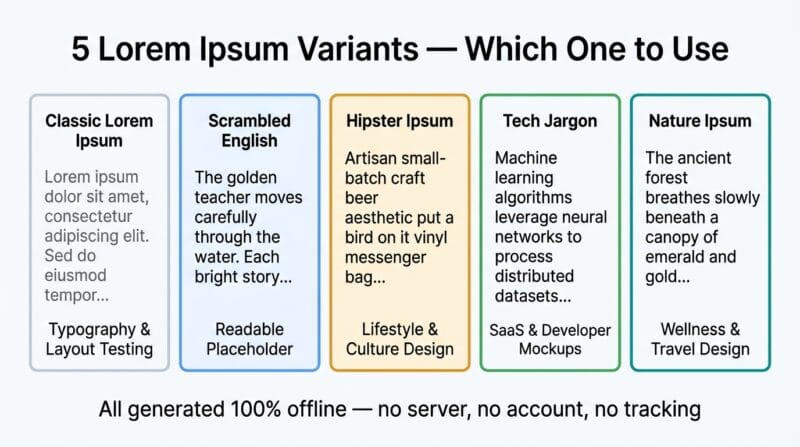
Classic Lorem Ipsum — derived from Cicero’s De Finibus Bonorum et Malorum (45 BC) — is the standard placeholder text because its Latin characters have the same visual density as English without being readable enough to distract reviewers. It has been used in typesetting since the 1500s and in digital design since the 1980s. The problem with classic Lorem Ipsum in modern design work is that it tells stakeholders nothing about how the actual content will read. When copy approval matters — when a client needs to sign off on a layout — readable placeholder text is more useful.
Scrambled Real English — this tool’s second Lorem variant — uses actual English words assembled into grammatically plausible but meaningless sentences. It gives the correct reading rhythm and visual word-length distribution of real English, while remaining semantically neutral. This is particularly useful for readability testing: real word shapes and lengths reveal how a typeface handles English text in ways that Latin cannot. Tech Jargon Ipsum mimics the visual density of developer documentation without actual meaning — useful for SaaS product screenshots and developer tool mockups where real technical language would distract. Nature Ipsum creates poetic, organic-sounding placeholder text appropriate for wellness, travel, and lifestyle design mockups where harsh tech language would break the mood. Choose the variant that matches the emotional register of the final content.
🟢 How the Sentence Structure Generator Works
The Sentences tab assembles grammatically valid sentences from six structural templates per topic. The Simple style uses Subject + Verb + Object — the clearest sentence structure in English. The Descriptive style prepends an adjective to the subject, adding one layer of detail. The Compound style joins two simple sentences with a coordinating conjunction (and, but, yet, so, while) — the foundation of prose rhythm variation. The Adverb style opens with an adverb followed by a comma, a technique common in literary fiction for creating pace and emphasis.
The tense engine applies standard English tense rules: present tense adds -s to the verb stem, past tense adds -ed with handling for verbs ending in -e (produce → produced) and -y (try → tried), and future tense prepends “will” to the bare infinitive. Template placeholders draw from filtered subsets of the 1200-word lexicon — only nouns with four or more letters for subject and object positions (avoiding pronouns as nouns in full sentences), verbs with three or more letters for the verb position. Topic Focus filters the template pool to thematically appropriate sentence patterns — Nature sentences don’t contain business vocabulary; Tech sentences use structural patterns suited to describing systems and processes. Use our Ultimate Word Studio Pro to explore all six topic themes across present, past, and future tenses. For deeper vocabulary tips see our complete guide to random word generators.
- 🔵 Starts With filter — useful for generating vocabulary lists for specific letters (e.g., “s” for alliteration practice or word game design), teaching phonics patterns, or creating themed word lists for crossword and puzzle construction.
- 🟠 Ends With filter — generate words ending in “-ing” for gerund practice, “-tion” for building academic vocabulary lists, or “-ly” to find adverbs for writing exercises.
- 🟣 JSON Array output — exports the word list as a valid JavaScript array (
["word1","word2","word3"]) — ready to paste directly into code for populating test data, game word lists, or autocomplete dictionaries.
How many unique words can I generate before repeats appear?
With Unique Words Only enabled, the maximum unique output equals the number of words matching your filters. The full lexicon contains 1200+ words across six parts of speech. If you select all three POS types (Nouns, Verbs, Adjectives) with no letter-length or letter filters, you can generate up to approximately 650 unique words in one session. With strict filters (e.g., only Rare Nouns starting with “s” between 6–10 letters), the pool shrinks significantly — if it reaches zero, the tool shows a “No words match your filters” message rather than repeating.
What is vocabulary richness and how is it calculated?
Vocabulary richness (also called lexical diversity or TTR — Type-Token Ratio) is the percentage of unique words relative to total words in a text. The formula is: (unique word count / total word count) × 100. A short text of 100 words with 80 unique words has 80% richness. Longer texts naturally have lower richness since common words repeat more. Generally, 60–70% richness in a 500-word text indicates good vocabulary variety. Below 40% in a 200-word text suggests over-reliance on the same words. The Stats tab calculates this against the filtered word set (stop words excluded).
Can I use the writing prompts for commercial projects?
Yes. All writing prompts generated by this tool are procedurally assembled from template fragments and the internal word lexicon — they are not reproduced from any copyrighted source. The prompts are generic story-starting concepts (a locked room, an unexpected letter, an impossible clock) that belong to no one and have appeared in countless writing workshops and creative exercises. Use them freely for commercial fiction, game design, film development, writing education, or any other purpose.
What does the Stop Words Remover do and why is it useful?
Stop words are common function words — the, and, is, in, at, to, a, an — that carry grammatical structure but no semantic meaning. Removing them from a text reveals the keywords: the meaningful nouns, verbs, and adjectives that actually represent the content’s topic. This is useful for SEO keyword extraction (pasting a competitor’s page title or meta description to extract their focus keywords), text summarisation prep, sentiment analysis input, and vocabulary analysis. The Highlight mode shows stop words in red without removing them — useful for visualising how much of a text is structural versus meaningful.
How does the Acronym Expander work?
The Acronym Expander takes each letter of the acronym you enter and searches the internal lexicon for words starting with that letter. It generates three different expansions — each using a randomly selected matching word per letter — so you get three candidate phrases for your acronym. This is useful for brand naming (finding what a new brand acronym could stand for), creating backronyms (names designed to spell a word), and brainstorming organizational mission statements. The Make Acronym function does the reverse: it takes each first letter of your phrase and builds the acronym string.
Are the generated sentences grammatically correct?
The sentences are grammatically structured but semantically random — the grammar rules (subject-verb agreement, tense inflection, sentence patterns) are applied correctly, but the meaning combinations are intentional nonsense. “The luminous river traverses the tenacious shore steadily” is grammatically valid but not a description of reality. This is the intended behaviour: the sentences are useful for writing warm-ups, testing typography, populating UI mockups with readable placeholder content, and practising sentence analysis — not for producing publication-ready prose.
What are the character names based on?
Each cultural origin draws from historically and culturally authentic name pools. English names are drawn from traditional British and American naming conventions. Celtic names use Irish and Scottish Gaelic names with correct spelling (Saoirse, Cillian, Caoimhe). Nordic names come from Old Norse and Scandinavian traditions. Latin names use classical Roman naming conventions with praenomina and cognomina. Japanese names use authentic first and family names common in contemporary Japan. Fantasy names are invented but follow phonological patterns typical of the high-fantasy genre. Surname pools are culturally matched to each origin category.
Can I export word lists for use in other applications?
Yes. The JSON Array format exports words as a valid JavaScript/JSON array: ["word1","word2","word3"] — paste directly into JavaScript code, a game engine word list, or a JSON config file. The Comma Separated format works for import into spreadsheets (Excel, Google Sheets) or CSV-based tools. The Numbered List format is ready for direct use in blog posts, educational materials, or printed worksheets. All formats export cleanly via the 📤 Export .txt button as a downloadable file, or via 📋 Copy for immediate clipboard use.
What makes this different from other random word generators?
Most random word generators offer a single output: a list of random words from a flat dictionary with minimal filtering. This tool adds five additional generation modes (Sentences, Lorem Ipsum in 5 styles, Writing Prompts in 8 genres, Character Names in 6 cultural origins), four toolkit tools (Alliteration, Scramble, Acronym, Stop Words), and a full text statistics analyzer — all in one browser-based tool with no account, no server, and no external requests. The word lexicon includes rare literary vocabulary unavailable in standard word lists, plus frequency-tier filtering to control vocabulary level.