Password Studio
Free offline password studio. Generate cryptographically strong passwords, audit your own for real entropy and weak patterns, and build PINs, recovery codes and passphrases. Nothing is uploaded.
Table of Contents
Need a password that a dictionary attack will not crack? Choose the length and character mix, generate one on the spot, and check the live strength meter before you use it. Each password is built in your browser and never stored or logged, so it is safe for real accounts.
Random characters drawn from your browser's cryptographic generator, shuffled with an unbiased Fisher-Yates pass. The strength shown is real entropy, measured in bits.
Paste a password you already use and see what an attacker sees: its real entropy, the patterns it leans on, and how long each kind of attack would take. Nothing is uploaded.
ℹ️ This runs entirely on your device. Even so, prefer testing a close variant rather than the exact password of a live account.
Numeric PINs that avoid the patterns thieves try first, and grouped backup codes of the kind services hand out for two-factor recovery.
Recovery / backup codes
When a system demands a shape rather than a strength — a WiFi key, a licence code, a legacy field with a fixed mask — describe the shape and let the studio fill it randomly.
ℹ️ A uppercase a lowercase 9 digit # symbol H hex * any anything else is copied as-is.
A passphrase trades character soup for words you can actually remember. Its strength comes only from the word count and the size of the list, never from how clever the words look.
🛡️ What "strong" actually means
Strength is entropy: how many equally likely possibilities an attacker must search. It is measured in bits, and every extra bit doubles the work. A password is not strong because it looks messy; it is strong because it was chosen unpredictably.
Rough targets
| Bits | Verdict |
|---|---|
| < 28 | Very weak |
| 28–35 | Weak |
| 36–59 | Fair |
| 60–79 | Strong |
| 80+ | Excellent |
Related Tools
Generate without the hidden bias
Characters are drawn from your browser’s cryptographic generator and shuffled with an unbiased Fisher-Yates pass, so no position is more predictable than another. The strength shown is real entropy in bits, not a vague label, and you can mint up to a hundred at once.
Audit a password you already use
Paste an existing password and the studio shows what an attacker sees: its raw bits, the effective bits after common patterns are subtracted, and the exact weaknesses it found. It catches keyboard walks, dates, repeats and leetspeak versions of known passwords.
Build PINs, codes and passphrases
Numeric PINs that reject 1234 and birth years, grouped recovery codes in a look-alike-free alphabet, pattern-based keys for WiFi and licences, and memorable word passphrases with honest per-word entropy all live in their own tabs.
How to Use the Password Studio
Generator
Set the length, tick the character types, and press Generate. Watch the entropy and crack-time update live.
Strength Auditor
Paste any password to see its effective bits, the patterns it leans on, and how each attack type would fare.
PIN & Recovery
Create safe numeric PINs and backup codes for two-factor recovery, in the format your service expects.
Pattern & Passphrase
Fill a fixed template for keys, or build a word passphrase you can actually remember and type.
Last updated: July 2026
🔴 Why a random-looking password is not the same as a random one
Most password tools generate something that looks scrambled and call it done. The trouble hides in how the characters are ordered. A common shortcut is to force one uppercase, one digit and one symbol into the string, then shuffle with a quick sort trick. That sort is not a real shuffle, and it leaves the first character heavily weighted toward the uppercase letter that was placed first. An attacker who knows the tool can lean on that. This studio uses a Fisher-Yates shuffle instead, the only method that gives every arrangement an equal chance, so the guaranteed character types are spread genuinely at random.
The randomness itself comes from crypto.getRandomValues, your browser’s cryptographic generator, never from the ordinary random function that is fine for shuffling a playlist but not for guarding an account. There is even a subtle bias lurking in how random numbers get mapped onto a character set: a naive modulo makes the first few characters slightly more likely. The generator here rejects and re-rolls the rare values that would cause that skew, so every character in the pool is equally probable. These are the kinds of details that separate a password you can trust from one that merely looks the part.
You will notice the strength readout is a number of bits, not a colour word. That is deliberate, and the next section explains why it is the only honest measure.
🟡 Reading the strength meter, and trusting the auditor
Strength is entropy, and entropy is bits. The formula is plain: length multiplied by the base-two logarithm of the pool size. A twenty-character password drawn from ninety-four possible symbols carries about a hundred and thirty bits, and every single bit doubles the attacker’s work. This matters because meters that score on looks get it badly wrong. A sixty-four-character passphrase of nothing but lowercase letters holds around three hundred bits and is essentially uncrackable, yet a naive checker often rates it merely “fair” because it lacks symbols. The Generator here reports the real figure, so length gets the credit it deserves.
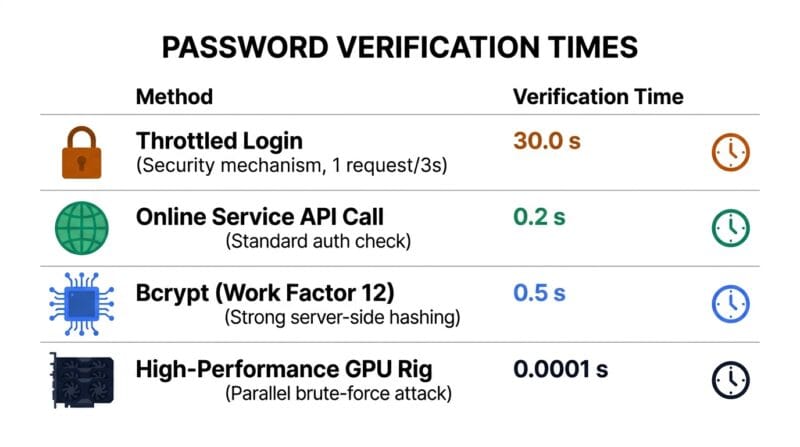
The Strength Auditor turns that lens on a password you already have. It reports raw bits, then effective bits, and the gap between them is the interesting part. Raw bits assume every character was a fair coin toss. Effective bits subtract for the shortcuts real crackers exploit. Feed it P@ssw0rd2024! and it does not see a strong mix of four character types; it undoes the leetspeak, recognises the base word “password”, spots the appended year, and collapses the score accordingly. That is exactly what a modern cracking rig does in its first pass. The crack-time table then shows how long each kind of attacker would take, from a rate-limited login form to an offline GPU rig, because a password that is hopeless against an offline attack can still be fine behind a good lockout policy.
🟢 The patterns the auditor hunts for
🔵 Keyboard walks such as qwer or asdf, and their reverses.
🟠 Alphabet or number runs like abcd and 2345, three-in-a-row repeats, and whole passwords built from one repeated block.
🟣 Embedded years, and dictionary words hiding under symbol swaps, which is why P@ssw0rd is treated as the word it plainly is.
🟢 PINs, recovery codes and keys with a fixed shape
Not every secret is a website password. A phone unlock is a PIN, and PINs have their own trap: a huge share of people pick 1234, 0000 or a birth year, so a thief with three guesses tries those first. The PIN generator rejects that whole family of predictable choices, including ascending and descending runs and any four digits that look like a recent year, and it tells you how many possibilities your chosen length actually spans.
The recovery-code generator produces the grouped codes services hand out for two-factor backup, in a deliberately reduced alphabet that omits the characters people misread. Leaving out capital I, lowercase l, the letter O and the digits zero and one means a code copied from a screenshot or read down a phone line does not turn into a failed login. The Custom Pattern tab covers the odder requirements: give it a template like AAAA-9999-aaaa and it fills each marked slot at random while keeping your separators, and it still tells you how many real bits of randomness the result carries, so a pretty-looking key with too few slots cannot fool you into a false sense of safety.
🔴 What this tool refuses to do, on purpose
Everything runs in your browser, and it stays that way by design. No password is saved, logged, or written to browser storage, and nothing is ever sent to a server, which is what makes it safe to audit a password you actually use. That last point rules out one feature you might expect: a check against breach databases like Have I Been Pwned. That check needs a network request, and adding it would quietly break the promise that nothing leaves your device, so it is left out. The exports carry the same honesty. A .txt file, a CSV or a printed page holds the password in plain text, so the tool tells you to move it into a manager and then destroy the copy.
The larger point is that a generator is one link in a chain. A strong, unique password per site is only as good as where you keep it, which for most people means a password manager rather than memory or a notebook. Passwords also pair with other building blocks: when you need a one-way fingerprint of data rather than a login secret, the Secure Hash Generator covers SHA hashing, and for how sites should store passwords safely, the Bcrypt Hash and Verify tool shows the slow hashing they ought to use. If you like the passphrase idea and want more raw word material to play with, the Random Word Generator is next door. The reasoning behind favouring length and passphrases over forced complexity is set out in the widely cited NIST digital identity guidelines.
Is my password sent anywhere?
No. Generation and auditing run entirely in your browser using its cryptographic generator. Nothing is uploaded, logged, or saved to browser storage, so even the Auditor is safe to use.
What does “bits of entropy” mean?
It measures how many equally likely possibilities an attacker must search, as length times log2 of the pool size. Every extra bit doubles the effort. Sixty bits or more is strong for most accounts.
Why is a long lowercase phrase stronger than a short complex one?
Because length raises entropy faster than symbol variety. A long passphrase can hold far more bits than a short string with mixed characters, even though it looks simpler.
Why did the Auditor rate P@ssw0rd as weak?
Because crackers undo predictable swaps first. It reverses @ to a and 0 to o, finds the base word “password”, and treats it as the common word it is, regardless of the symbols.
Does it check breach databases?
No, and that is intentional. Checking a breach list needs a network request, which would break the promise that nothing leaves your device. Use a dedicated breach-check service separately if you need one.
Are the exported files safe?
A .txt, CSV or printout stores the password in plain text. Use them only to move a password into a manager, then delete the file and destroy any printout.
What makes a PIN weak?
Predictable choices like 1234, 0000, repeated digits, ascending or descending runs, and birth years. The generator rejects these so your PIN is not among the first a thief tries.
Why leave letters out of recovery codes?
Capital I, lowercase l, the letter O and the digits 0 and 1 are easily confused. Removing them means a code read aloud or copied from an image still works the first time.
Should I still use a password manager?
Yes. A unique strong password per site is only useful if you can store them all. A manager remembers them so you do not reuse one, which is the single biggest real-world risk.

