Title: JSON, CSV, XML and YAML — How Data Formats Actually Differ
A plain-English guide to how JSON, CSV, XML and YAML store the same data differently, how conversion and JSONPath work under the hood, and why local processing matters.
Table of Contents
Last updated: July 2026
🔴 They’re All “Serialization” — Same Data, Different Clothes
Underneath, a list of contacts is just a list of contacts. A data format is simply an agreed way to write that structure down as text so a machine can read it back later — the technical term is serialization. JSON, CSV, XML and YAML are four such agreements. They encode the same information; they just make different trade-offs about readability, structure, and how much punctuation you have to tolerate.
🟡 What Each Format Is Quietly Optimized For
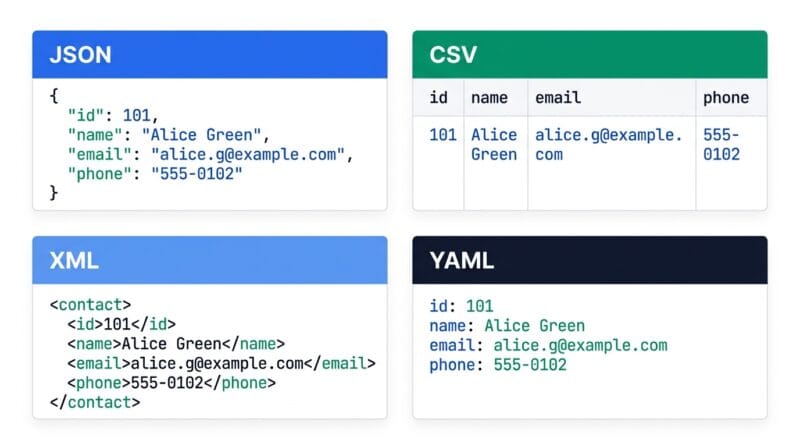
CSV is a grid — rows and columns, nothing nested. It’s perfect for spreadsheets and terrible for anything with hierarchy. JSON adds nesting and data types, which is why it became the language of web APIs. XML is JSON’s older, more verbose cousin; it wraps everything in named tags and supports attributes, which makes it powerful but heavy. YAML throws out most punctuation in favor of indentation, which is why humans like it for config files. The reason converting between them sometimes loses a little fidelity is that they don’t all support the same concepts — CSV has no idea what “nested” means, so flattening a deep JSON object into it always involves a compromise.
🟢 How Conversion Actually Works
Every conversion is really two steps: parse and serialize. First the tool reads your input into an in-memory structure — a tree of objects, arrays and values. Then it writes that same structure back out in the target format’s rules. CSV → JSON reads rows into objects keyed by the header. JSON → XML walks the object tree and wraps each key in tags. YAML relies on a parser like the widely used YAML spec’s reference implementations to turn indentation back into structure. Nothing magical happens; the format just changes clothes.
Where JSONPath Fits In
Once data is parsed into that in-memory tree, JSONPath is a way to address parts of it. The $ means “start at the root,” a dot steps into a property, and [*] means “every item in this array.” So $.store.book[*].author reads as “from the root, into store, into every book, give me the author.” It’s the same idea as a file path on your computer, applied to a data structure.
🔴 Why Converting Locally Matters More Than It Sounds
Plenty of online converters ask you to paste your data into a box on their server. That’s fine for a dummy example and a real problem for anything else — API responses routinely contain access tokens, and database exports contain personal records. Once that text is transmitted, it exists on infrastructure you don’t control. A browser-based converter parses and serializes entirely in your own tab’s memory, so the data is never sent anywhere. The cost is that your device does the work, so a very large file is slower than a server would be — but for sensitive data, that’s a trade most developers are glad to make.
You can try all of this in the JSON Studio Pro tool, and if you work across many such utilities, our guide to client-side offline developer tools is a good next read.
Which format should I actually use?
JSON for APIs and app data, CSV for spreadsheets, YAML for config files, XML when a system requires it. Match the format to the tool that reads it.
Why does converting to CSV lose structure?
CSV is a flat grid with no concept of nesting. Deeply nested JSON has to be flattened or stringified to fit into rows and columns.
Is YAML just JSON with less punctuation?
Close. YAML uses indentation instead of braces and brackets, which is easier for humans to edit, and any valid JSON is also valid YAML.
What does the $ mean in JSONPath?
It’s the root of your data. Every JSONPath expression starts there, then steps into properties and array items like a path.
Does conversion ever change my data?
The values stay the same, but structure can shift — for example, flattening nesting for CSV or wrapping values in tags for XML. It’s reshaping, not altering.
Why prefer a local converter over an online one?
Your data — which may include tokens or personal records — never gets transmitted. It’s parsed and rewritten in your own browser instead of on someone’s server.