How to Convert CSV to SQL
A CSV is just rows of text; a SQL table is structured, typed data. Turning one into the other is a routine task, but doing it well means understanding a few things the automatic tools handle quietly: how columns become types, why the same query looks different across databases, and how to keep the values safe.
Table of Contents
Last updated: August 2026
🔴 Two formats, one goal: rows into a table
Learning how to convert CSV to SQL starts with seeing what each format really is. A CSV file is plain text where each line is a record and commas separate the fields, with quotes around any value that itself contains a comma or a line break — a small format described precisely in RFC 4180. A SQL database, by contrast, stores data in tables with named, typed columns. Conversion is the bridge: the CSV header row becomes column names, and every data row becomes an INSERT statement that adds one record to the table.
So the mechanical job is straightforward. Read the header to learn the columns, read each row, and build a statement like INSERT INTO users (id, name) VALUES (1, 'Ada'). Do that for every row and you have loaded the file. Often you also want a CREATE TABLE statement first, which defines the columns and their types before any data goes in. The details of the syntax for one common database live in the PostgreSQL INSERT documentation.
🟡 Choosing column types, and why it matters
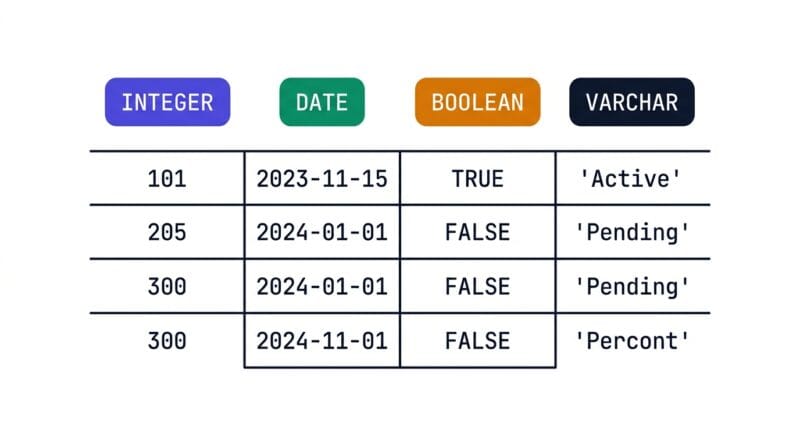
The interesting part is deciding what type each column should be. A CSV does not know the difference between the number 42 and the text “42” — everything is just characters. A database does care. Storing a number as an integer lets you sum and sort it correctly and uses less space; storing a date as a real date type lets you filter by range. A CSV to SQL converter infers these types by scanning a column’s values: if every value is a whole number it picks an integer, if they all have decimals it picks a numeric type, if they match a date pattern it picks a date, and otherwise it falls back to a text column sized to the longest entry.
- 🔵 Integer / bigint: whole numbers, chosen bigger when values exceed the normal integer range.
- 🟠 Decimal / date / boolean: detected from consistent patterns across the whole column.
- 🟣 VARCHAR(n) or text: the safe fallback, sized to the longest value so nothing is truncated.
Getting this right up front saves painful migrations later. It is also why a column is marked nullable when some cells are empty: the schema has to allow the gaps that already exist in your data.
🟢 Dialects, quoting, and staying safe from injection
SQL is a standard, but every database speaks its own accent. The clearest difference is how they quote identifiers like table and column names: MySQL uses backticks, PostgreSQL and Oracle use double quotes, and SQL Server uses square brackets. Data types differ too — a boolean is BOOLEAN in PostgreSQL, TINYINT(1) in MySQL, and BIT in SQL Server. Even the “insert or update” command varies, from ON DUPLICATE KEY UPDATE to ON CONFLICT to MERGE. A good converter picks the right accent for you so the output runs without edits.
Then there is safety. Any value that contains a single quote — think of a name like O’Brien — would break the statement unless the quote is escaped, usually by doubling it to two single quotes. That is fine for loading your own trusted data. It is not a substitute for the real defence against SQL injection, which is parameterised queries: you never build a live query by gluing user input into a string, you pass values separately so the database treats them strictly as data. Generated INSERTs are a loading convenience, not a query-building pattern. And because your rows may hold personal or private information, doing the conversion locally — where the data stays in your browser — matters, which is the same reasoning behind the site’s offline developer tools. Once you can see how types, dialects, and escaping fit together, converting CSV to SQL stops being a copy-paste gamble and becomes something you trust.
What is the difference between CSV and SQL?
CSV is plain text with rows and comma-separated fields and no type information. SQL organises data into tables with named, typed columns inside a database that can query and relate it.
How does CSV to SQL conversion work?
The header row becomes column names and each data row becomes an INSERT statement. Optionally a CREATE TABLE statement defines the columns and types before the data is inserted.
What is a CREATE TABLE statement?
It defines a table’s structure: the column names, their data types, whether they can be null, and any primary key. You run it once before inserting rows into the new table.
How are data types chosen from a CSV?
By scanning each column. Consistent whole numbers become integers, decimals become numeric types, date patterns become dates, and anything mixed falls back to a sized text column.
Why do SQL dialects differ?
Databases evolved separately, so identifier quoting, some data types, and commands like upsert vary. The core language is shared, but the exact syntax depends on which database you target.
How do you escape quotes in SQL values?
A single quote inside a value is doubled, so O’Brien becomes ‘O”Brien’. This keeps the statement valid when you load text that contains apostrophes.
What is the risk of SQL injection here?
Generated INSERTs are for your own trusted data. For queries built from user input, escaping is not enough; use parameterised queries so input is always treated as data, never executable SQL.
Should I use single or multi-row INSERTs?
Multi-row INSERTs load faster because the database processes one statement instead of many. Single-row statements are easier to read and debug for small or one-off loads.
Is my data private in a browser converter?
In an on-device tool, yes. The conversion runs locally, so your rows never leave your machine. Cloud converters differ, since they send your data to a server to process it.