How a Web Page Becomes a Code Editor
A browser tab can host an HTML editor, run the code you write, isolate it so it cannot damage the page around it, and report its errors back to you — all without a server anywhere in the loop. Here is the machinery that makes that possible.
Table of Contents
Last updated: July 2026
🔴 The problem: running untrusted code inside your own page
An online editor has an awkward job. It must take whatever code you type and actually execute it, but that code sits inside a real web page — the editor’s own page. If it simply ran your script directly, your code would share the same window, the same document, and the same variables as the editor itself. One stray line could overwrite the editor’s own functions, and an infinite loop would freeze the page you are typing into. Worse, a malicious snippet in a shared link could read whatever the host page had access to.
The browser already has the answer, and it is the same mechanism that lets an advertisement sit safely on a news site: the iframe. An iframe is a separate browsing context with its own document, its own window object and its own JavaScript environment. Code inside cannot reach out and touch the page around it unless the browser explicitly allows it. Every browser-based editor you have used is built on that boundary.
🟡 srcdoc and the sandbox attribute: the two ingredients
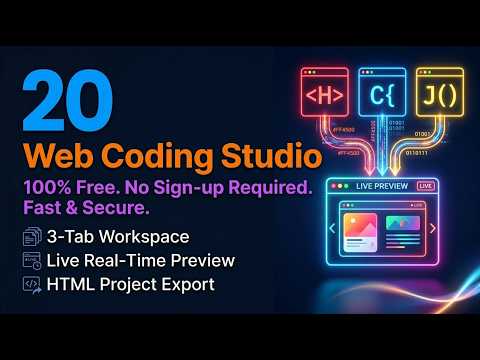
Traditionally an iframe points at a URL. But an editor has no URL to point at — the page does not exist yet, it only exists as text in three panes. The srcdoc attribute solves this: you hand the iframe a complete HTML document as a string and the browser renders it as if it had been downloaded. So the editor assembles a document — a head containing your CSS in a style block, a body containing your HTML, and a script block containing your JavaScript — and writes that whole string into srcdoc. Every time you stop typing, it rebuilds the string and hands it over again. That is the entire mechanism behind live preview: not magic, just a rebuilt document.
The sandbox attribute is the second half. It starts by denying the frame almost everything and then lets you grant permissions back one at a time. Granting scripts lets your JavaScript run. Granting forms lets a form submit. Notably, an editor usually does not grant same-origin access, which means the framed document is treated as coming from a different origin than the host page. That is a deliberate choice: it means your preview cannot read the editor page’s data, and the isolation holds even if a shared link contains hostile code. The trade-off is that some browser APIs behave as they would in a third-party context, which is why storage inside the preview is restricted.
The same idea explains a limit people trip over constantly. Your preview runs like a real page, so a fetch call to another website is subject to that site’s CORS policy. If the server does not send permission headers, the request is blocked — not by the editor, but by the browser’s origin rules working exactly as they should.
🟢 Catching the console across the boundary
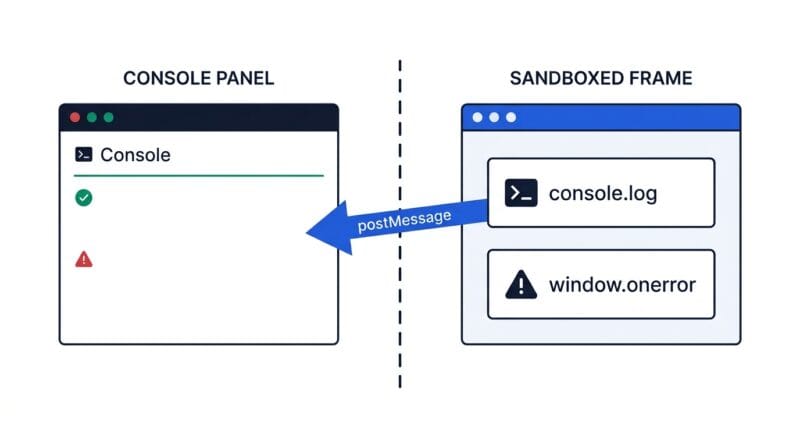
Here is the part that makes an editor genuinely useful rather than merely pretty. Your code runs inside the sandbox, so its console output goes to the browser’s own developer tools, not to anything the editor page can see. The isolation that protects you also hides your errors. Getting them back requires a deliberate bridge.
The technique is to inject a small script into the top of the preview document, before your code runs. That script replaces the console methods with wrappers: each wrapper formats its arguments into a string and then calls postMessage, which is the one channel the browser permits between isolated frames. It also registers a handler on window.onerror, which fires whenever an uncaught error is thrown and receives the message, the source, and crucially the line number. The editor page listens for those messages and paints them into a console panel. That is why a typo in your script can appear as a red line with a line number in the editor’s own interface — the sandbox reported it home through the only door available.
🟡 No server, and what that changes
Notice what has not appeared in any of this: a backend. The editor is HTML and JavaScript; the preview is a document string; the console is a message channel. Nothing needs to leave your machine, which means an offline editor can genuinely work with your Wi-Fi off, and your code is never transmitted, logged or stored on someone else’s server. For client work, unreleased features or anything under an NDA, that distinction is not a nice-to-have. It is the same principle we cover in our note on client-side data processing: the safest data is the data that never travels.
Even the exports stay local. A Blob is an in-memory file object, and URL.createObjectURL turns it into a temporary link the browser can download from — so an editor can hand you a ZIP or a standalone HTML file without a single network request. Sharing works the same way: encode the project into the URL fragment, the part after the hash, and it becomes a link that carries the code with it. The fragment is never sent to a server by the browser, which is precisely why it is the right place to put it. The cost is length, since the whole project rides inside the address.
🔴 Where an in-browser editor fits, and where it does not
A browser editor is unbeatable for the small, fast job: prototyping a component, testing a CSS idea, reproducing a bug, teaching a concept, or sharing a runnable example. It has no install, no build step, and no project setup, so the gap between having an idea and seeing it run is a few seconds. What it is not is a replacement for a full development environment. There is no package manager, no build pipeline, no version control and no multi-file module system, and those things exist for good reasons once a project grows past a single page.
The sensible workflow is to treat it as the front of a chain. Draft in the Web Studio, verify the layout across widths in the Responsive Studio, check the output for layout shift and render-blocking problems in the PageSpeed Analyzer, then compress it with the Code Minifier before it ships. Each tool does one thing properly, and every one of them runs on your own machine. If you are assembling a wider offline toolkit, our roundup of client-side developer tools is a good place to continue.
Why do code editors run your code in an iframe?
An iframe is a separate browsing context with its own document and JavaScript environment. It stops your code from overwriting the editor’s own variables or freezing the page you are typing into.
What does the srcdoc attribute do?
It lets you give an iframe a complete HTML document as a string instead of a URL. The editor rebuilds that string from your three panes on every change, which is what live preview really is.
How does the editor see my console.log output?
It injects a small script that wraps the console methods and forwards each call through postMessage, the one channel allowed between isolated frames. The editor page listens and displays them.
How are JavaScript errors caught with line numbers?
Through window.onerror inside the preview frame. It fires on any uncaught error and receives the message, source and line number, which are sent back to the editor and shown in red.
Why does fetch sometimes fail in a browser editor?
Your preview behaves like a real page, so a request to another site is subject to that site’s CORS policy. If the server does not send permission headers, the browser blocks it.
How can it export a ZIP with no server?
A Blob is an in-memory file, and URL.createObjectURL turns it into a temporary download link. The file is assembled in your browser and never touches a network.
Is code in a share link sent to a server?
No. The code sits in the URL fragment, the part after the hash, which browsers never transmit to the server. The trade-off is that big projects create very long links.
Can a browser editor replace VS Code?
Not for real projects. There is no package manager, build step, version control or multi-file module system. It excels at prototypes, bug reproductions, teaching and shareable examples.