How AI Runs Inside a Browser Tab, Without a Server
WebGPU, WebAssembly, and clever compression now let real models run on your own machine with nothing sent to the cloud. Here is what is actually happening under the hood, and what it means for speed, privacy, and when you should reach for it.

Table of Contents
Last updated: July 2026
🔴 What “running AI in the browser” really means
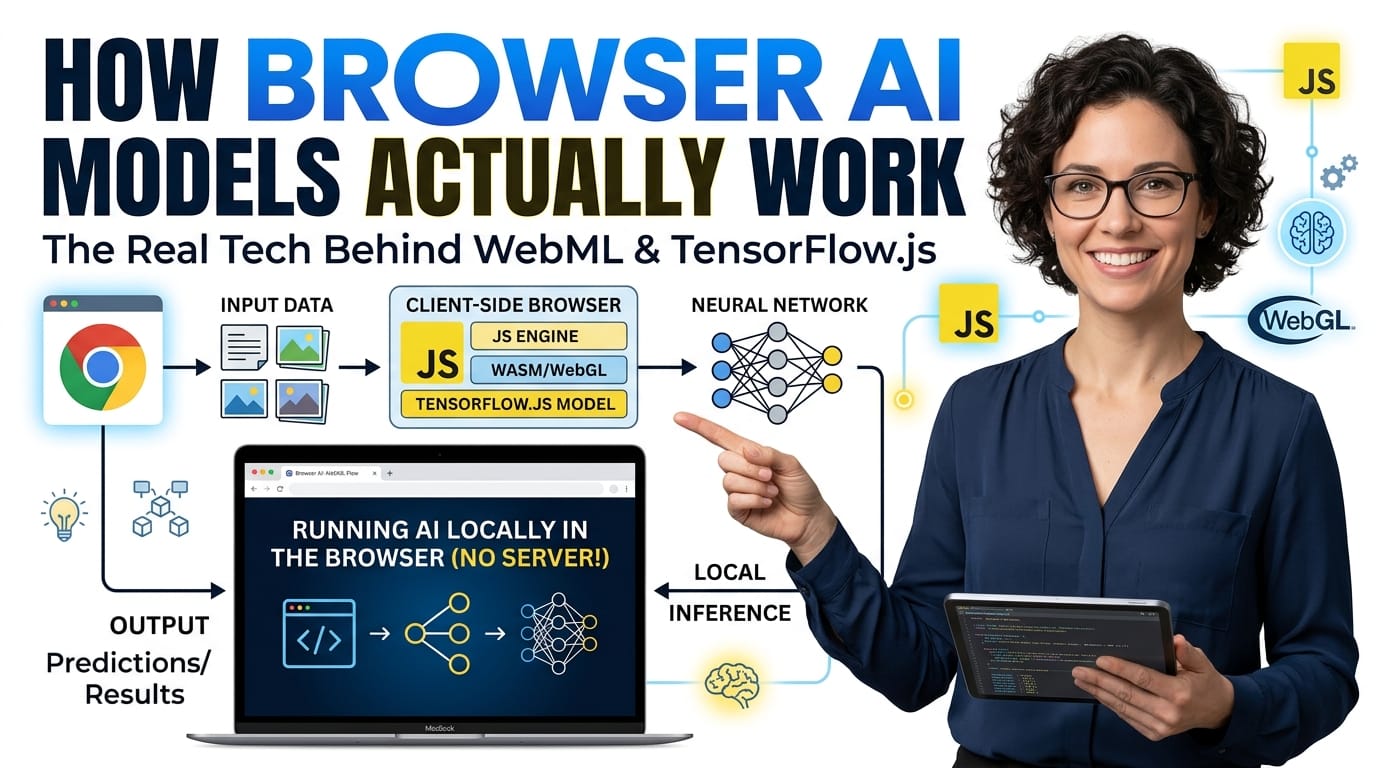
For years, using an AI model meant sending your text or image to a company’s server, letting their machine do the work, and reading the answer that came back. Browser AI flips that. The model itself, a file of numbers called weights, is downloaded to your device once, and every calculation after that happens locally in the tab. There is no request to an AI server during inference, because your own hardware is the AI server for that moment.
The flow is simple to picture. The browser downloads the model file, caches it so the next visit is instant, compiles it into something the hardware can execute, and then runs your input through it to produce an answer. The interesting engineering is in that third and fourth step, because a browser was never designed to do heavy math, and two technologies had to arrive before this was practical.
🟡 WebGPU and WebAssembly: the two engines doing the work
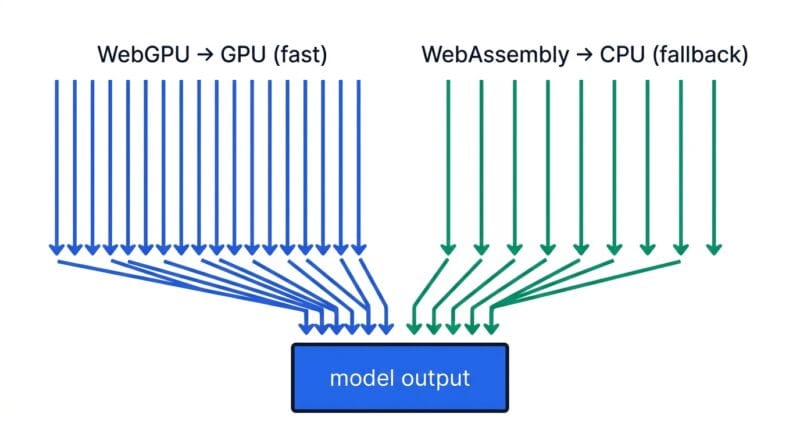
Running a model is mostly a huge pile of matrix multiplication, and there are two ways to do that in a browser. The fast path is WebGPU, which gives web pages direct access to your graphics card. A GPU is built to do thousands of small calculations at once, which is exactly the shape of neural-network math, so a WebGPU model can feel genuinely responsive. The compatibility path is WebAssembly, a way to run compiled, near-native code on the CPU. It is slower for this kind of work, but it runs almost everywhere, so many tools use it as a fallback when a GPU is not available.
Sitting on top of these engines are runtimes that do the plumbing, so app developers do not write GPU code by hand. Libraries like ONNX Runtime Web and Transformers.js take a model, decide whether to use WebGPU or WebAssembly, load the weights, and expose a simple function you call from JavaScript. When a directory entry lists its tech as WebGPU with a JavaScript SDK, this is the stack it is describing: a runtime driving one of those two engines from a few lines of browser code.
🟢 Why the same model ships in wildly different sizes
You will notice one model listed at several sizes, and the reason is quantization. A model’s weights are numbers, and originally each is stored at high precision, using sixteen or thirty-two bits. Quantization squeezes those numbers into fewer bits, often eight or even four, which shrinks the file dramatically. A model that was several gigabytes at full precision might become under a gigabyte quantized, at the cost of a small, usually acceptable drop in quality.
This is the single most important idea for browser AI, because size is the whole game on a device with limited memory. A four-bit version of a model is what lets a laptop or a phone hold it in memory at all. When you shortlist a model and see a friendly size, you are almost always looking at a quantized build, engineered specifically so it fits inside a browser rather than a data center.
🟡 The privacy difference nobody spells out
Here is the part that matters beyond speed. With a cloud model, your input travels to someone else’s server, gets processed there, and may be logged or retained under their policy. You also have to manage an API key, and a key that leaks can be abused and billed to you. With a browser model, none of that applies during inference. The text or file you feed it stays in the tab’s memory, and because there is no request to an AI backend, there is nothing to intercept, log, or leak.
That changes what is safe to work with. Medical notes, legal drafts, internal code, personal messages, the things you would hesitate to paste into a public chatbot, can be processed locally without leaving your machine. It also sidesteps the key-exposure problem entirely, which is worth understanding on its own; our note on securing API keys with client-side processing covers why keeping work on the device removes a whole class of risk.
🔴 When browser AI is the right call, and when it is not
Local inference is not automatically better; it is a trade. Reach for browser AI when privacy is non-negotiable, when the feature has to work offline, when you want to avoid per-request cloud costs, or when you need low latency without a network round-trip. A note-summarizer, an on-device transcriber, or a small chat helper are all natural fits, which is why tools like our offline summarizer and AI Code Studio lean on this approach.
Reach for the cloud instead when you need the largest, highest-quality models that simply will not fit on a personal device, or when your users are on old hardware that cannot handle WebGPU. Remember the first-load cost too: the model download is a one-time hit that the browser then caches, but it is real, so a several-gigabyte model is a poor fit for a casual visitor on a slow connection. The honest summary is that browser AI trades some raw model quality for privacy, offline capability, and zero server cost, and whether that trade is worth it depends entirely on what you are building.
Is browser AI as good as a big cloud model?
Usually not at the top end. Browser models are smaller and quantized to fit your device, so you trade some quality for privacy, offline use, and no server cost. For many everyday tasks the gap is small.
Does the model download every time I use it?
No. The first run downloads the weights and the browser caches them. After that it loads from cache, so later sessions start quickly even offline.
What is quantization in plain terms?
It stores the model’s numbers at lower precision, four or eight bits instead of sixteen, which shrinks the file a lot with only a small quality drop. It is what lets big models fit on a phone or laptop.
Is my data really private with browser AI?
During inference, yes. The input stays in the tab and no request goes to an AI server, so there is nothing sent out to be logged or intercepted. That is the core privacy advantage over cloud tools.
Do I need a powerful computer?
A capable GPU with WebGPU makes larger models fast, but small quantized models run acceptably on modest hardware through the WebAssembly CPU path. Match the model size to your device.
WebGPU or WebAssembly, which one runs my model?
WebGPU uses your graphics card and is faster; WebAssembly uses the CPU and runs almost everywhere as a fallback. Most runtimes pick WebGPU when the browser supports it, otherwise WebAssembly.
Can I use these models commercially?
It depends on each model’s license, not on the browser. Check the license of the specific model before shipping it in a product; running locally does not change those terms.
Where do I actually run one of these models?
Through a tool that wraps a model or through your own JavaScript using a runtime. Browse the browser AI models directory to shortlist one, then test it in a tool like AI Code Studio.