How Browser-Based AI Code Tools Really Work
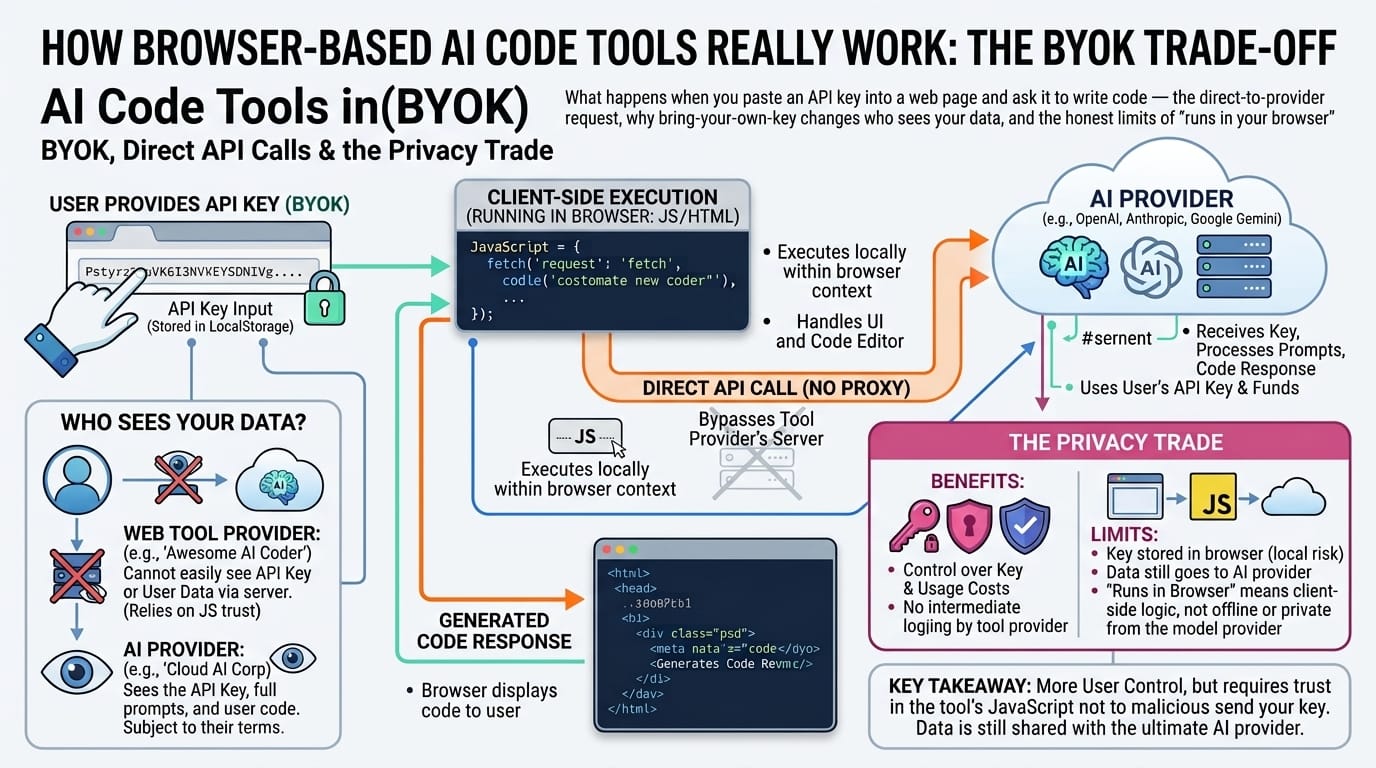
What happens when you paste an API key into a web page and ask it to write code — the direct-to-provider request, why bring-your-own-key changes who sees your data, and the honest limits of “runs in your browser”.
Table of Contents
Last updated: July 2026
🔴 Two Ways to Build an AI Tool, and Who Sees Your Code
Every AI-powered web tool has to answer one architectural question: where does the API key live? The answer decides everything else about cost, privacy, and who sits between you and the model.
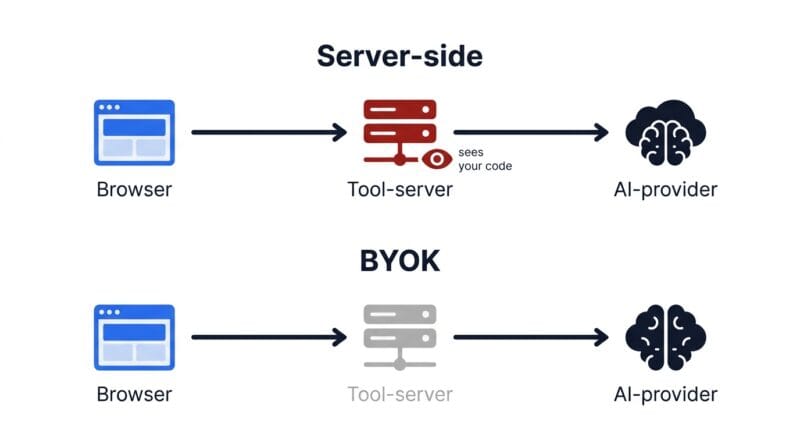
The common design is server-side. The tool’s owner holds one API key on their backend, your request travels from your browser to their server, their server adds the key and forwards it to the AI provider, and the answer comes back the same way. This is why most AI tools need a subscription — the owner is paying for every call and billing you for access — and it means the owner’s server sees every prompt and every piece of code you submit. Convenient, but you are trusting a middleman.
The other design is bring-your-own-key. There is no backend in the loop. The web page ships some JavaScript, and that JavaScript makes the API call from your browser, using a key you supplied, straight to the provider. The tool’s owner never holds a key, never pays for your usage, and — importantly — never sees your code, because nothing routes through their servers. This is the model a browser-based AI code editor uses, and understanding it explains both its advantages and its one unavoidable limitation.
🟡 What a Direct Browser-to-Provider Call Looks Like
When you click Generate, the tool assembles an ordinary HTTPS request with the browser’s fetch function and sends it directly to the provider’s endpoint. Three providers, three slightly different shapes, but the same idea.
Google’s Gemini endpoint takes the key as a URL parameter and the prompt as JSON in the body. Groq deliberately mirrors the widely-used OpenAI request format, key in an Authorization header, which is why so many tools support it with little extra code. Anthropic’s Claude endpoint uses its own header and a messages array. In every case the request carries two things that matter to you: your code and prompt, and your API key. Both leave your machine, and both go to the provider — not to the website that served you the tool.
The provider runs the model, and the response comes back as JSON with the generated code inside it. The tool extracts that text, strips the surrounding code fence, and drops it into the editor. All of the intelligence happened on the provider’s hardware; the browser’s job was to ask the question well and present the answer. That division is the whole reason the next point is unavoidable.
🔴 Why “Client-Side” Does Not Mean “Private” Here
There is a genuine and important distinction between two claims that sound similar: “your data does not go to this website’s server” and “your data does not go anywhere.” A bring-your-own-key AI tool can honestly make the first claim. It cannot make the second, and any that does is misleading you.
A truly offline tool — a hash generator, a URL parser, an image resizer — does its work with JavaScript running on your own processor, and you can verify it by opening the browser’s network panel and watching zero requests fire. An AI code tool cannot work that way, because the model that writes the code is enormous and lives on the provider’s servers. The moment you ask it to generate anything, your prompt and your code must cross the internet to reach that model. There is no client-side version of GPT-scale inference sitting in your browser tab.
So the correct mental model is a triangle with one corner deliberately cut off. Your code goes to the AI provider — yes, necessarily. Your code does not go to the tool’s website — correct, because BYOK removes that hop. What the provider then does with your request is governed entirely by their data-retention policy, which you should actually read if the code is sensitive. Being clear about this is not a weakness of the design; it is the difference between an honest tool and a dishonest one.
🟡 sessionStorage vs localStorage: A Small Choice That Matters
A BYOK tool has to keep your key somewhere between the moment you paste it and the moment you use it. The browser offers two obvious places, and the difference is more than academic when the thing being stored is a credential.
localStorage persists indefinitely — data written there survives closing the tab, closing the browser, and restarting the machine, until something explicitly deletes it. sessionStorage is scoped to the tab: the moment you close it, the data is gone. For a convenience setting like a theme preference, localStorage is the obvious pick. For an API key — which is money and access if it leaks — sessionStorage is the safer default, because a credential that is never written to persistent disk storage has a much smaller window in which anything could read it back.
The trade is real but minor: with sessionStorage you re-paste your key each new session. For something guarding your provider account, that is a reasonable price. It is worth knowing which choice a tool makes, though, because a tool that quietly persists your key forever in localStorage is making a different security promise than one that deliberately forgets it when you leave.
🟢 The Live Preview Sandbox
For code the browser can run — HTML, CSS, JavaScript — a live preview needs to execute untrusted, half-finished, AI-generated code without letting it interfere with the surrounding page. The mechanism is an inline frame fed through its srcdoc attribute, which renders a string of HTML as a complete isolated document without needing a server or a URL. A sandbox attribute then constrains what that document may do: scripts are allowed, so buttons and animations work, but popups, external form submissions, and navigation away from the frame are blocked. The preview also waits a fraction of a second after you stop typing before re-rendering, so it is not trying to execute code mid-keystroke. Languages the browser cannot run — PHP, Python, SQL — are shown as formatted text instead, because honestly displaying code beats dishonestly pretending to execute it.
🟡 Why the Free Tiers Exist At All
It is reasonable to wonder why Google and Groq give away AI inference that costs them real money to run. The answer is strategic, and knowing it helps you use the free tiers sensibly rather than nervously.
Google offers a free Gemini tier because developer adoption is the point — the more people build against Gemini, the more of them eventually deploy paid production workloads on it. Groq gives away fast inference to showcase its custom hardware, which is its actual product; the free API is a demonstration. These are loss-leaders with a business rationale behind them, not charity that might vanish tomorrow, which is why they are stable enough to build a workflow on. The free tiers carry rate limits — caps on requests per minute and per day — that are generous for a person coding interactively and only bite at automated or high-volume scale, at which point moving to a paid tier is the expected path. For occasional code generation, free is genuinely free.
One moving part to accept: providers rename and retire models frequently. A model string that is current when a tool ships may be superseded within months, which is why a well-built tool includes fallbacks and why this article deliberately avoids pinning its advice to specific version numbers. The provider tiers — Google’s fast free models, Groq’s speed-optimised open models, Anthropic’s paid high-quality models — are the stable way to think about the choice.
🟢 Using a Tool Like This Sensibly
- 🔵 Match the provider to the task. Free and fast for prototyping and iteration; paid and careful for complex logic or WordPress PHP where correctness matters most.
- 🟠 Read the provider’s data policy before sending real client code. The tool not seeing your code does not mean the AI provider does not — that is governed by their terms, not the tool’s.
- 🟣 Treat generated code as a draft, not a delivery. Review it, and use the tool’s own bug-finding and explanation features to understand it before you ship it.
- 🔵 Keep truly secret work on fully-offline tools. When code genuinely cannot leave your machine, a tool that must call an external model is the wrong choice — no matter how private its key handling is.
Used with those limits in mind, a browser-based BYOK code tool is a genuinely useful thing: no install, no subscription, your key under your control, and the tool’s owner cut out of your data path entirely. You can see the approach in the PrimeToolHub tools directory, the broader landscape of in-browser code editors is covered in the companion piece on how browser code editors and AI assistants work, and the case for keeping data on the client wherever possible is laid out in the guide to secure offline development utilities — which also covers the fully-local tools to reach for when even a trusted AI provider is one party too many.
What does BYOK mean?
Bring your own key. Instead of paying a tool for AI access, you get an API key directly from the AI provider and the tool uses it to call the provider from your browser. You control the key and pay the provider directly — often nothing, on a free tier.
If it runs in my browser, is my code private?
Partly. Your code does not go to the tool’s website — that hop is removed. But it must go to the AI provider, because that is where the model runs. “Client-side” here means “not through the tool’s server”, not “nowhere”.
Why store the key in sessionStorage instead of localStorage?
Because a key is a credential. sessionStorage clears when you close the tab, so the key is never written to persistent disk storage where something could read it back later. You re-paste it next visit — a fair price for a smaller leak window.
Can a browser run PHP or Python for the live preview?
No. Browsers execute only HTML, CSS and JavaScript. For other languages a live preview can only display formatted code, not run it. Any tool claiming to execute PHP or Python client-side is doing something misleading.
Will the free AI tiers disappear?
They are loss-leaders with a business rationale — Google wants adoption, Groq is showcasing hardware — not charity. They carry rate limits that only bite at high volume. For interactive coding they are stable enough to rely on.
Why do AI model names keep changing?
Providers release and retire models frequently. A version current at launch may be superseded within months, which is why good tools ship fallbacks and why it is wiser to think in provider tiers than to memorise specific model strings.