
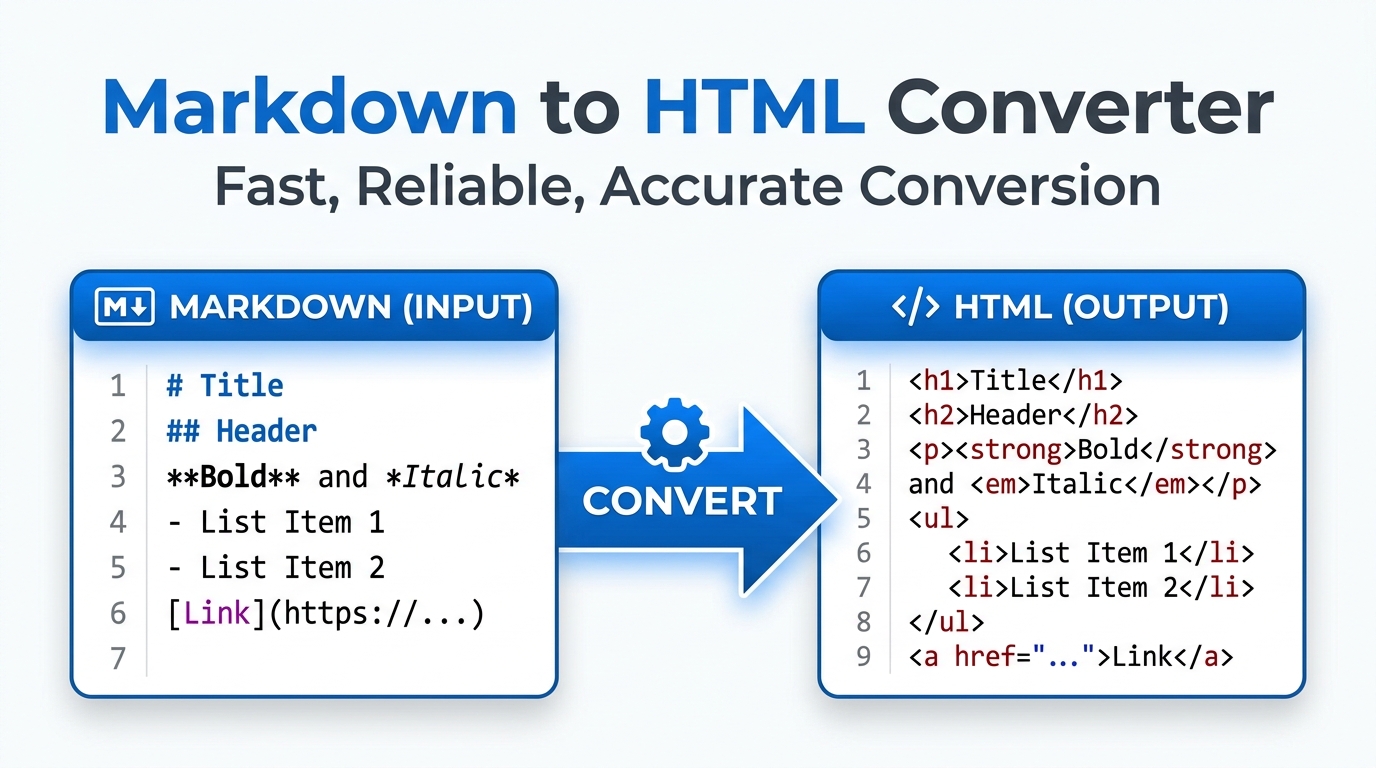
Markdown to HTML Converter
Convert Markdown to HTML instantly with our free offline Markdown to HTML converter. Features live preview, raw code extraction, and real-time word counts.
Table of Contents
Markdown Studio
Markdown Cheat Sheet
Use these simple symbols in the editor to quickly format your text into HTML.
| Element | Markdown Syntax |
|---|---|
| Heading 1 | # Heading 1 |
| Heading 2 | ## Heading 2 |
| Bold | **Bold Text** |
| Italic | *Italic Text* |
| Blockquote | > Quote text |
| Ordered List | 1. First item 2. Second item |
| Unordered List | - First item - Second item |
| Code (Inline) | `code block` |
| Horizontal Rule | --- |
| Link | [Title](https://url.com) |
| Image |  |
⚡ Live Markdown Compiler
Watch your Markdown syntax transform into perfectly formatted, web-ready typography in real-time as you type. No page reloads required.
👁️ Raw Code Extractor
Switch seamlessly between the visual live preview and the raw HTML source code tab to easily copy your formatted content into any CMS like WordPress.
📊 Blogger Analytics
Keep track of your writing progress with built-in, real-time analytics including an accurate word counter and an estimated reading time calculator.
HOW TO USE THE MARKDOWN STUDIO?
Write or Import
Type your Markdown directly into the dark editor pane, or click the “Import” button to load an existing `.md` or `.txt` file from your computer.
Use the Cheat Sheet
Not sure how to add a link or an image? Click the “Markdown Guide” tab on the right pane to access our built-in syntax reference table.
Export the HTML
Once finished, click the “Raw HTML” tab to copy the clean code, or click “Save HTML” to download a fully rendered web page directly to your device.
Read Full Guide: Writing with Markdown
📝 Introduction to Markdown
In the fast-paced world of digital content creation, writing raw HTML tags (like <h1> or <strong>) can be tedious and distracting. Markdown, created by John Gruber in 2004, was designed to solve this exact problem. It is a lightweight markup language with plain-text formatting syntax. Its primary design goal is readability: a Markdown-formatted document should be publishable as-is, as plain text, without looking like it has been marked up with tags or formatting instructions.
Today, it is the standard writing format for GitHub repositories, Reddit comments, technical documentation, and modern Content Management Systems. However, to publish this content on a standard website, it must ultimately be converted back into HTML. That is where a high-performance markdown to html converter becomes an invaluable asset in a writer’s toolkit.
⚙️ Why Use Our Offline Markdown Studio?
Writing in Markdown is all about flow and speed. Our studio by Prime Tool Hub is engineered to remove friction from your writing process by providing a distraction-free, 100% offline environment.
⚡ Sub-Tool: Live Dual-Pane Compiler
Using the industry-standard `Marked.js` engine, our tool compiles your text into HTML in real-time. As you type an asterisk for an *italic* word, the right pane instantly reflects the typographical change. This immediate visual feedback loop helps you catch formatting errors before you ever hit the publish button.
👁️ Sub-Tool: Raw HTML Extractor
While visual previews are great for writing, developers often need the raw code. By clicking the “Raw HTML” tab, you can instantly access the clean, minified HTML code generated from your Markdown. This makes it incredibly easy to copy-paste your article directly into a WordPress text editor, an email campaign tool, or a custom web framework.
📊 Sub-Tool: Blogger Analytics
Technical writers and SEO specialists often have strict word count targets. Our studio features a real-time analytics header that counts your words and calculates an estimated reading time (based on an average reading speed of 200 words per minute), keeping you perfectly aligned with your content goals.
🧩 Essential Markdown Syntax (Cheat Sheet)
Markdown relies on simple punctuation marks to dictate formatting. If you forget these, you can always reference the built-in “Markdown Guide” tab in the tool.
- Headings: Use the hash symbol (
#). One hash is an H1, two hashes is an H2, and so on. (e.g.,### This is an H3). - Emphasis: Wrap text in single asterisks for *italics* and double asterisks for **bold**.
- Lists: Use dashes (
-) or asterisks (*) for unordered bullet points. Use numbers (1. 2. 3.) for ordered lists. - Links: Wrap the text you want to display in brackets, followed immediately by the URL in parentheses. (e.g.,
[Prime Tool Hub](https://primetoolhub.com)). - Images: The syntax is identical to a link, but it begins with an exclamation mark. (e.g.,
).
🛡️ Privacy and Security First
When drafting unpublished blog posts, proprietary technical documentation, or sensitive company memos, data privacy is paramount. Unlike many online editors that save your drafts to a cloud database, our Markdown Studio executes entirely within your local browser. If you refresh the page or close the tab without saving, the data is gone forever. Your intellectual property never leaves your device.
❓ Frequently Asked Questions (FAQs)
1. Does this tool support GitHub Flavored Markdown (GFM)?
Yes. The rendering engine is pre-configured to support GitHub Flavored Markdown. This means advanced features like strikethrough (~~text~~), automated URL linking, and structured tables will render perfectly.
2. How do I save my work?
Because the tool operates 100% offline for privacy, there is no automatic cloud saving. When you are finished writing, click the “Download HTML” button to save the rendered output to your computer, or simply copy the raw Markdown/HTML to your preferred text editor.
3. Can I use regular HTML inside the Markdown editor?
Absolutely. Markdown is not a replacement for HTML; it is a writing shortcut. If you need a specific HTML element that Markdown doesn’t support (like a styled <div> or a complex <iframe>), you can type the raw HTML directly into the left pane, and it will be rendered correctly in the preview.
🟥 Elevate Your Content Creation Workflow
Stop wrestling with clunky WYSIWYG editors and start writing at the speed of thought. Bookmark this offline Markdown utility to streamline your blogging and documentation workflow. For more productivity-boosting web developer utilities, explore the complete Prime Tool Hub directory today.